- 17 -
www.SCEPTRE.com
SCEPTRE E27 Display User Manual
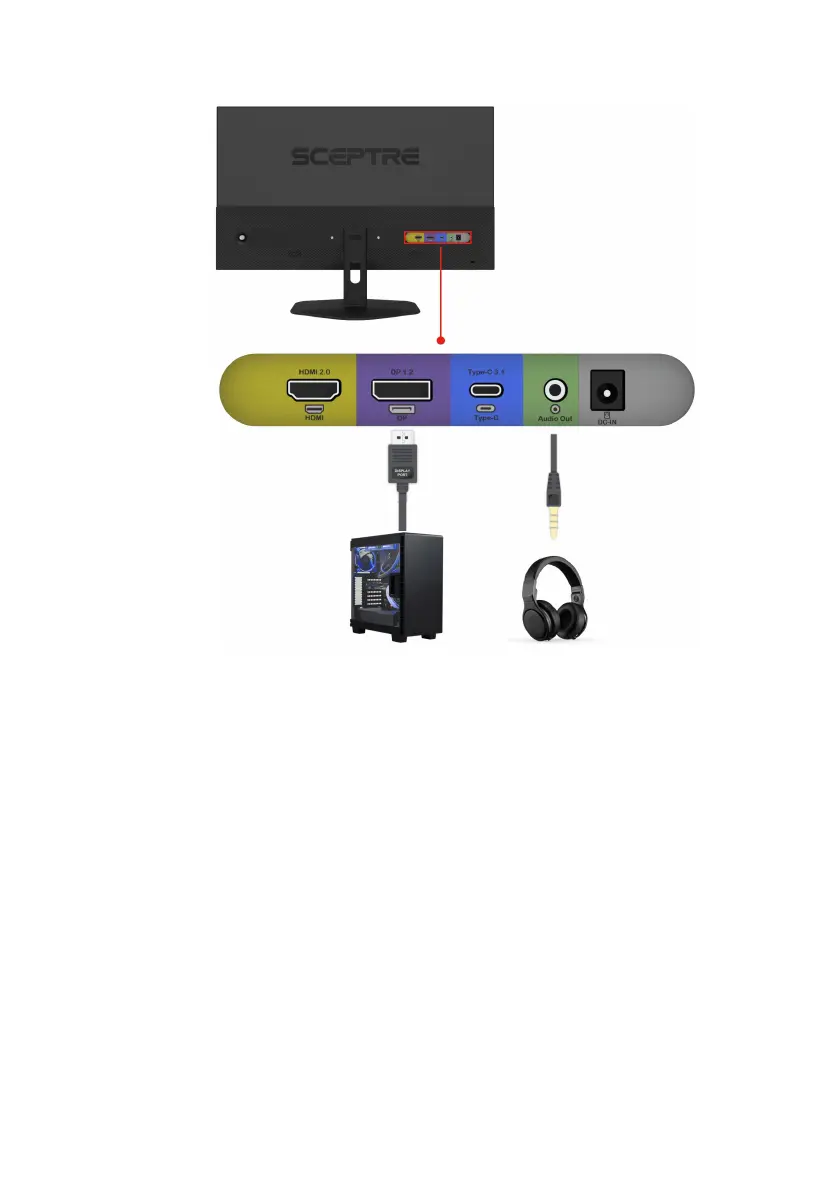
If You have DisplayPort Connection on Your Video Card…
1. Make sure the power of the E27 LED MONITOR is turned off.
2. Obtain a DisplayPort cable and connect one end to the back of the
monitor and the other end to the back of the computer.
3. For audio, you can plug in a set of headphones or speakers into the
headphone jack.
4. Turn on the power of both the E27 LED MONITOR and the computer.
Please Note:
• DisplayPort supports Adaptive Sync only.
• DisplayPort supports up to 100Hz refresh rate.
• At the optimal resolution of 1920 x 1080, the maximum support
refresh rate is 100Hz for DP.


 To Next Page