3.1.2 WIRING PIMS TO GALAXY DSI-485 BOARD
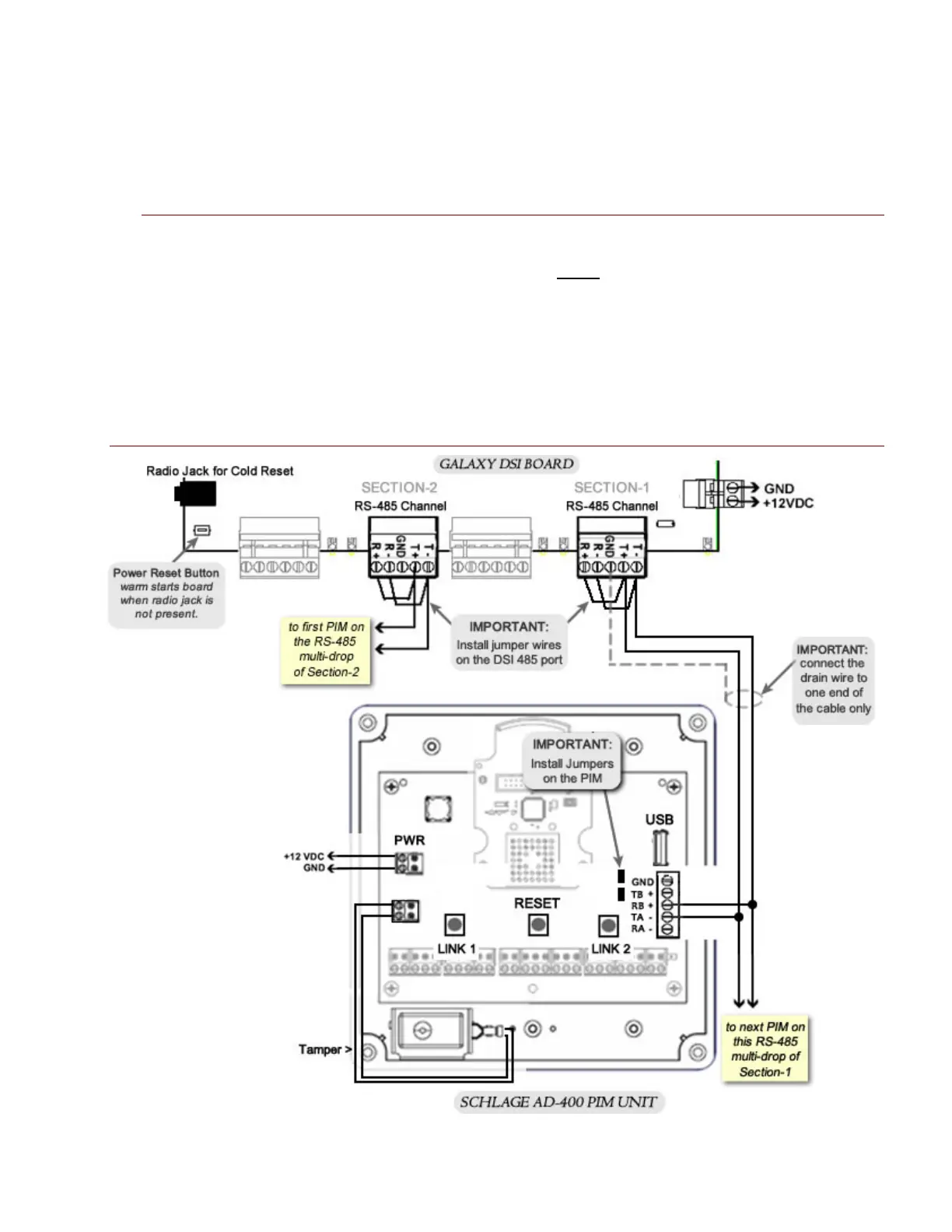
A 485 DSI board can have up to 16 doors on each RS-485 Section. There are two (2) RS-485 channels on a
DSI board. Multiple PIM-485 units can be connected in a daisy-chain fashion to the DSI 485 channel. See
Figure 25 on following page
.
IMPORTANT NOTES
• You must install jumper wires on the Galaxy DSI ports [ T – to R – ] and [ T + to R + ]
• You must also install the two black jumpers on every PIM unit (see diagram below).
• Landing the wires from DSI T- to PIM R+ ; and DSI T+ to PIM T- ; use diagram below.
• You must ground the shielding on for every segment of RS-485 cable on one end. The
following diagram shows shielding grounded on the controller end.
• The PIM unit should be powered on a separate power supply.
Figure 7 – WIRING DSI 485-Channel to AD-400 PIM
System Galaxy Integration to Schlage AD400/AD300 Page 26



 To Next Page