4.1.6 CONFIGURING THE SERIAL CHANNELS IN SYSTEM GALAXY
You must have added the DSI board in the controller property screen in order to be able to configure the
serial channels. All the readers on a channel must be the same format (e.g. all Wiegand or all ABA). You
cannot mix reader technology. This means you cannot have both ABA and Wiegand on the same DSI
port/channel.
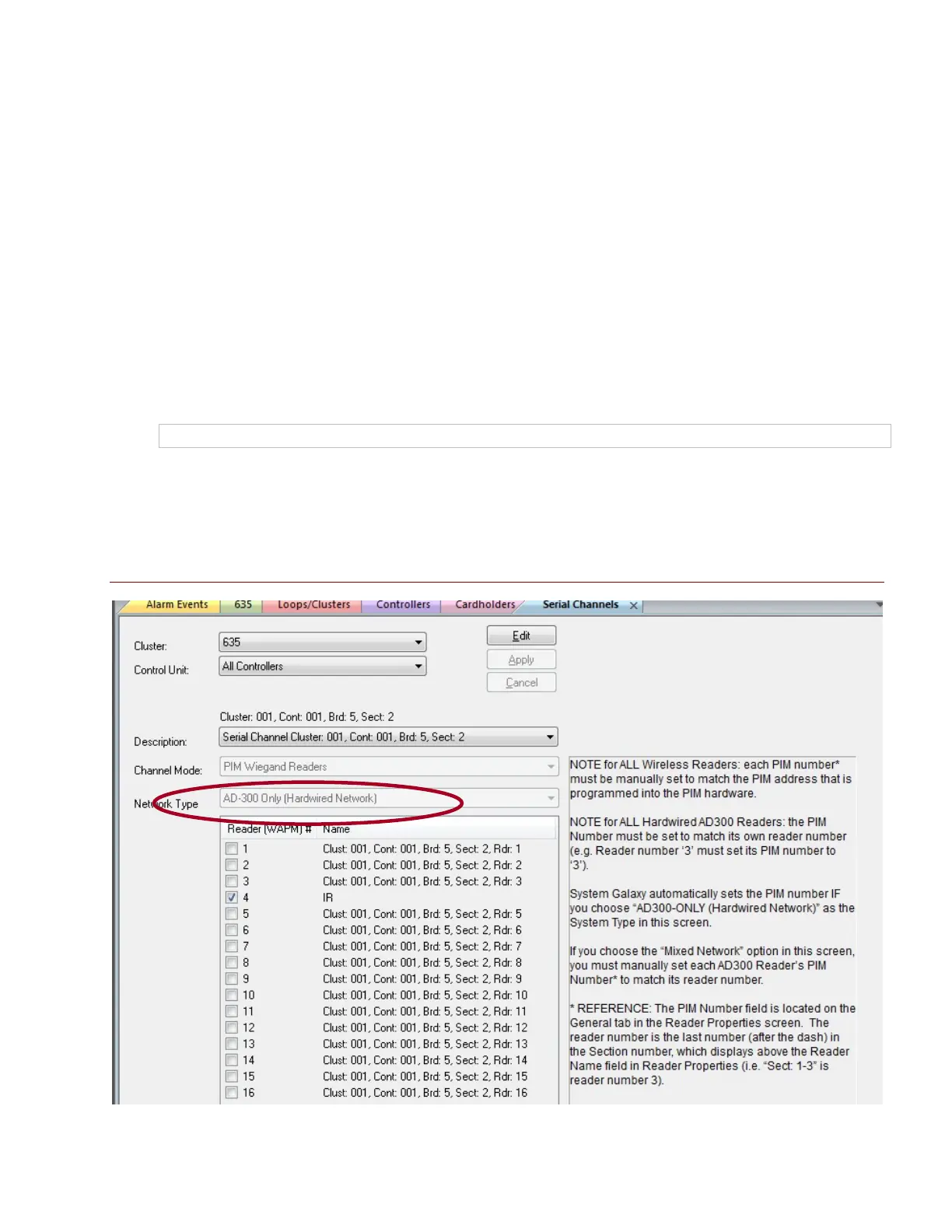
Open the Serial Channel screen : Configure > Hardware > Serial Channel from the SG menu
1. Select the Cluster/Loop Name
2. Select the Controller Name
3. Select the appropriate DSI Board & section number (e.g. Board 1; Sect 1) from droplist.
4. Click Edit button.
5. Set the Channel Mode: ‘Wiegand’ or ‘ABA’.
NOTE: setting a channel to ‘Unused’ will disable the channel.
6. Select the correct Network Type
7. “check” the appropriate reader numbers ID’s that you have attached to this DSI channel.
8. Then Apply to save changes.
Figure 11 – Serial Channel: AD300-ONLY ( HARDWIRED NETWORK )
See the following page to see the mixed-network and wireless only network setup.
System Galaxy Integration to Schlage AD400/AD300 Page 32



 To Next Page