4.1.4 ADDING THE LOOP/CLUSTER IN SYSTEM GALAXY
Add the 635 Loop/cluster before adding the access control panel:
Click on the Loop button on the toolbar;
{Or from the menu, select Configure > Hardware > Loops/Clusters.}
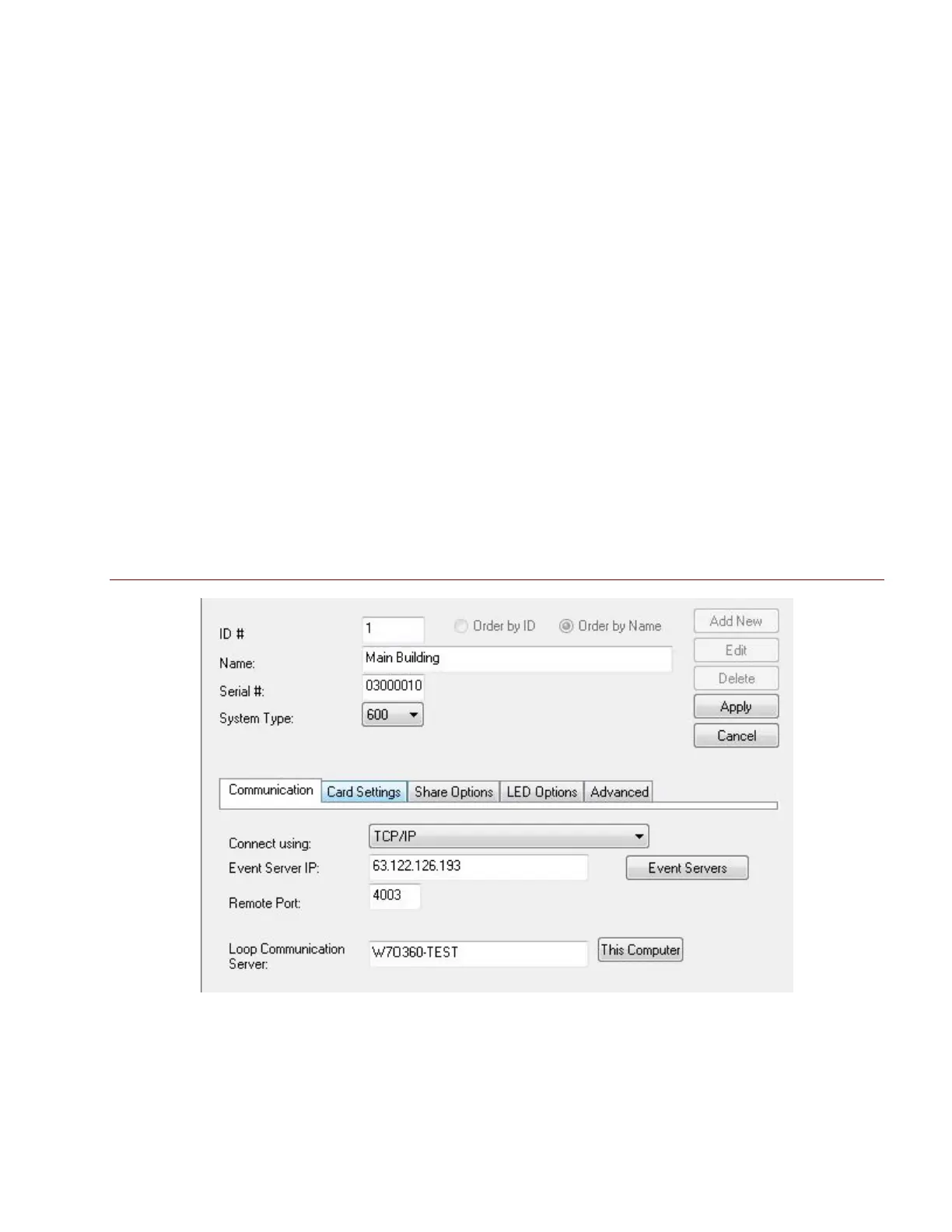
When the Loop Properties screen opens, click [ Add New ].
Type in a loop name.
Set Loop Type to “600”.
Set Connection Type to “TCP/IP”.
Enter the IP address of the Event Server (the PC running the GCS Event Service)
Remote Port should be “4003”
Enter the computer name of the Communication Server (the PC running the GCS
Communication Service). you can click the [ This Computer ] button if you are programming this
on the communication server.
Click [ Apply ] to save settings.
Figure 9 – Loop/Cluster Properties: Configuring the Loop
System Galaxy Integration to Schlage AD400/AD300 Page 30



 To Next Page