4.2.3 SETTING READER SCHEDULES
These options, and the schedules on which they rely, must be configured in the SG software, saved (applied) and then
loaded to the access control panel.
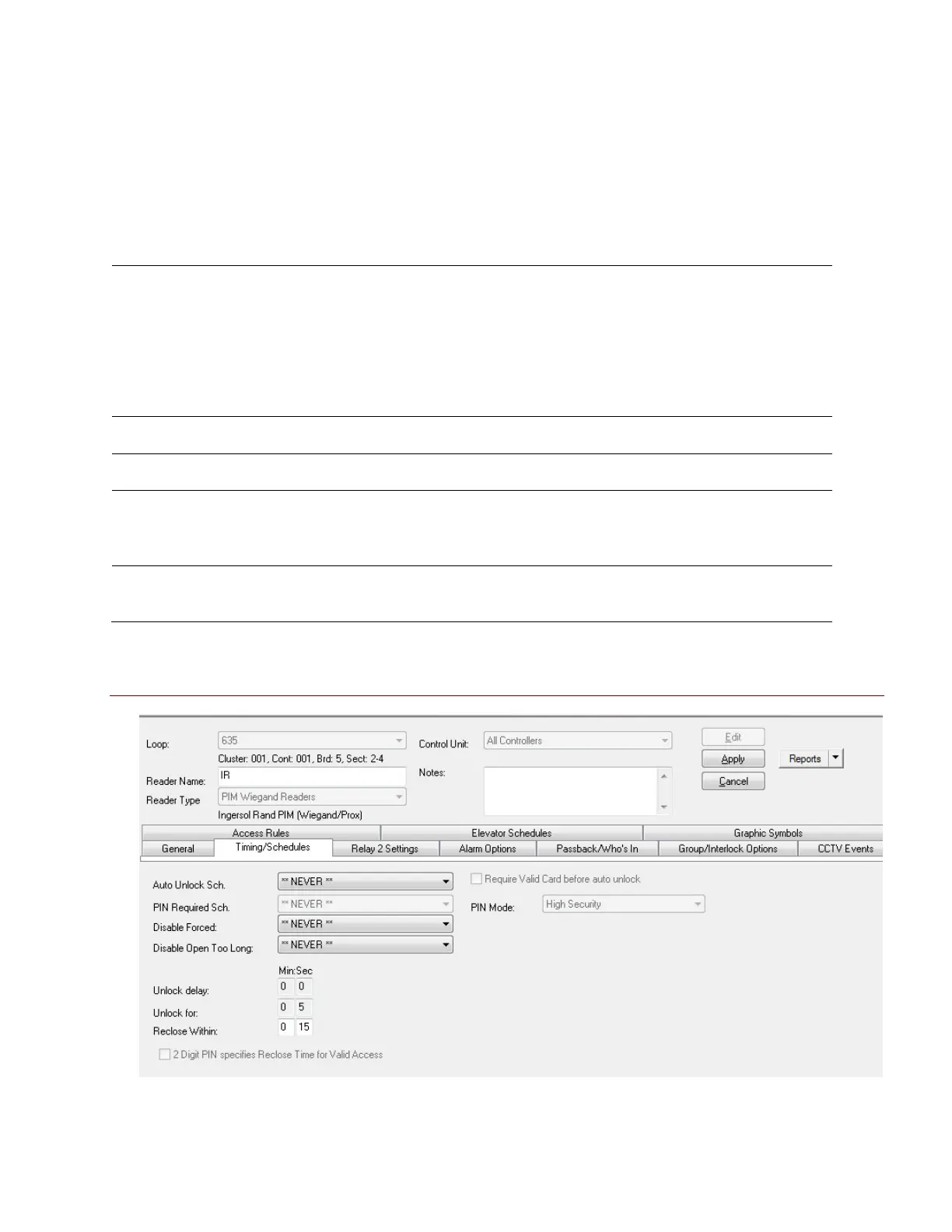
The Schedules tab contains fields that affect the timing of the locking and unlocking at the reader. Disabled (grayed)
features are not available for Schlage Wireless readers in SG 9/10.
Auto Unlock Schedule: when selected, the door or Wireless Reader will receive an unlock command from the
access control panel when the schedule becomes active. The door will receive a lock command from the
access control panel when the schedule becomes inactive. Also holidays cab affect the unlock schedule.
Schedules and Holidays must be created and loaded the control panel. An auto-unlock schedule is used when a
door should always unlock and relock at a specific time (e.g. 8am to 5pm). During the unlocked portion of the
schedule, the door is open and no card access is required. During the locked portion of the schedule, an access
card must have ‘valid access privileges’ in order to open the door.
PIN required schedule: not available for Schlage Wireless readers in SG 9/10.
Disable Forced (schedule): when selected, the system will not report a door forced condition at the door.
Disable Open Too Long (schedule): when selected, the system will not report a ‘door open too long’ condition
at the door. This could be helpful during certain times when a door must be open for an extended period of
time on a routine bases (e.g. a loading dock).
Reclose Within (mm:ss): the default is 15 seconds. This is the amount of time the controller will wait for the
door contact to close at the door before generating a ‘door open too long alarm’.
Figure 18 – Reader Properties: Configuring the Timing/Schedules
Disabled or grayed out options are not supported for Schlage readers
System Galaxy Integration to Schlage AD400/AD300 Page 37



 To Next Page