4.2.4 SETTING READER ALARM OPTIONS
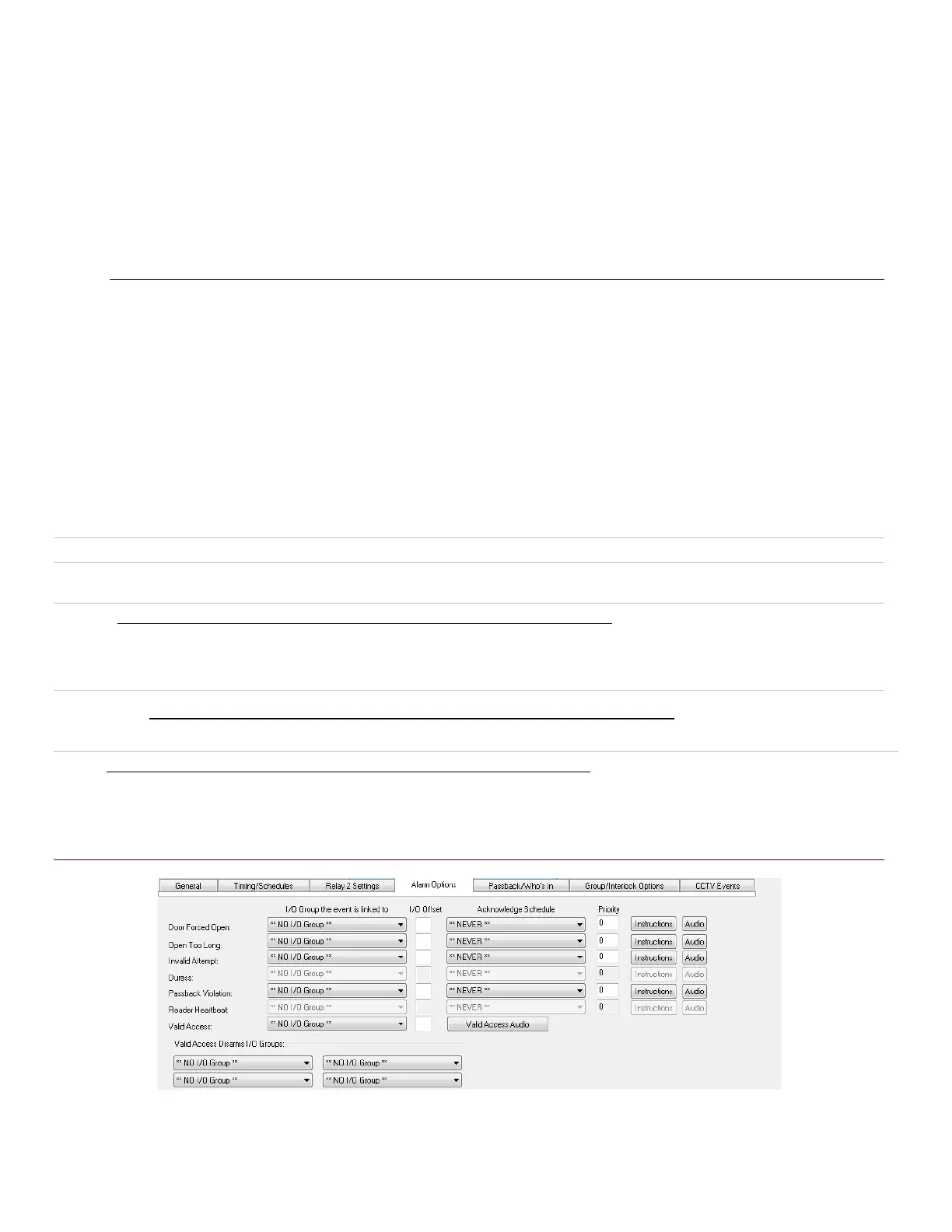
Several device conditions can be configured to generate an Alarm Event in System Galaxy. The conditions are: Door
Forced, Open Too Long, Invalid Attempt, Valid Access, and Passback Violation.
An alarm event is generated when a condition occurs at a door/reader that is configured to generate an
acknowledgeable Alarm. The alarm event displays in the Alarm Event window in the order it occurs unless an alarm
priority is assigned. IF an alarm priority is assigned, the alarm message appears in the Alarm Event window sorted in
the order of the assigned priority number.
IMPORTANT
» These options, and any I/O Groups on which they rely, saved (applied) and loaded to the access
control panel.
» (OPTIONAL) You can assign an I/O Group to the condition. This is not required since Alarm Options are
independent of I/O groups.
» (OPTIONAL) You can also assign priorities to the Alarm Conditions.
» The ACKNOWLEDGE check-box must be checked to make the event display in the Alarm Event
window; also required for the Priority sorting to apply.
I/O Groups: The drop-down list shows all the available I/O Groups. By default, the field is set to **NO I/O GROUP**.
When an I/O Group is selected, that I/O group will be activated whenever the condition occurs on the reader. I/O
groups are used to activate outputs associated with the alarm condition.
I/O Offsets: This field contains the I/O Offsets for each condition.
Acknowledge: Select (check) this checkbox if the condition should appear as an alarm event (in alarm events window).
Priority: The Acknowledge check-box must be selected before Priority will apply. The priority field is an optional
numeric field that accepts a value equal or less than 9999. This is the priority level of that will be assigned to the alarm
event. Priority affects the order of the alarm events in the Alarm Events window. Alarms with higher priority number
are sorted to the top of the screen regardless of the order they occur.
Instructions: The Acknowledge check-box must be selected before Instructions will apply. When this button is clicked, a
window appears in which you can type in text instructions for responding to the alarm event.
Audio: The Acknowledge check-box must be selected before Audio will apply. The location of files must also be set up in
the Multimedia tab of the Workstation Options window (Configure > Options > Workstation Options > Multimedia tab).
One .wav file can be selected to play when the alarm event occurs.
Figure 19 – Reader Properties: Configuring the Alarm Options
Disabled or grayed out options are not supported for Schlage readers
System Galaxy Integration to Schlage AD400/AD300 Page 38



 To Next Page