EC4 series integrated I/O user manual Use
Copyright © Nanjing Solidot Electronic Technology Co., LTD. 2023
7.2.3 Application in Sysmac Studio software environment
1、 dead work
hardware environment
Module model EC 4-1616B
One computer, pre-installed with Sysmac Studio software
The Omron PLC has one set
Take the model N X1P 2-9024 DT as an example
EtherCAT Special shielding cable
Switch power supply
Device Profile
Profile acquisition address:https://www.solidotech.com/documents/configfile
Hardware configuration and wiring
Please follow the"5 Installation and wiring"And"6 The wiring"Requires the operation
Computer IP requirements
Set the IP address of the computer and the IP address of the PLC to ensure that it is in the same
network segment.
2、 new construction
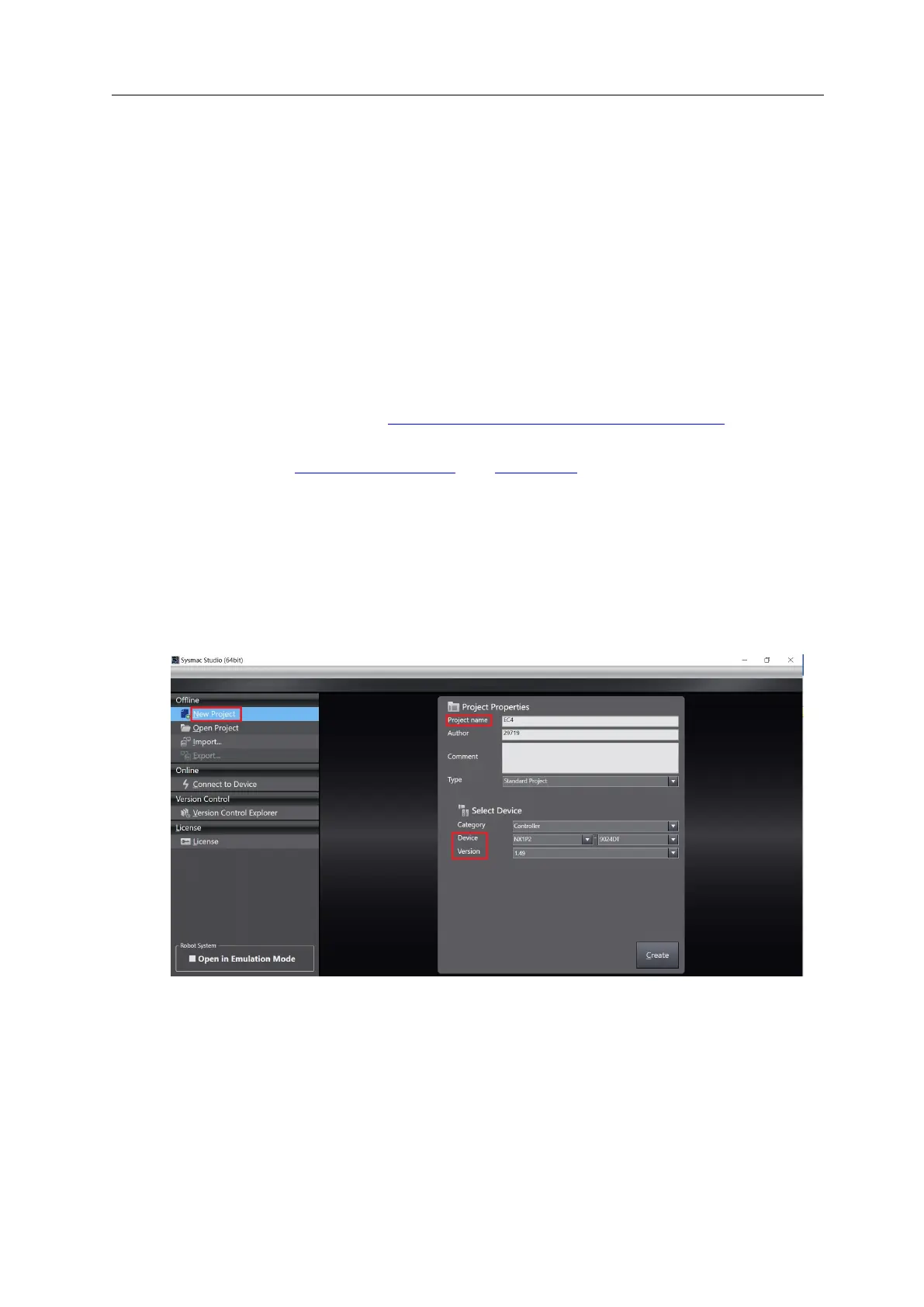
a. Open the Sysmac Studio software and click the New Project button.
Project name: custom-defined.
Select equipment: "Device" selects the corresponding PLC model, and "Version" recommends
selecting V 1.40 and above.
b. When the project property input is complete, click the Create button.



 To Next Page