Before you really get started… • 69
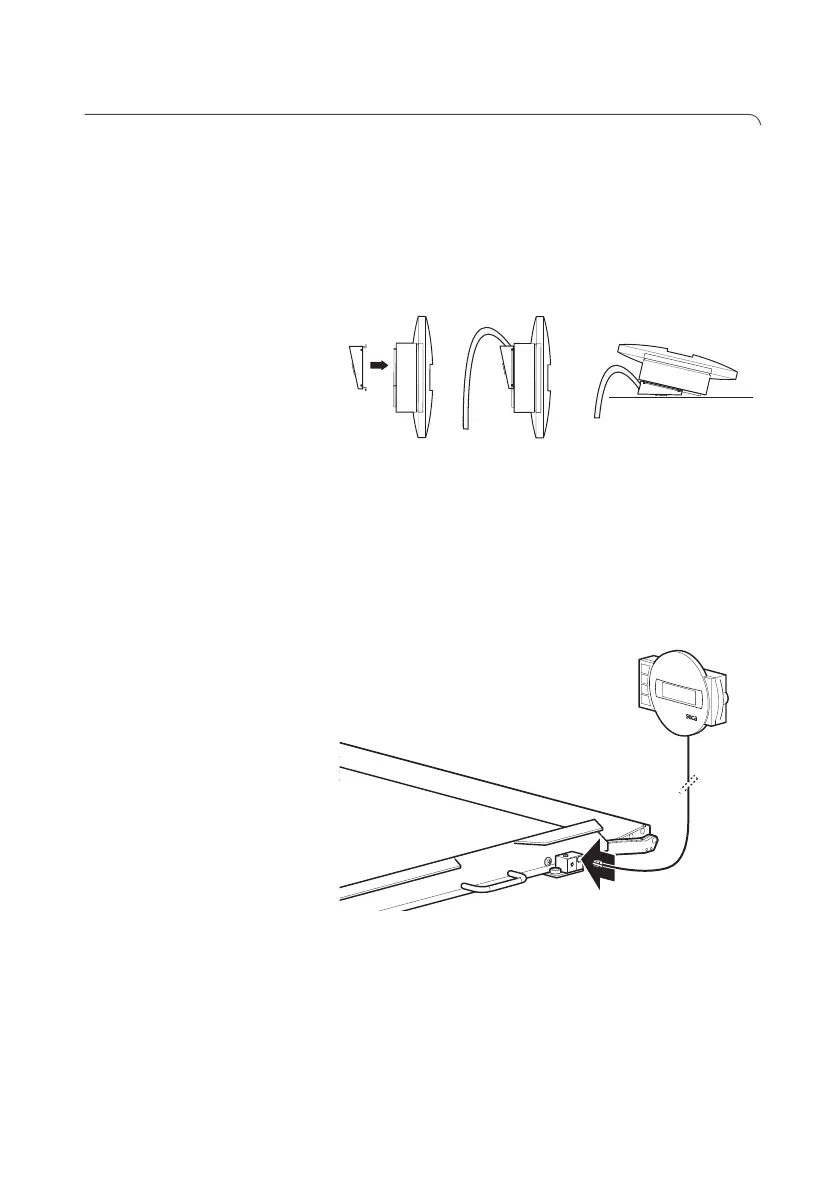
5.2 Making display housing ready for use (desktop display)
ATTENTION!
Damage to device
The angle adapter cannot be removed once
fitted.
–Ensure before fitting that the display housing
is to be set up on a desktop.
Fitting the angle
adapter
1. Hold the angle adapter against the display housing
in the position shown.
2. Ensure that the connecting cable is running in the
guide groove of the angle adapter.
3. Push the angle adapter onto the display housing
until all four lugs engage audibly.
Connecting the
connecting cable to the
platform
NOTE
When selecting the setup location, take
account of the length of the connecting cable
so that you can set up the display housing on a
work surface.
1. Place the scales on a firm, level surface.
2. Connect the connecting cable to the electronics
box of the scales.
=>
=>
Click!



 To Next Page