Operation • 81
the section entitled "Operating the scale in a wireless
group (menu)" on page 88.
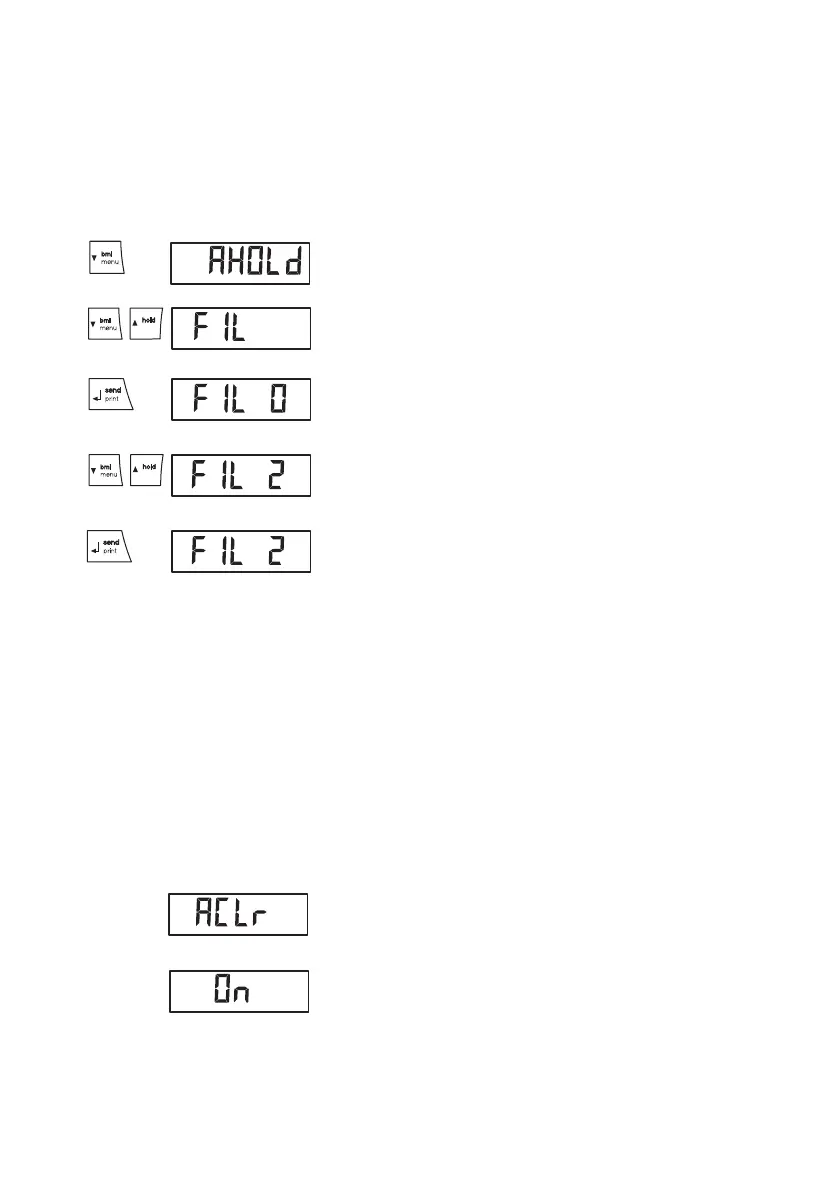
Navigating in the menu 1. Switch on the scale.
2. Keep arrow key (bmi/menu) pressed until the
menu is called up.
The last menu item selected (in this case: auto hold
"Ahold") appears in the display.
3. Press one of the arrow keys until the desired menu
item appears in the display (in this case, filtering
"Fil").
4. Confirm your selection with Enter (send/print).
The current setting for the menu item or a submenu
are displayed (in this case: level "0").
5. To amend the setting or call up a different sub-
menu, press one of the arrow keys until the desired
setting (in this case: level "2") is displayed.
6. Confirm the setting with Enter (send/print).
You exit the menu automatically.
7. To make more settings, call up the menu again and
proceed as described.
NOTE
If no key is pressed for about 24 seconds, you
exit the menu automatically.
Deleting saved values
automatically (AClr)
To prevent current measurement results remaining in
the memory of the device and leading to an incorrect
BMI calculation, you can set the scale so that measure-
ment results are automatically deleted after 5 minutes.
NOTE
This function is activated at the factory on some
models. You can deactivate the function if
desired.
1. Select the item "AClr" from the menu.
2. Confirm your selection.
3. Select the desired setting:
–On
–Off
4. Confirm your selection.
You exit the menu automatically.
tare
tare


 To Next Page
 Loading...






