18 •
17-10-07-651-100a/07-2019S
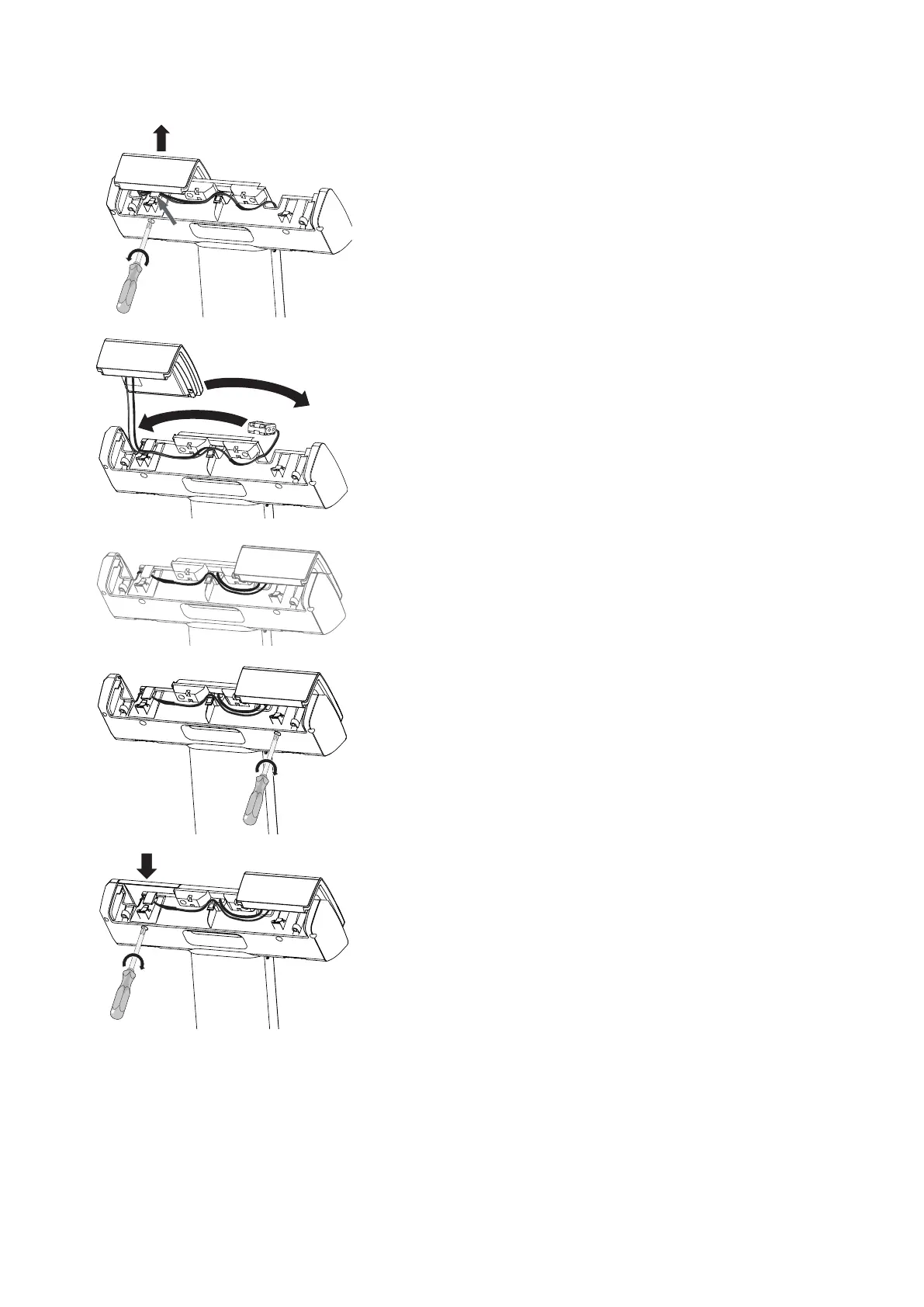
3. Remove the display unit:
a) Undo the cross-head screw behind the display unit
b) Remove cable tie on the cable hook, if present
c) Draw cables out of the cable hook
d) Lift off display unit
4. Switch the positions of the display unit and the battery holder:
a) Put the battery holder in its new position
b) Carefully put the display unit in its new position
5. Route the cables so that they do not dangle out of the display head.
NOTE
When fitting on the right-hand operating side: You can gather all the
cables into the cable hook and secure them with a cable tie if neces-
sary.
6. Fit the display unit:
a) Hold the display unit steady
b) Tighten the cross-head screw behind the display unit
7. Fit the battery compartment lid:
a) Insert the battery compartment lid and hold it steady
b) Tighten the cross-head screw behind the battery compartment lid



 To Next Page