Installation Instructions TM50/TM80 - MO911/1V0
Page 12
Programming the Forces and Running Distance
1
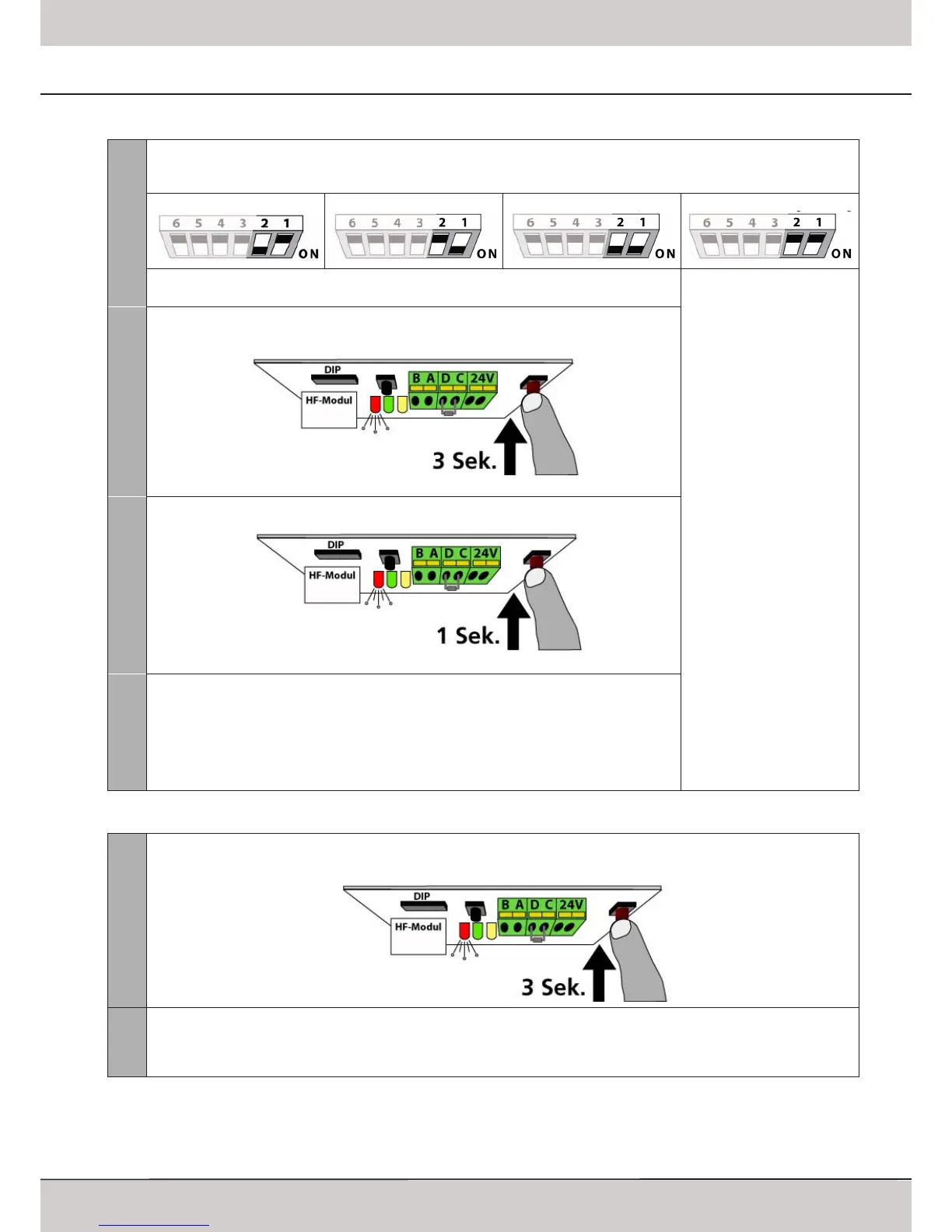
Choosing the type of door
The standard pre-setting is „Sectional Door“; if this shall be used, then proceede with step 2�
For other types of doors the DIP-switches 1 and 2 must be adjusted accordingly�
Sectional Door
Tilting Door
When the DIP-switch settings are changed, the red LED starts blinking in intervalls; proceede
as described below�
Pls� refer to chapter „Free
Programming“, Page 13�
2
Keep the red LEARN-button pressed for approx� 3 seconds�
Release the button once the red LED and the operators‘ lighting start blinking�
3
Press the LEARN-button once again shortly�
4
The operator now starts with the learning cycles (force measurement and running distance):
- it hits the OPENING limit block
- it closes slowly until it reaches CLOSED-position
- it opens fast until it reaches OPEN-position
- it closes fast until it reaches CLOSED-position
The operators‘ light keeps blinking for a little while after the operator stops running� Once
the operators‘ light stops blinking the programming has been successful�
Programming Remote Components
1
Keep the red LEARN-button pressed for approx� 3 seconds�
Release the button once the red LED and the operators‘ lighting start blinking�
2
Press the button on the remote component which is intended for use with the operator for approx� 1 second� The opera-
tors‘ light stops blinking and the component was programmed successfully�
Steps 1 and 2 must be repeated for each remote component�
For more information on remote components pls� refer to page 16�
Printed Circuit Board: Adjustments and Connectors
Standard Programming



 To Next Page