141
K600000000SE 030804 011018
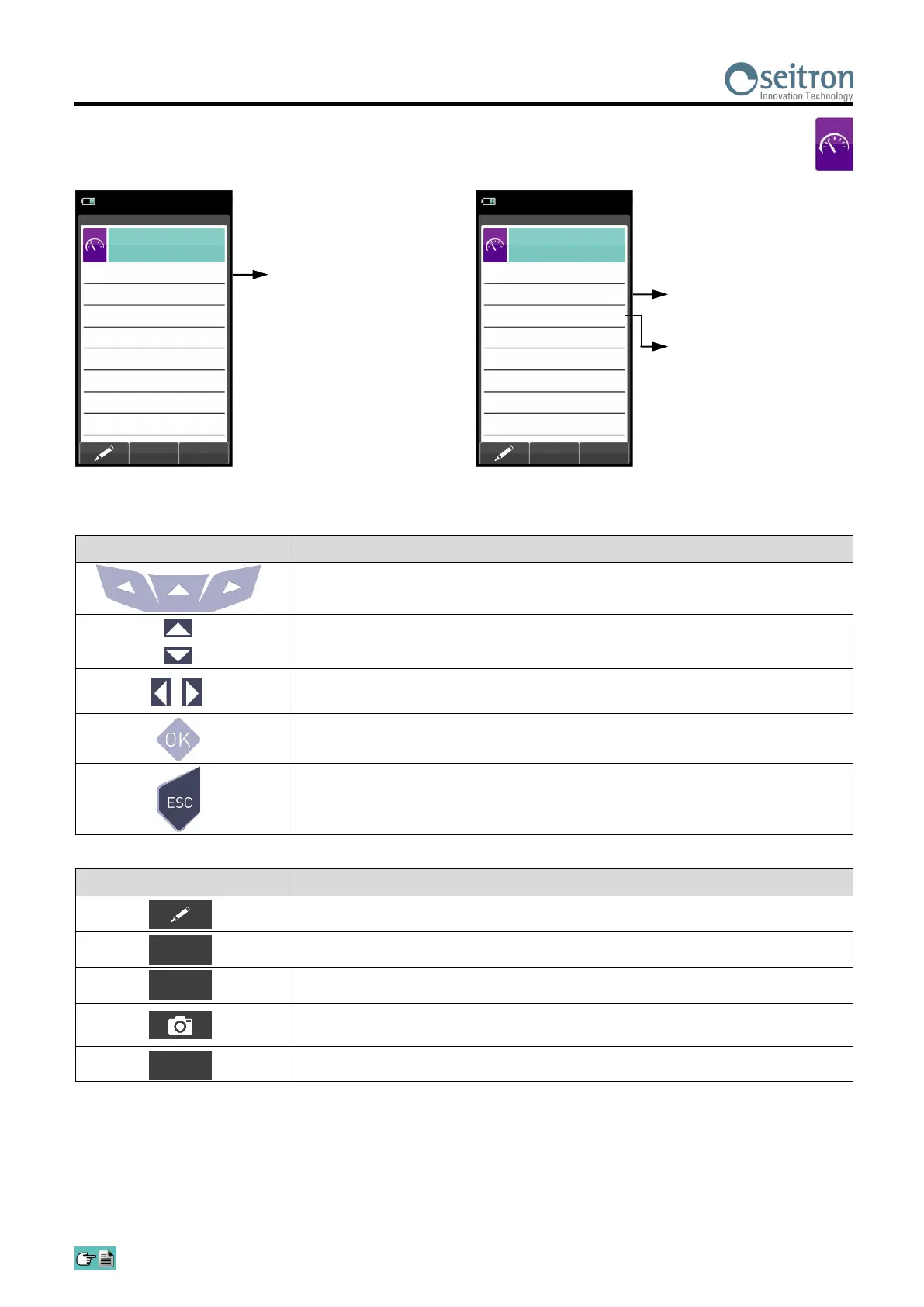
Enter the thermal power
value calculated manually by
the operator.
15/01/14
10:00
Power of burner
Configuration
Mode
manual
13.15 Measurements→Power of burner
CONTEXT KEY FUNCTION
Enters the modification mode for the selected parameter.
Confirms the settings.
Go to next step.
Saves, in the memory selected in the "Memory Select" menu, the value of
the draft measured.
Stops the test.
OK
KEY FUNCTION
Activate the context keys shown on the display.
Selects line; the selected line is displayed in red.
When in modify mode, sets the desired value.
In change moves the cursor to the box corresponding to the desired
number to set the desired value.
Activates the context key located in the left side of the display.
Returns to the previous screen.
When in modify mode cancels the modification just made.
Test mode: you can choose
to calculate the thermal
power by entering a flow
value, or by reading the
volumetric counter (gaseous
fuels only).
Duration of test: the option is
displayed only for the test
mode 'COUNTER', available
for gaseous fuels. It is
possible to enter the number
of seconds between the
reading of the initial and final
gas volume. The minimum
time required by law is 120 s.
15/01/14
10:00
Power of burner
Configuration
Test duration
s
120
Type
meter
Mode
measure


 To Next Page