181
K600000000SE 030804 011018
ANNEX A
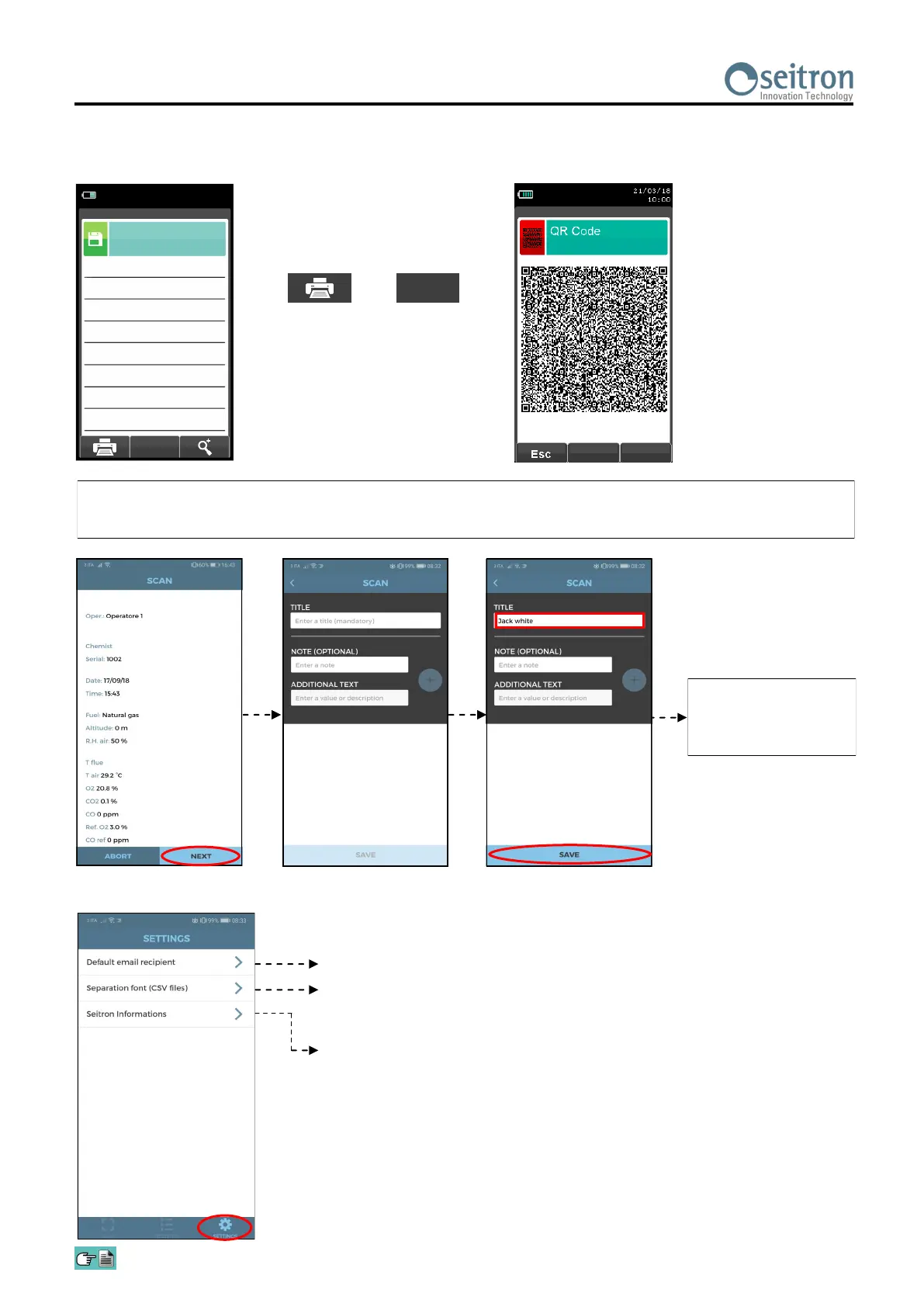
Data Management with “SMARTFLUE LITE MOBILE” APP
SCAN THE QR CODE USING SEITRON APP “SMARTFLUE LITE MOBILE”, TO DOWNLOAD THE
ACQUIRED DATA.
Memory
Average analysis
21/03/18
10:00
ηs
%
91.4
Qs
%
8.6
ΔT
°C
74.7
T aria
°C
15.4
T fumi
°C
190.1
λ,n
1.25
CO
2
%
9.3
O
2
%
4.2
THE ACQUIRED
DATA ARE SAVED IN
THE INSTRUMENT
MEMORY.
APP settings.
Insert a default email address.
Select the data separation mode: comma (,) or semicolon (;).
This setting is useful if it’s needed to import the csv file in an electronic sheet
such as Excel or google drive.
Visualize the version of the APP and Seitron contacts.
Download all analysis data
on the display.
+
OK
603 B


 To Next Page