72
K600000000SE 030804 011018
11.0 MEMORY
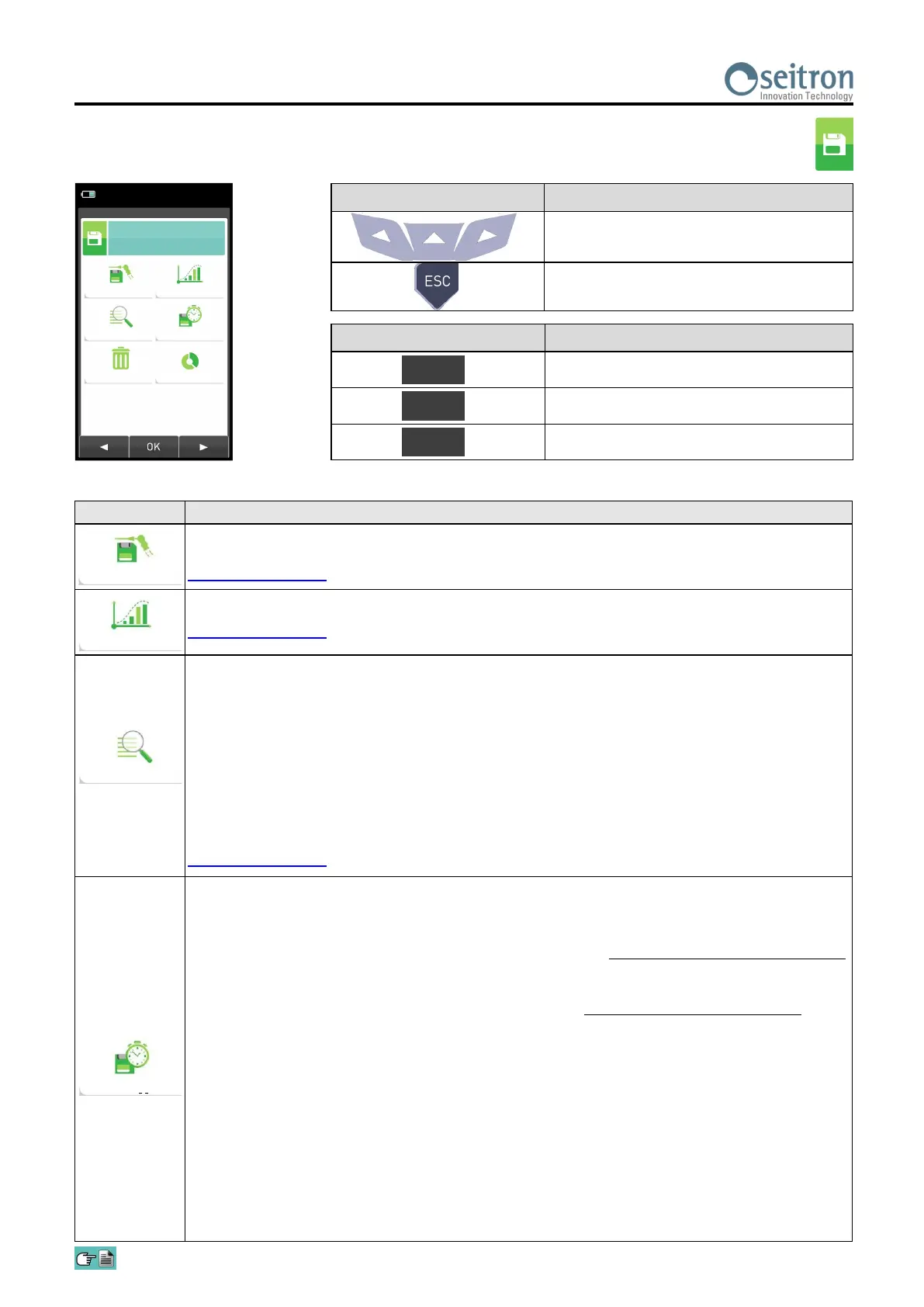
11.1 Memory Menu
PARAMETER DESCRIPTION
From this screen the user can start the combustion analysis.
The data shown summarizes the mode of analysis and the selected memory.
SEE SECTION 11.2.
Allows the user to see the average of the analyses contained in the selected memory.
SEE SECTION 11.3.
- Allows the user to choose the memory position to be used to save the combustion analysis
and/or the draft/pressure measurement. For each memory it is possible to enter the personal
information of the customer (name of the customer, address, telephone number, type of boiler,
etc.).
- Allows the user to see and print the stored analyses, individually or as an average. The
analyses can be found (via the context key "find") by memory location or by the date they were
saved; it is also possible to see the draft, smoke and ambient CO.
In the menu "Find Memory" the activation of the Print Memory is enabled only on the page
where the analyses or the draft, smoke and ambient CO data are displayed.
SEE SECTION 11.4.
This submenu allows the user to define the mode of analysis and of memory selection:
Automatic analysis mode:
UNI 10389
The factory settings of the device are in accordance with the Italian standard UNI 10389-1,
which requires that you perform at least 3 samples spaced at least 120 sec.
BImSchV
The factory settings of the device are in accordance with the German standard BImSchV, which
requires that you perform at least 30 samples spaced 1 sec.
data logger
This mode is entirely configurable by the user (it is necessary to set the number of samples to
be acquired, the duration of acquisition of each sample and the printing mode).
When the combustion analysis starts, the device will automatically carry out and store the
number of samples set, spaced from one another according to the set time.
After the combustion analysis (indicated by a beep), if the "Manual Print" mode has been
selected, the device will display the average of the samples taken with the possibility to recall
them individually; the user can then print them (total, complete, …).
On the contrary, if the user has selected the option "Automatic Print", the device will
automatically proceed to print the analyses, according to the current printing settings, without
displaying the average.
15/01/14
10:00
Save
Select
Delete
Average
Data logger
Usage %
Memory
KEY FUNCTION
Activate the context keys shown on the
display.
Returns to the previous screen.
CONTEXT KEY FUNCTION
Selects the available parameters.
Enters in the selected parameter setting.
Selects the available parameters.
OK
◄
►
Save
Average
Select
Data logger


 To Next Page