25
1.3.4 Program storage menu
It is accessed from the quick menu; in this menu it is possible to
store the selected welding program.
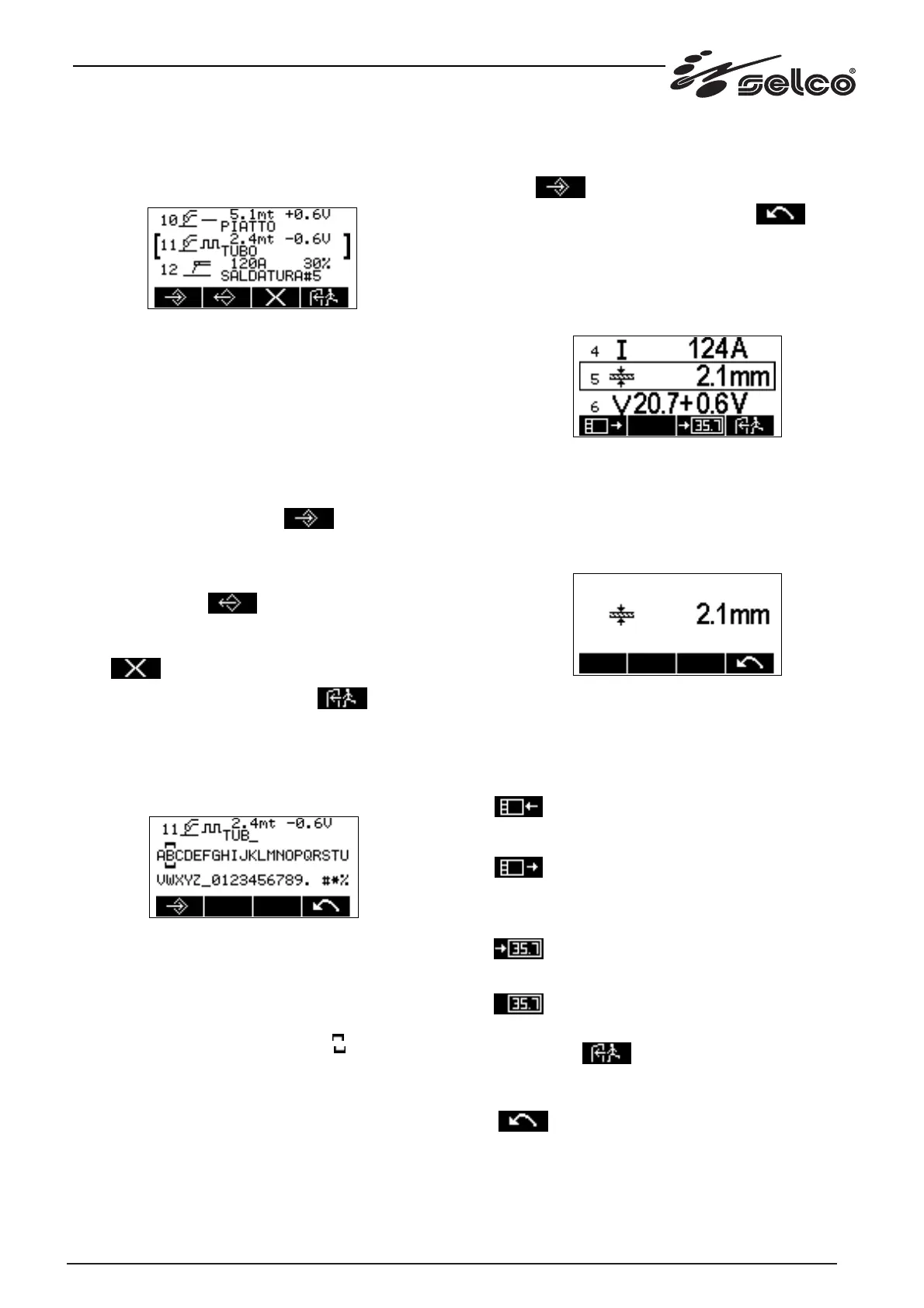
A typical screen appears as follows:
Up to 50 programs can be stored, to which a name with maxi-
mum of 12 alphanumerical characters can be attributed.
The symbol of the welding procedure and the value of the two
main parameters at the time of storage are also displayed.
The list is scrolled by rotating the encoder E1; the selected pro-
gram line is the one between the two brackets "[" "]".
If the program is empty, only the number is displayed.
Description of keys
* Key K1: stores in the selected line the welding program cur-
rently in use. A double confirmation is requested; the opera-
tion can be cancelled via key K4.
* Key K2: recalls the program stored in the line highlighted.
Choice of this key causes abandonment of the welding pro-
gram currently in use which is replaced with the one stored in
the line highlighted.
* Key K3: permits elimination of a stored program and requires
double confirmation; the operation can be cancelled via key
K4.
* Key K4: quit and return to main menu.
1.3.5 Program description writing menu
After choosing and confirming your wish to store a new program,
a further menu appears that allows you to write the description.
A typical screen appears as follows:
At the top the program in the storage phase is displayed while at
the bottom, on two lines, there is a list of alphanumerical cha-
racters to describe the program. The list is scrolled with the
encoder E1, moving the selection onto the required alphanume-
rical character and selecting the character by pressing the enco-
der E1 key, up to a maximum of 12 characters.
The selection is highlighted by the symbols:
With key K4 you cancel the last character selected.
When you have finished writing the description, press key K1 to
store.
The description can also remain empty by immediately pressing
key K1.
Description of keys
* Encoder E1: allows you to compose the description of the program.
* Key K1: confirms storage of the program and description
string.
* Key K4: cancels the last character selected.
1.3.6 Set-up menu
The set-up menu is accessed by keeping the encoder E1 key
pressed for 2 seconds.
A typical screen appears as follows:
The set-up parameters are distinguished by the line number, a
symbol identifying the meaning, and the value. They are scrolled
by rotating the encoder E1.
To modify the value of the parameter highlighted, simply press
the encoder E1, rotate it and then press again to confirm. During
the modification operation the parameter is displayed alone in
the middle of the display:
Description of keys with selected set-up list
* Encoder E1: allows you to scroll the set-up list, select the para-
meter and modify it.
* Key K1: allows you to move the parameter to the quick menu
or vice versa.
Moves the parameter to the quick menu (displayed
only if the parameter is not already present in the
quick menu).
Removes the parameter from the quick menu (dis-
played only if the parameter is already present in the
quick menu).
* Key K3: activates display of the parameter on the 7-segment
display D2.
Activates display of the selected parameter on the 7-
segment display D2 (displayed only if the parameter
is not already displayed in the 7-segment display D2).
Identifies the current parameter shown in the 7-seg-
ment display D2.
* Key K4: quit and return to the main menu, with storage of the
modifications.
* Key K4: cancels the modifications to the parameter, restoring
the previous value, and returns to the set-up list selection.



 To Next Page