18
Putting the HE 1 into operation | Using the tube headphone amplier connected to a Mac/PC
Using the tube headphone amplifier connected to a
Mac/PC
You can connect the HE 1 via USB directly to your Mac or PC and use it as an
audio output device. Depending on the driver and settings used, high-resolu-
tion music les can be reproduced via the high-quality DAC (digital-to-analog
converter) of the HE 1.
Notes on DSD reproduction
Information on the possible conguration options for your Mac or PC for
native reproduction of DSD music les using third-party software can be
found on the HE 1 product page at www.sennheiser.com/download.
Apple OS X operating system
For an Apple Mac OS X operating system from version 10.6 onwards, you do
not have to install a driver. The HE 1 is recognized automatically.
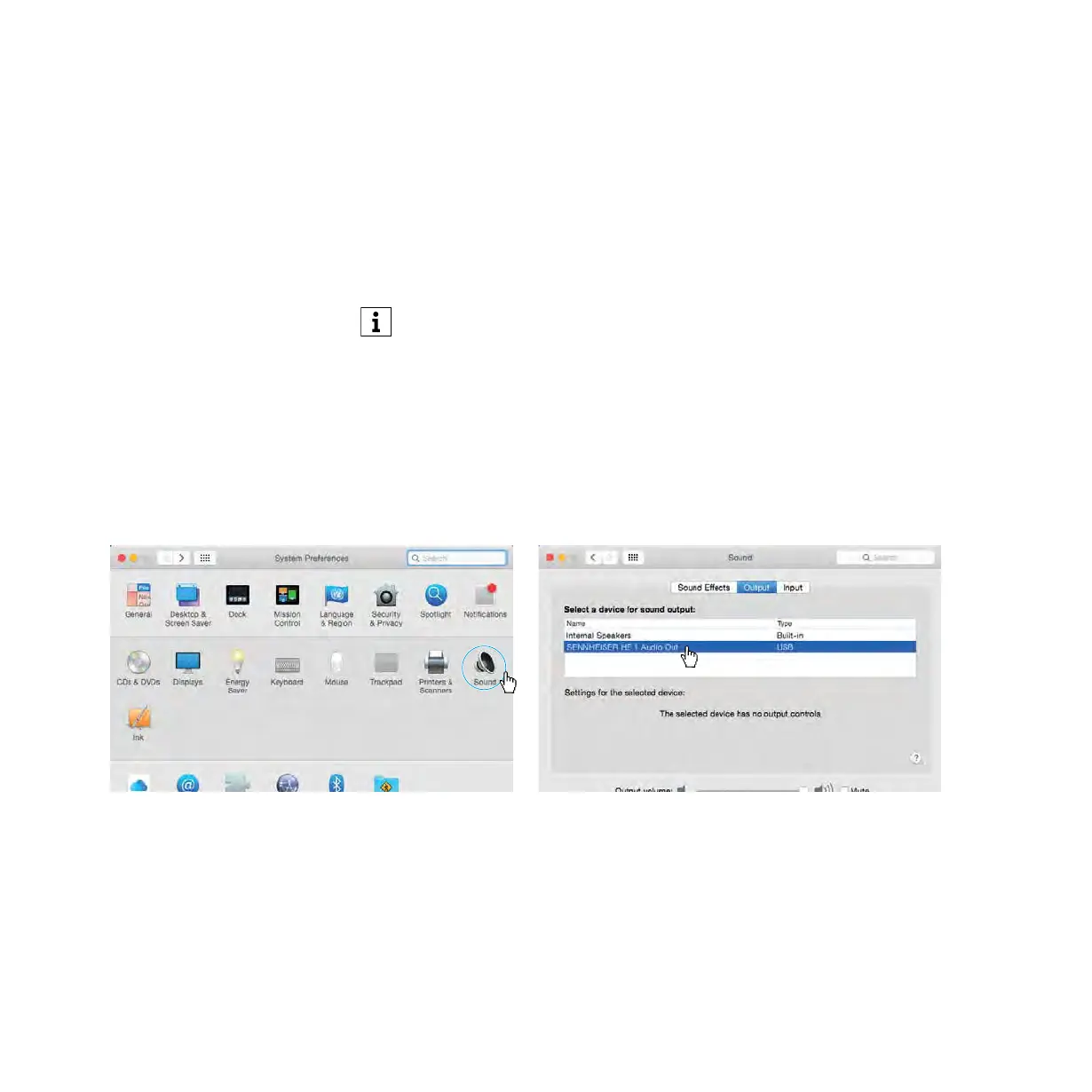
▷ From the System Preferences, select “Sound” and then select “Sennheiser
HE 1” as the default audio output device.



 To Next Page