11
Product overview | Overview of the LED indicator
Product overview
The product overview can be found on the fold-out page at the beginning of
this instruction manual.
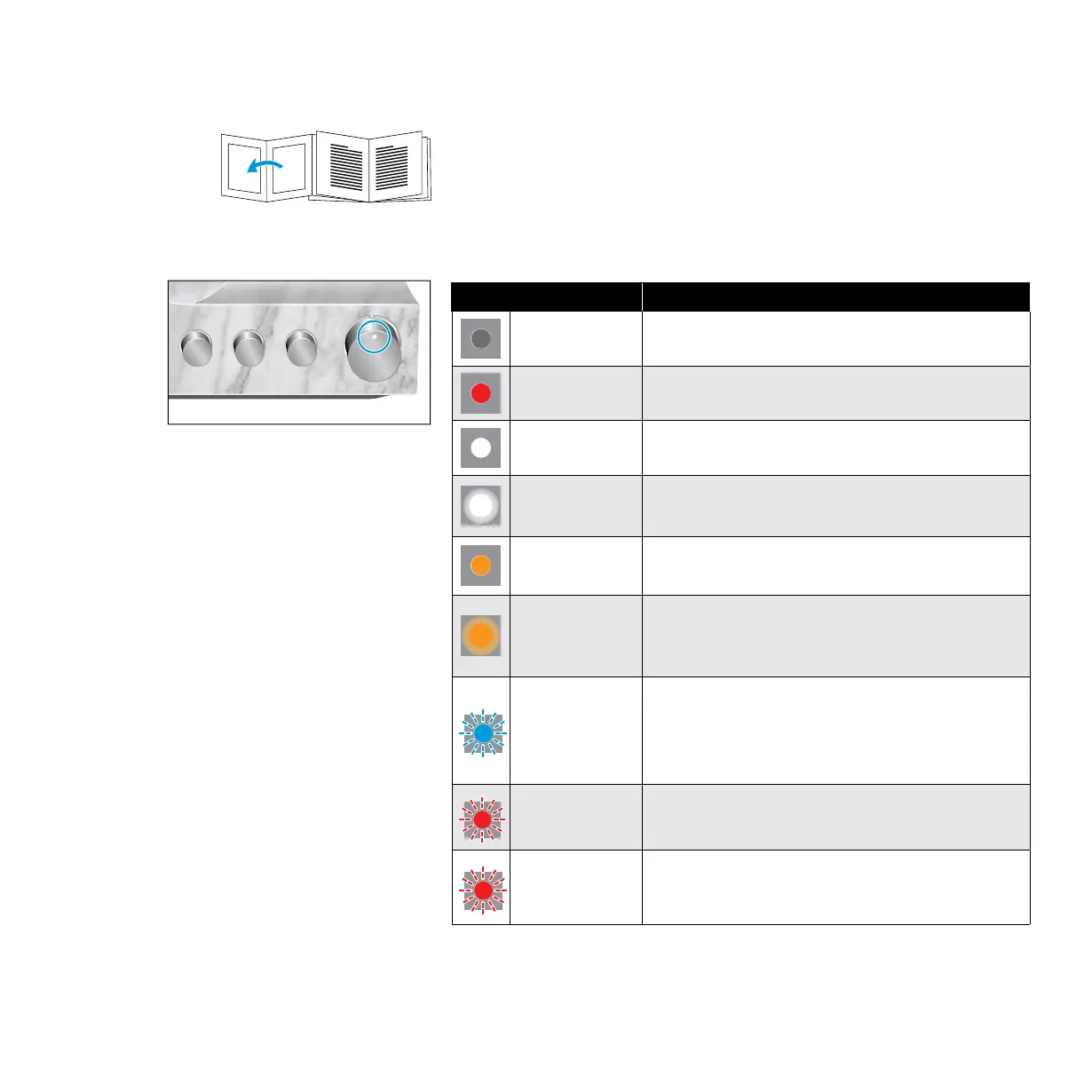
Overview of the LED indicator
Status LED Meaning
– Power switch set to position OFF
lights up red Standby
lights up white Operation
pulses white
Headphones are/audio output is muted
(OUTPUT rotary switch in position MUTE)
lights up
orange
Operation, a tube replacement is required
(see page 42)
pulses orange
Headphones are/audio output is muted
(OUTPUT rotary switch in position MUTE),
a tube replacement is required (see page 42)
flashes blue
quickly 2 times
Incompatible digital audio signal; headphones are/
audio output is muted (OUTPUT rotary switch in
position MUTE) (see page 16)
flashes red
quickly 2 times
High-voltage protection is activated; device cannot
be operated (see page 50)
flashes red
quickly 3 times
Operating elements or amplifier tubes are blocked;
device cannot be operated
(see page 28)



 To Next Page