36
Using the HE 1 | Adjusting the signal levels of the OUTPUT audio outputs
Adjusting the signal levels of the OUTPUT audio
outputs
You can increase or reduce the audio output level depending on the power am-
plier or the active loudspeakers used. Thus, the complete adjustment range
of the HE 1 volume control is maintained and perfectly adjusted to the devices
used.
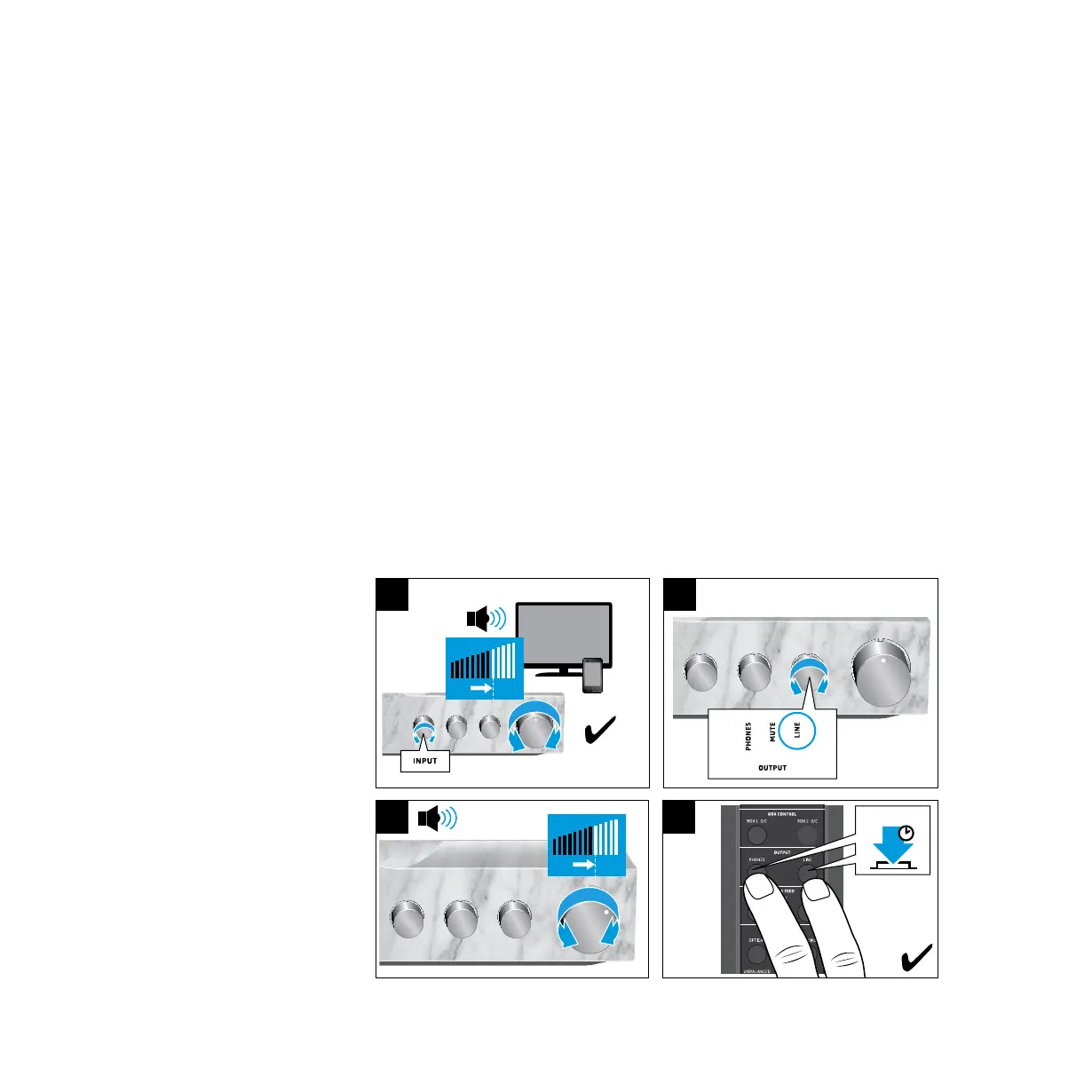
1. Make sure that the signal levels of the INPUT audio inputs are correctly
adjusted (see page 33).
2. Set the OUTPUT rotary switch to LINE and start playback.
3. Adjust the volume on the HE 1 to a medium level that is comfortable for
you and suitable for your power amplier or the active loudspeakers used.
This volume level becomes the reference level for the center position of the
volume control.
4. Press and hold the PHONES button and the LINE button on the remote
control for 2 seconds.
The status LED ashes green. The signal level for the audio inputs is stored.
The volume control automatically returns to the center position so that you
can use the complete volume range.
INPUT
CROSS FEED
USB COAXIALOPTICAL
BALANCEDUNBALANCED
LOW HIGHOFF
2 s
4
3
1
3 4
2
2
OutputInput



 To Next Page