45
Servicing the HE 1 | Restoring the factory default settings
Restoring the factory default settings
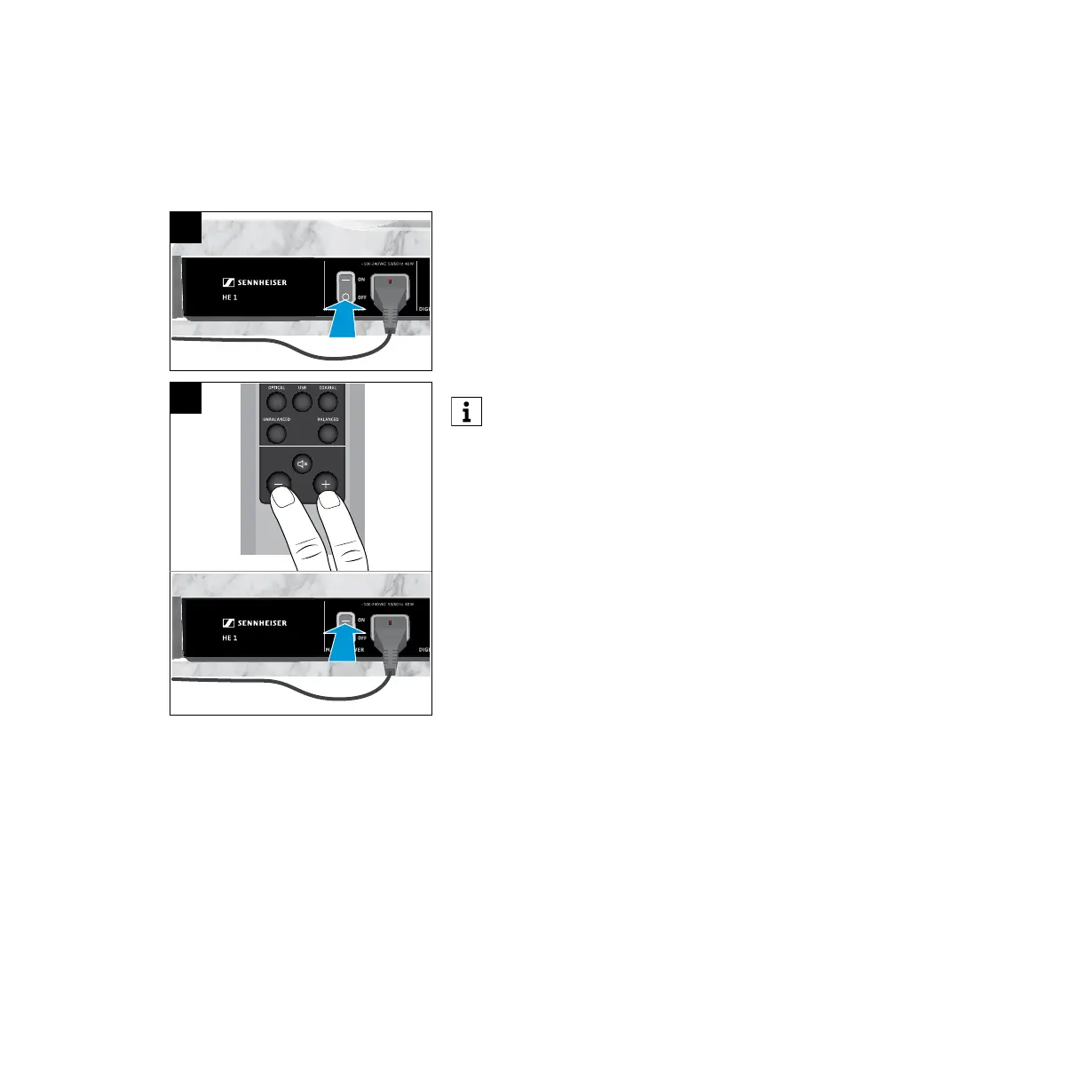
To reset all individually stored signal levels of the INPUT audio inputs and
OUTPUT audio outputs and the last settings used to the factory default
settings:
1. Set the power switch to OFF to switch the HE 1 off and wait until the status
LED goes off (up to 30 seconds).
2. Simultaneously press the - and the + button on the remote control and
then set the power switch to ON to switch the HE 1 on.
The status LED ashes green. All settings are reset to the factory default
settings. Once the process is completed, the status LED lights up red. The
HE 1 is switched off (standby).
When restoring the factory default settings, make sure to point the
remote control at the remote control sensor located on the front bottom
of the amplier. Otherwise the amplier switches on normally.
OUTPUT
USB COAXIALOPTICAL
BALANCEDUNBALANCED
LOW HIGHOFF
LINEPHONES
BOX CONTROL
BOX 2 O/CBOX 1 O/C
OFF
ON
1
2



 To Next Page