39
Using the HE 1 | Opening/closing the headphone storage box
Opening/closing the headphone storage box
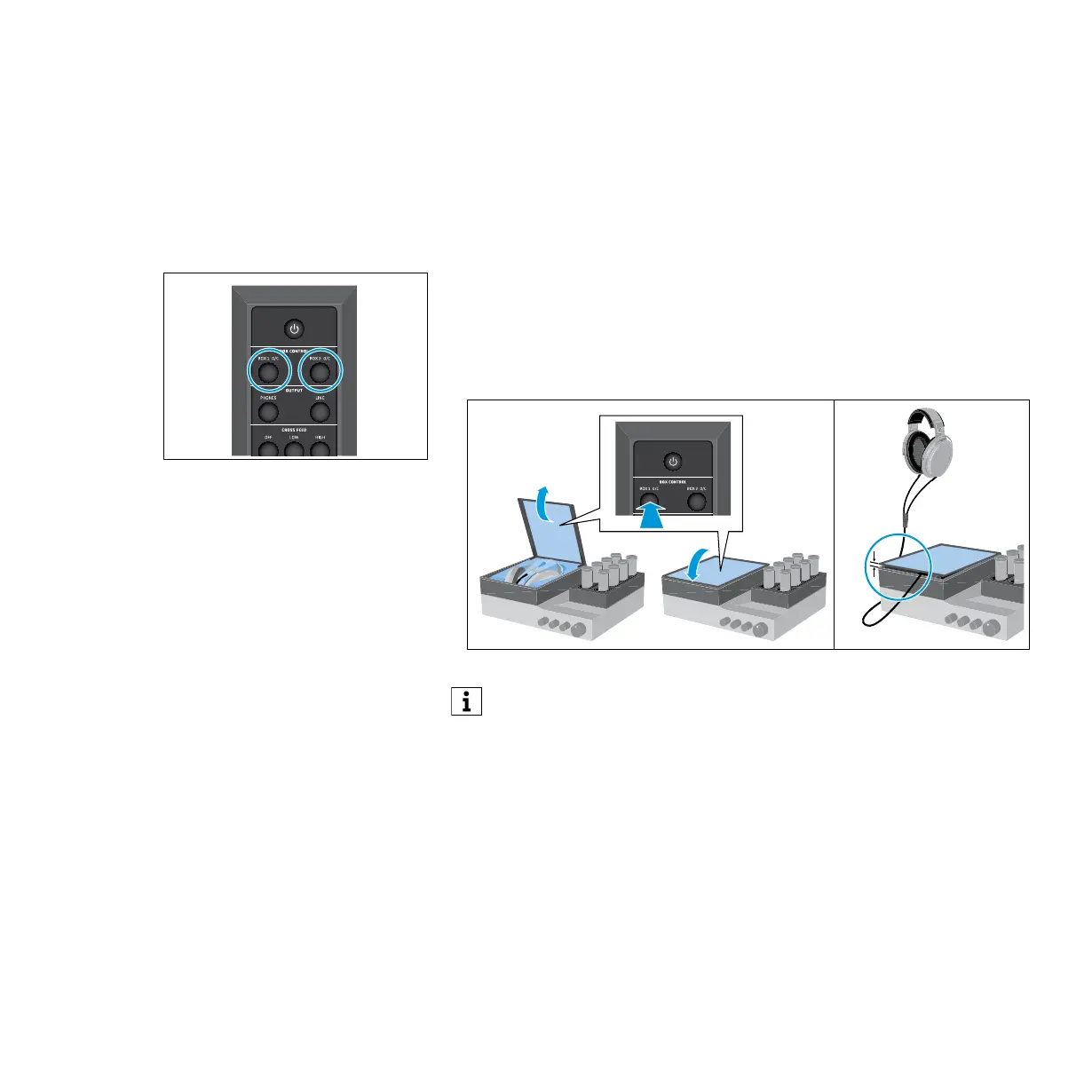
The BOX 1 headphone storage box and the optional separate BOX 2 storage
box open automatically during switch-on and close automatically during
switch-off of the tube headphone amplier.
To open or close the glass cover of the BOX 1 or BOX 2 storage box during
operation:
▷ Press the BOX 1 O/C button or the BOX 2 O/C button on the remote control.
The glass cover opens or closes. If, during closing of the glass cover, the
cable leaves the storage box or the travel of the glass cover is blocked, the
glass cover remains ajar so that e.g. the cable does not get clamped.
If the OUTPUT audio output is set to LINE, the headphone storage boxes
remain closed when the HE 1 is switched on.
INPUT
USB COAXIALOPTICAL
BALANCEDUNBALANCED
INPUT
CROSS FEED
OUTPUT
USB COAXIALOPTICAL
BALANCEDUNBALANCED
LOW HIGHOFF
LINEPHONES



 To Next Page