PXC 550 | 13
Getting started
Getting start ed
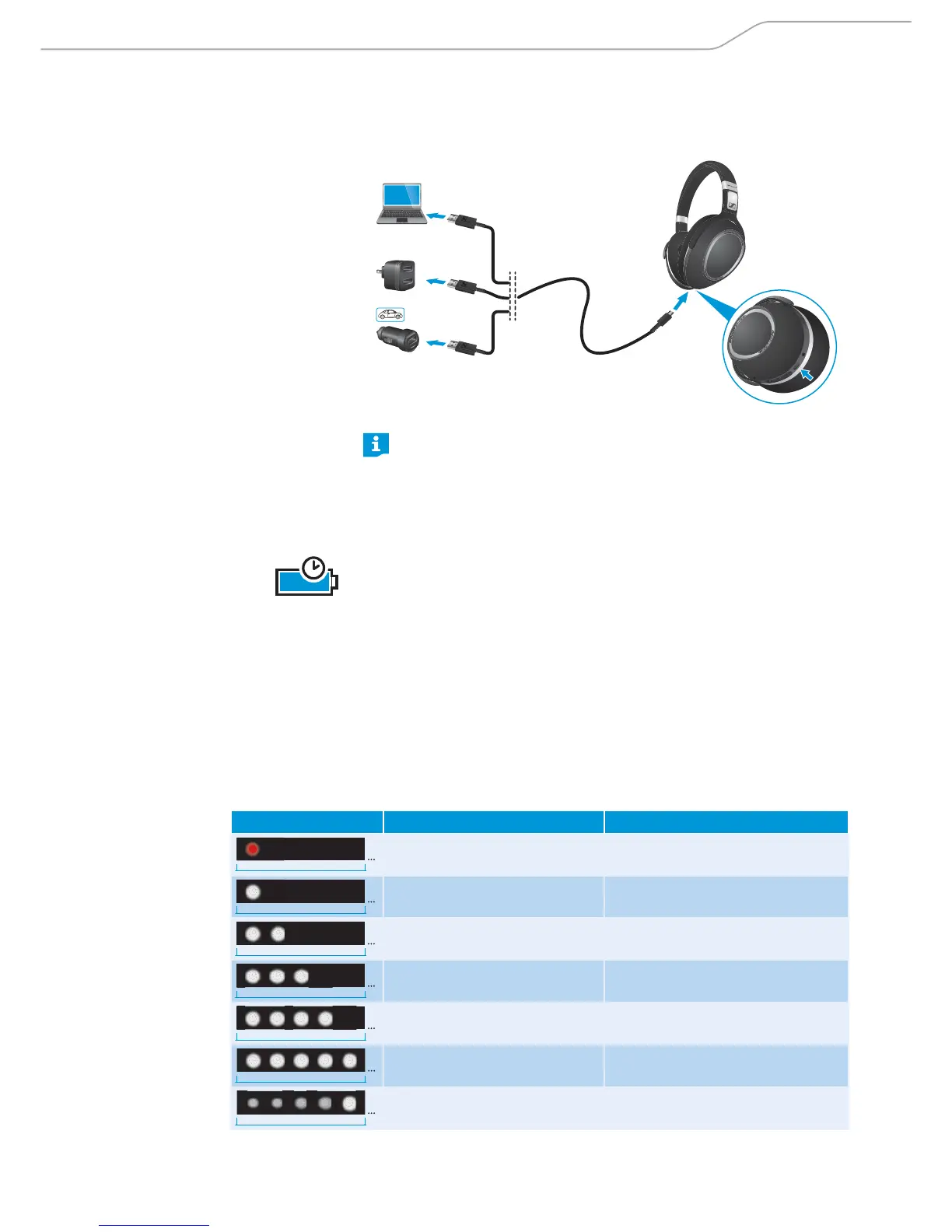
Charging basics
*
Accessories not included.
*
*
*
The following steps and step results assume that the headphones are
straight out of the box, or that the features of the headphones have
not been enhanced by the Sennheiser CapTune app.
The step results on the procedures specified in this instruction manual
may change if some of the features have been activated or deactivated
using the Sennheiser CapTune app.
A complete charging cycle takes about
3 hours. Before using the headphones
for the first time, charge the rechargeable battery for a complete charging cycle
without interruption.
When the battery is almost empty or when the headphones are being charged,
the indicator LEDs light up as indicated in the following table and a voice prompt
announces the charge condition of the battery. When the battery charge drops
to a low level, a voice message prompts you to recharge the headphones.
It is recommended to charge the headphones using only the supplied USB cable.
If you are charging using an external USB-power adapter, it is recommended to
use an adapter with an output rating of 350 mA or higher.
You can continue to listen to music or make calls from your smartphone via
Bluetooth wireless connection while the headphones are being charged.
3h
LED display Meaning Voice prompt
5s
Battery is almost empty
(less than 2% charged)
“ Re charge he adset“
5s
Battery is less than 15% charged “ Le ss than 20% batte ry le ft”
5s
Battery is less than 25% charged “ Mo re than 20% batte ry le ft”
5s
Battery is less than 50% charged “ Mo re than 40% batte ry le ft”
5s
Battery is less than 75% charged “ Mo re than 60% batte ry le ft”
5s
Battery is more than 80% charged
(battery is almost fully charged)
“ Mo re than 80% batte ry le f”
1m
Battery is fully charged








 To Next Page