30 | PXC 550
Using the headphones
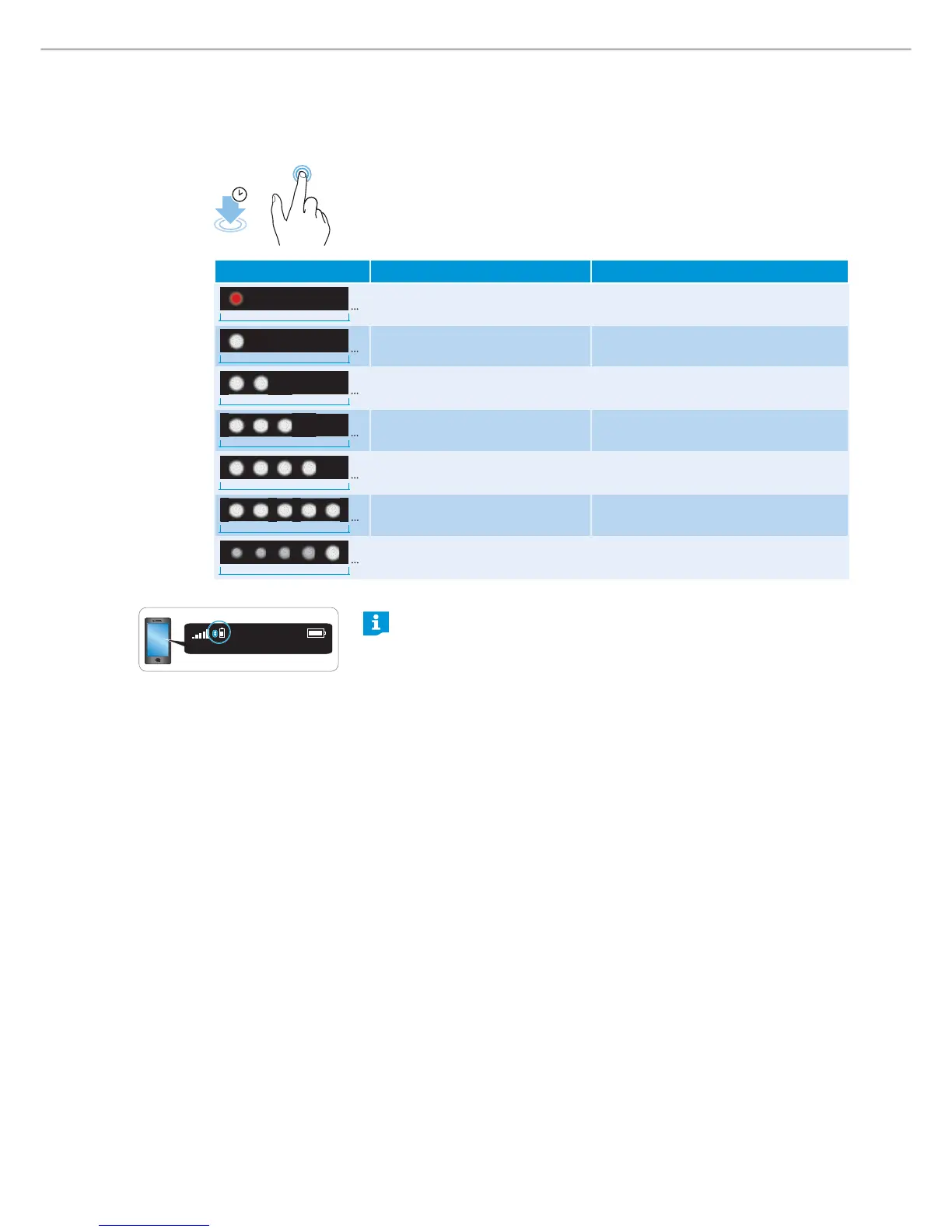
Checking the remaining bat t ery life from the headphones
You can check the remaining play and talk time at any given time except when
you are on an active call or when listening to music.
X Tap and hold the touch control panel for about 4 seconds.
You hear the voice prompt announcing the remaining play time and the LEDs
flash/light up depending on the battery charge level.
Depending on your smartphone, the battery life of your headphones
may also be displayed on the screen.
4s
LEDs Meaning Voice prompt
5s
Battery is almost empty
(less than 2% charged)
“ Re charge he adset“
5s
Battery is less than 15% charged “ Le ss than 20% batte ry le ft”
5s
Battery is less than 25% charged “ More than 20% batte ry le ft”
5s
Battery is less than 50% charged “ Mo re than 40% batte ry le ft”
5s
Battery is less than 75% charged “ Mo re than 60% batte ry le ft”
5s
Battery is more than 80% charged
(battery is almost fully charged)
“ Mo re than 80% batte ry le ft”
1m
Battery is fully charged










 To Next Page