36 | PXC 550
Listening to music
Making calls using the PXC 550 headphones
The following call functions are only available if the headphones and the smart-
phone are connected using Bluetooth wireless technology
or if the USB cable is
used.
Some smartphones may not support all functions.
Making a call
X
Dial the desired number on your mobile phone.
If your mobile phone does not automatically transfer the call to the headphones:
X Select the PXC 550 as the audio source on your smartphone (see the instruc-
tion manual of your smartphone if necessary).
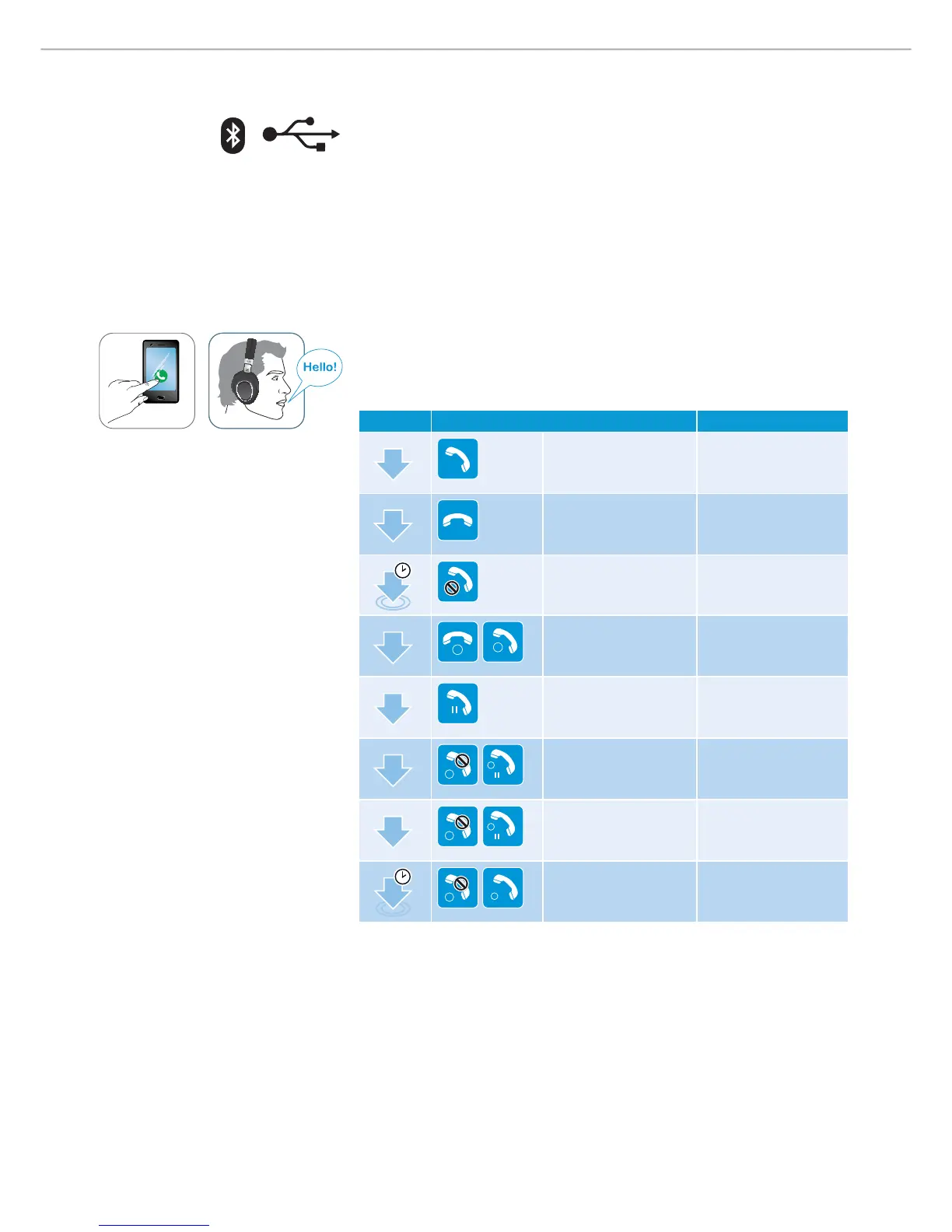
Accepting/ reject ing/ ending a call
When you receive a call, you hear the ring tone from the PXC 550 and an LED
flashes white 3 times every 2 seconds. If you listen to music when you receive a
call, the music is paused until you end the call.
X Tap the touch control panel accordingly:
Gesture Function Signal
1x
Accepts a call
1x
Ends a call “ Call e nde d”
1s
Rejects a call “ Call re je cte d”
1x
1
2
Accepts an incoming
call and ends the
active call
2x
HOLD
Puts the call on hold
2x
2
HOLD
1
Accepts an incoming
call and puts an active
call on hold
2x
2
HOLD
1
Toggles between 2
active calls
1s
2
1
Rejects an incoming
call and continue with
the active call











 To Next Page