If a problem occurs ...
RS 195 | 29
You can also contact your Sonova Consumer Hearing partner for
assistance. You can find your local Sonova Consumer Hearing part
-
ner at www.sennheiser-hearing.com/service-support.
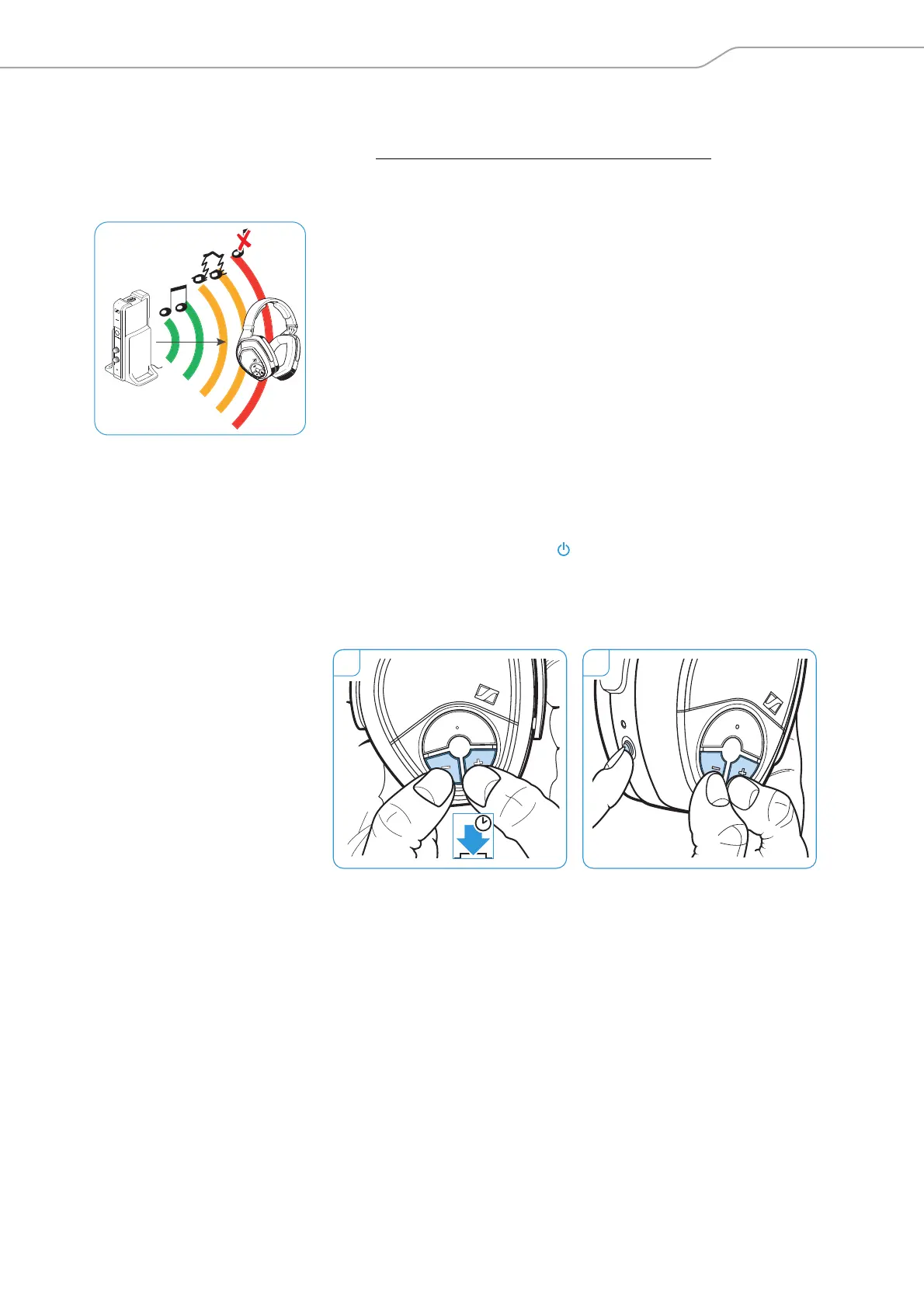
Leaving the range of the transmitter
The range of the transmitter largely depends on environmental con-
ditions such as wall thickness, wall composition etc. If you, and
therefore the headphones, leave the transmission range of the trans
-
mitter, the sound drops out occasionally at first before the connec-
tion breaks down completely.
If you re-enter the transmission range within 5 minutes, the connec-
tion is automatically re-established.
If you spend more than 5 minutes outside the transmission range,
the headphones switch off automatically.
Clearing the pairing settings from the headphones
1 Simultaneously press the Volume +/– buttons for 2 seconds.
The HDR status LED flashes red rapidly.
2 Press the HDR power button while holding the Volume +/– but-
tons pressed. Release all 3 buttons.
The HDR status LED lights up green or red, depending on the bat-
tery condition, and starts flashing slowly. The pairing settings are
cleared from the headphones.











 To Next Page