Using the RS 195
20 | RS 195
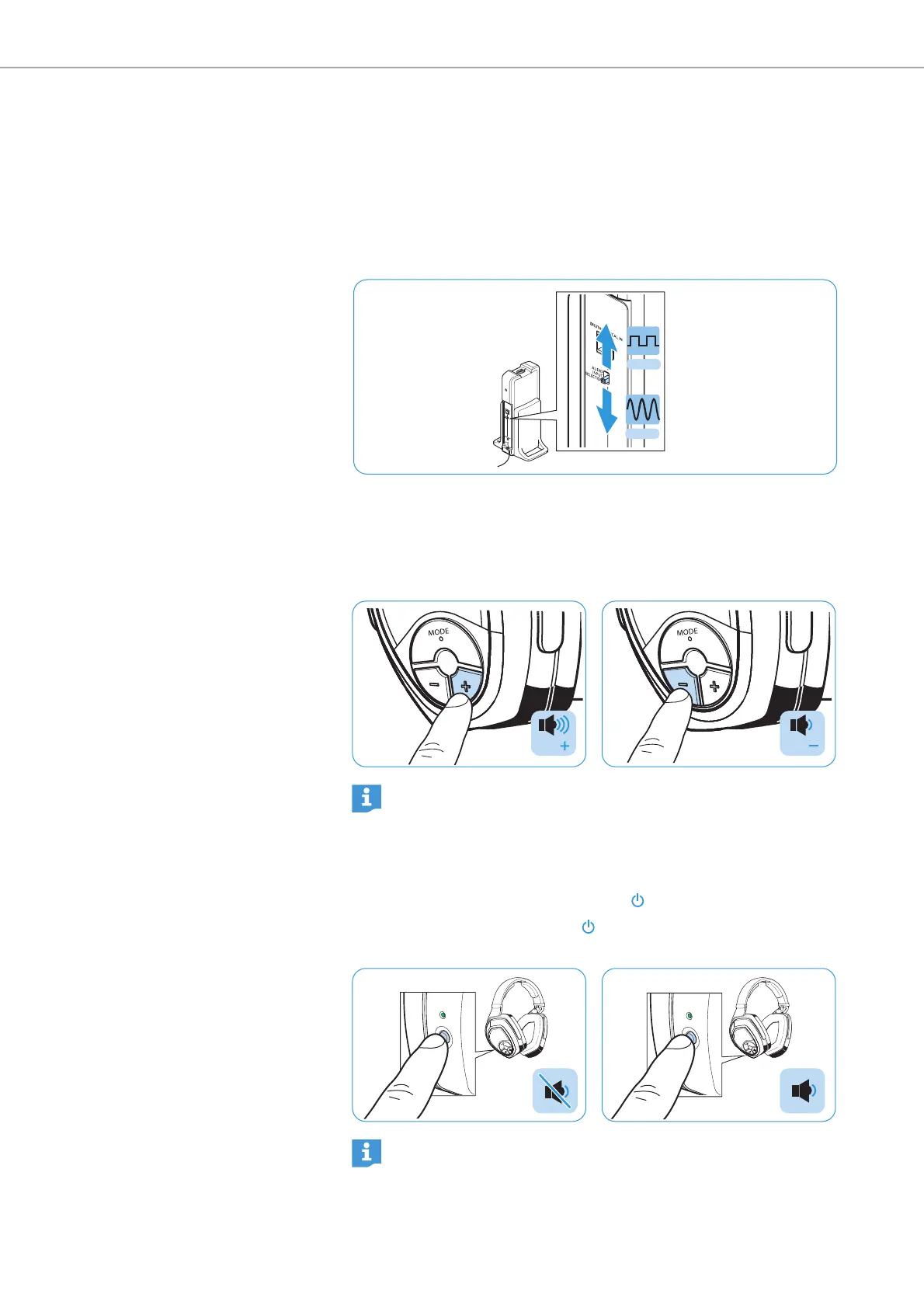
Selecting an audio input
If both the analog and the digital audio input are connected to an
audio source, you can toggle between the two audio inputs.
b Slide the AUDIO INPUT SELECTION switch up to select the digital
(optical) audio input (see page 13).
b Slide the AUDIO INPUT SELECTION switch down to select the
analog audio input (see page 14 and 15).
Adjusting the volume
b Press the Volume + button or the Volume – button repeatedly until
the volume is adjusted to the desired level. When the minimum or
maximum volume is reached, you hear a beep in the headphones.
Muting/unmuting the headphones
b Briefly press the Power HDR button to mute the headphones.
b Press the Power HDR button or one of the Volume +/– buttons
to
cancel the muting.
Digital
Analog
If you are using
Personal Hearing
and the maximum possible
volume is not sufficient, you can further increase the volume
level (see page 23, from product version 06/2017).
Vol
Vol
If the headphones are muted for more than 15 minutes, they
switch off automatically.











 To Next Page