Putting the RS 195 into operation
14 | RS 195
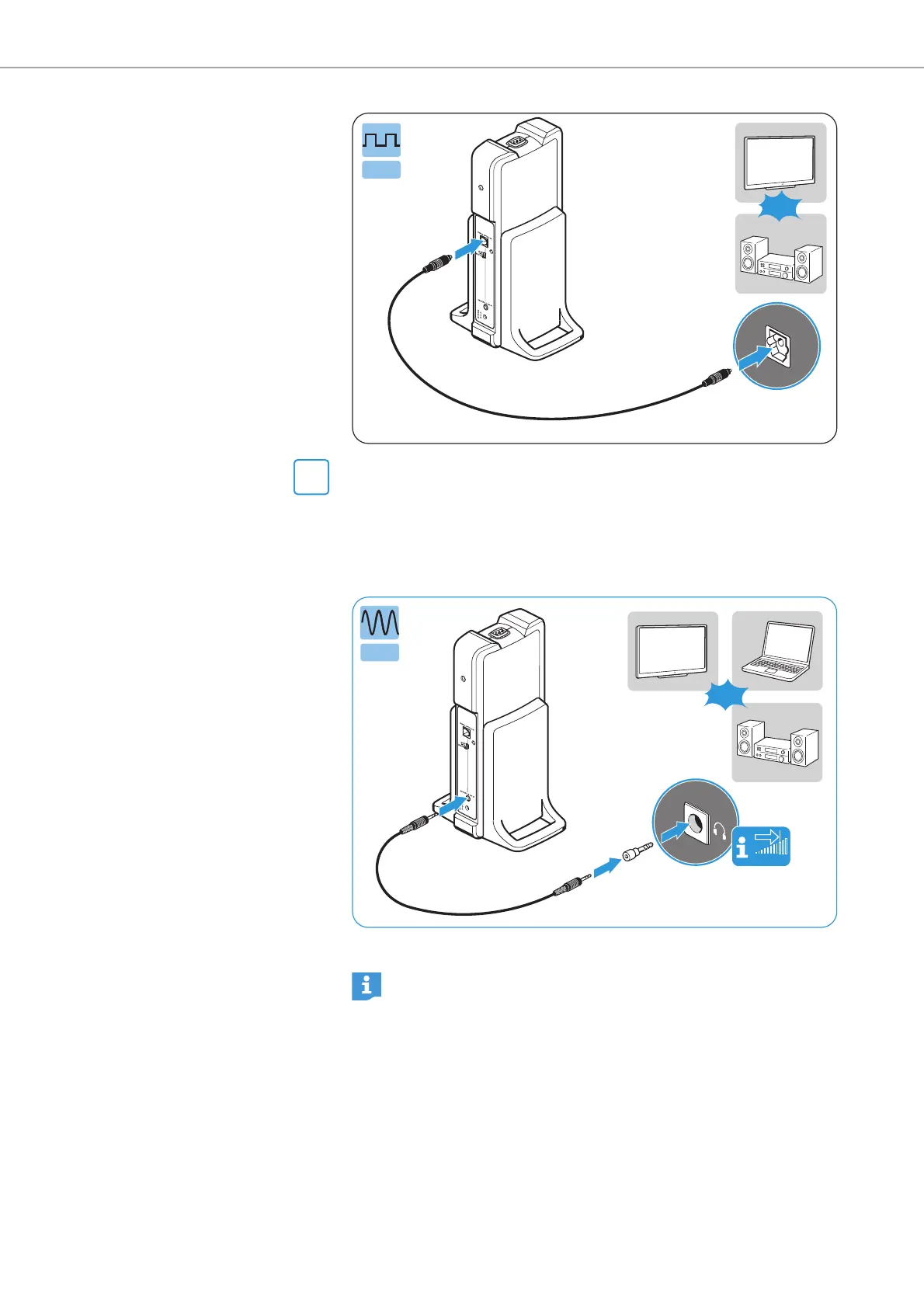
Connection possibility B: 3.5 mm or 6.3 mm/¼" jack socket
(analog)
b If necessary, plug the adapter 6.3 mm/¼" jack plug onto the ste-
reo audio cable.
b Connect the stereo audio cable to the 3.5 mm jack socket of the
transmitter and to the headphone socket of your audio source.
* optional accessory
If the headphones socket on your audio source is a 6.3 mm/¼" jack
socket, you require an adapter (3.5 mm jack plug to 6.3 mm/¼" jack
plug, optional accessory) for the supplied 3.5 mm stereo audio cable.
Some TV models mute the loudspeakers when you connect the
transmitter to the 3.5 mm headphone socket. Other TV models have
their own menu for adjusting the volume of the headphone socket.
Adjust the volume of the headphone socket on your TV/audio
source to at least a medium level.
This improves the quality of wireless audio transmission. For
detailed information, please refer to the instruction manual of
your TV/audio source.












 To Next Page