Maintenance, Repair and Troubleshooting
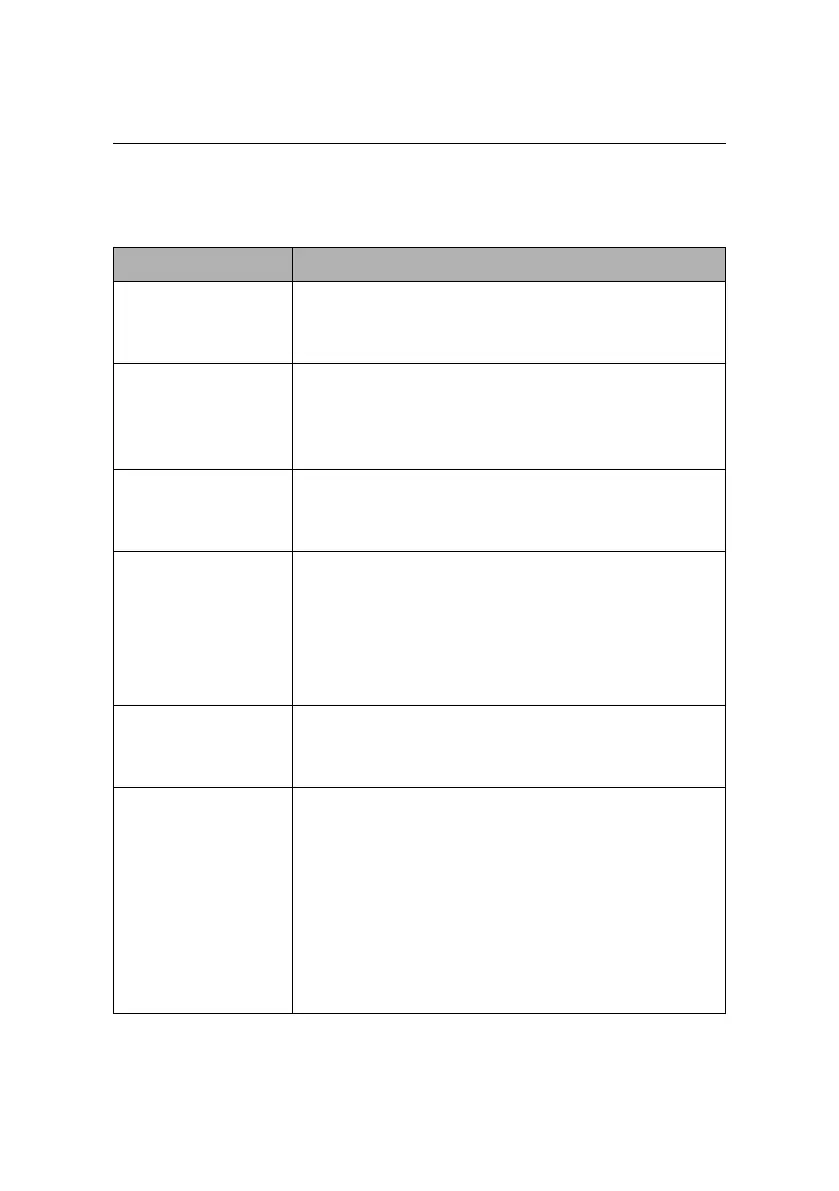
Table 4: Take-off vetos
eMotion text Description and User action
Drone not
horizontal (roll or
pitch)
The eBee RTK must be held horizontally with level
wings to initiate take-off.
User action: Hold the drone horizontally.
Motor is blocked Excessive current was detected from the motor.
User action: Check that the propeller is mounted
correctly and that the motor is freely turning and try
the take-off procedure again.
Battery too low for
take-off
The drone requires a fully-charged battery for the
take-off procedure.
User action: Change the battery.
Wings not
detected
The drone’s wings are not attached correctly or the
wing struts are damaged.
User action: Ensure that the wings are fully inserted
into the main body and that the wing struts are
not damaged, as described in section ‘Preparing the
eBee RTK for flight’ on page 41.
USB cable
detected
The eBee RTK has detected a USB cable connected to
the drone’s autopilot.
User action: Remove the USB cable before take-off.
RTK source not de-
fined
You have chosen a flight mode that requires RTK cor-
rection data, but none is available.
User action: Check that your GNSS/RTK base station
is powered on and connected to the computer that
is running eMotion.
Check that you haveselected the correct base station
connection type and parameters in eMotion.
Check that you have set up and, if necessary, logged
in to your VRS stream.
162



 To Next Page