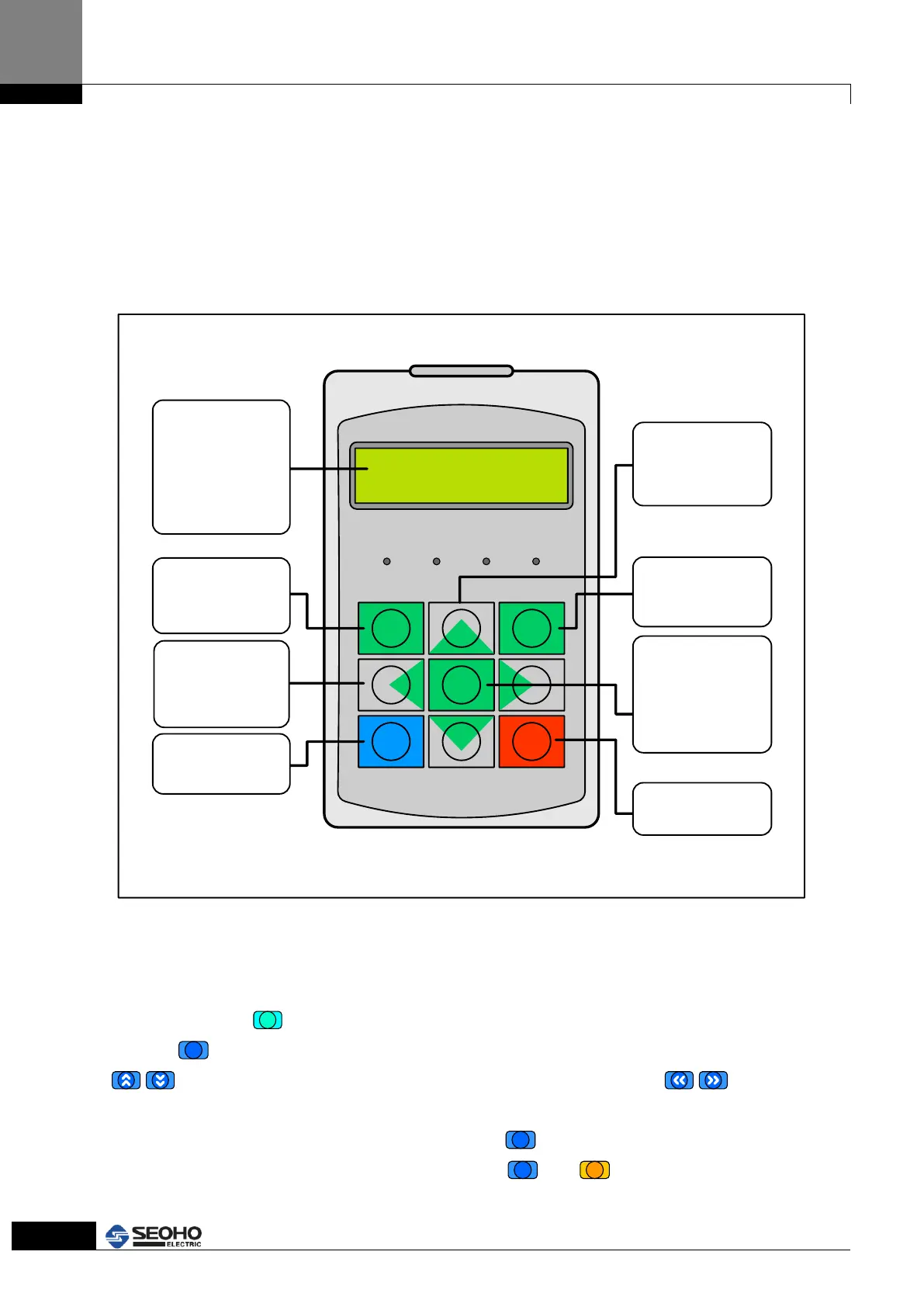
4. KEYPAD
4.1 KEYPAD description
The keypad of SOHO VD Power Supply is composed with 9 keys (ESC, ENTER, RUN, STOP,
MENU, Left, Right, UP and Down scroll key). Users can set up parameters and monitor the
operation status and run/ stop the power supply with keypad, etc.
Se o ho E le ctri c
AC Driv e
ESC ENTER
MENU
RUN STOP
LOCAL RUN STOP FAULT
L/R scroll key :
When users change
parameters, these
keys move the digits
of parameter values.
ESC Key :
Move to upper menu.
Reset when a Fault
occurs.
LCD Display :
If there are no work for
c e r t a i n t i m e , t h e
backlight will be off.
A n d i t w i l l b e
automatically turned on
when it starts working.
The default value is 30
minutes.
RUN Key :
When running the
motor with keypad.
U/D scroll key :
When moving to the
Menu page, Monitor
item and parameter
items
ENTER key :
When moving to the
lower menu or
Executing
STOP Key :
When stopping the
motor with Keypad
MENU Key :
When a fault occurs,
this is for moving to
the last item, this
moves to the inverter
s t a t u s m o n i t o r .
(toggle button)
Figure 4.1 KEYPAD
4.2 KEYPAD operation
The data of KEYPAD is composed with Main Menu and low-level sub-Menu as Figure 4.1
Push the button,
, to move from Main Menu to low-level sub-menu. And Push the
button,
, to escape from low-level sub-Menu to Main Menu. Use the buttons,
, to Increase or decrease the data value. Use the button, , to move
cursors when setting-up parameters. When monitoring/checking the status of Power
Supply and listing the Error/Fault, use the button,
. When operating by KEYPAD, users
can start/stop the power supply with the buttons,
and
.



 To Next Page