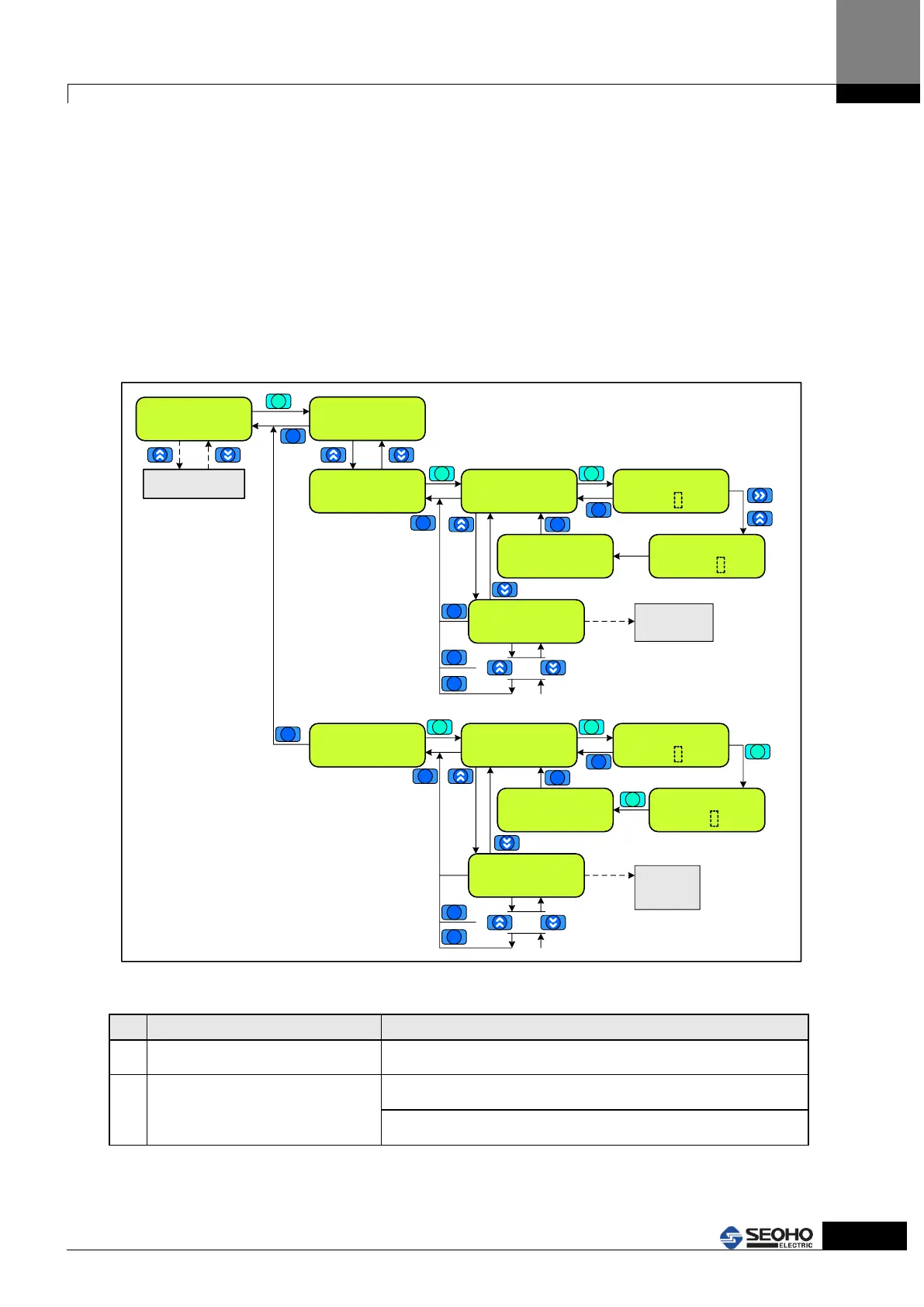
4.7 Main Menu Page[6] Password
In M6 password Page, users can check what access level of parameters can be edited.
If a user wants to change the Power Supply parameters for more professional level, the
user must be certified for higher level access. Certifying the higher level access can be
done at "Admission" with the relevant password for each level. Then, the parameters of
the higher level can be accessed. It is recommended to use Access level from 0 to 1 for
normal users (L[0] ~ L[1]). If users want higher level, please contact the head office. If
users are certified higher than L[1], it will be returned to L[0] automatically after 1 hour
passes. Refer to Figure 4.8 for KEYPAD usage and the setting instruction.
M6 Password
[0] Access = [L0]
Main Menu Page
M6 Password
Main Menu Page
M0~M6
M6 Password
[1] Admission
[1] Admission
Password [L1]
Password [L1]
Enter : 0000
Blink
Password [L1]
Enter : 0100
Blink
X 1
X 1
If the password
of L1 is 0100
Password [L1]
Admitted. [L1]
[1] Admission
Password [L2]
.
.
.
M6 Password
[2] Pwd Change
[2] Pwd Change
Password [L1]
Password [L1]
Enter : 0000
blink
New Password [L1]
Enter : 0000
점멸
New Password [L1]
Completed...
*) Input the old password.
The procedure is the same
as in [1] Admission of M6
Password
L2-L5 have the
same procedure of
setting as L1
*) after input the
old password
*) Input the new password.
The procedure is the same as [1] Admission
of M6 Password
[1] Admission
Password [L2]
.
.
.
L2-L5 have the
same procedure
of setting as L1
ESC
ENTER
ENTER
ESC
ESC
ESC
ENTER
ENTER
ESC
ESC
ESC
ENTER
ESC
ENTER
ESC
ESC
ESC
ESC
ESC
ENTER
Figure 4.8 “M6 Password” Menu Page
Indication of certified Access level
L[2] ~ L[5] : Contact the Seoho Electric.



 To Next Page