
 Need help?
Do you have a question about the Servomex 2700 and is the answer not in the manual?
Explains the use of WARNINGS, CAUTIONS, and NOTES in the manual for user safety and information.
Details the manual's coverage of the Servomex 2700 Combustion Gas Analyser and its available options.
Provides manual reference and order numbers for the Servomex 2700 Quickstart Manual.
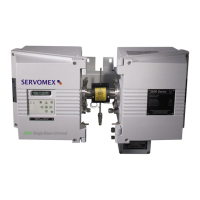
Identifies components in Figure 1 (Sensor head and control unit) and Figure 2 (Display and keypad layout).
Provides steps and precautions for powering up the analyser, including a CAUTION for low temperatures.
Details the procedure for safely shutting down the analyser, including WARNING and CAUTION notes for hot surfaces.
Explains the analyser's keypad functions, display, and basic operational procedures.
Describes how to access diagnostics, history logs, and configure analyser settings with passwords.
Guides users on configuring concentration alarms, including level, hysteresis, and polarity.
Explains how to assign functions to the analyser's 4 relay outputs for alarms, calibration, and control.
Details how to configure 0-20mA or 4-20mA analogue outputs for oxygen and combustibles sensors.
Outlines the procedure for setting up timed or event-triggered blowback processes for probe cleaning.
Explains how to adjust the analyser's time, date, and date display format.
Describes how to change supervisor and operator passwords for accessing analyser functions.
Details how to configure the auxiliary air setting, which is required when the combustibles sensor is used.
Introduces the calibration functions, recommendations, and password requirements for sensors.
Introduces service functions like testing outputs and deleting history, requiring supervisor password access.
Explains how to adjust software filtration settings for signal smoothing and integration into control systems.
Describes how to configure the analyser display language to English, French, or German.
Details the performance specifications for oxygen measurement, including output ranges, resolution, and accuracy.
Details the performance specifications for combustibles measurement, including output ranges, resolution, and accuracy.
Covers analyser inputs, outputs, physical dimensions, weight, power supply, and operating environment.
 General
| Technology | Paramagnetic |
|---|---|
| Measurement Range | 0-100% O2 |
| Outputs | 4-20 mA, RS232/RS485 |
| Power Supply | 24 VDC or 100-240 VAC |
| Operating Temperature | 0 to 50°C (32 to 122°F) |









 To Next Page