235
SHIFT/CHANGE FUNCTIONS
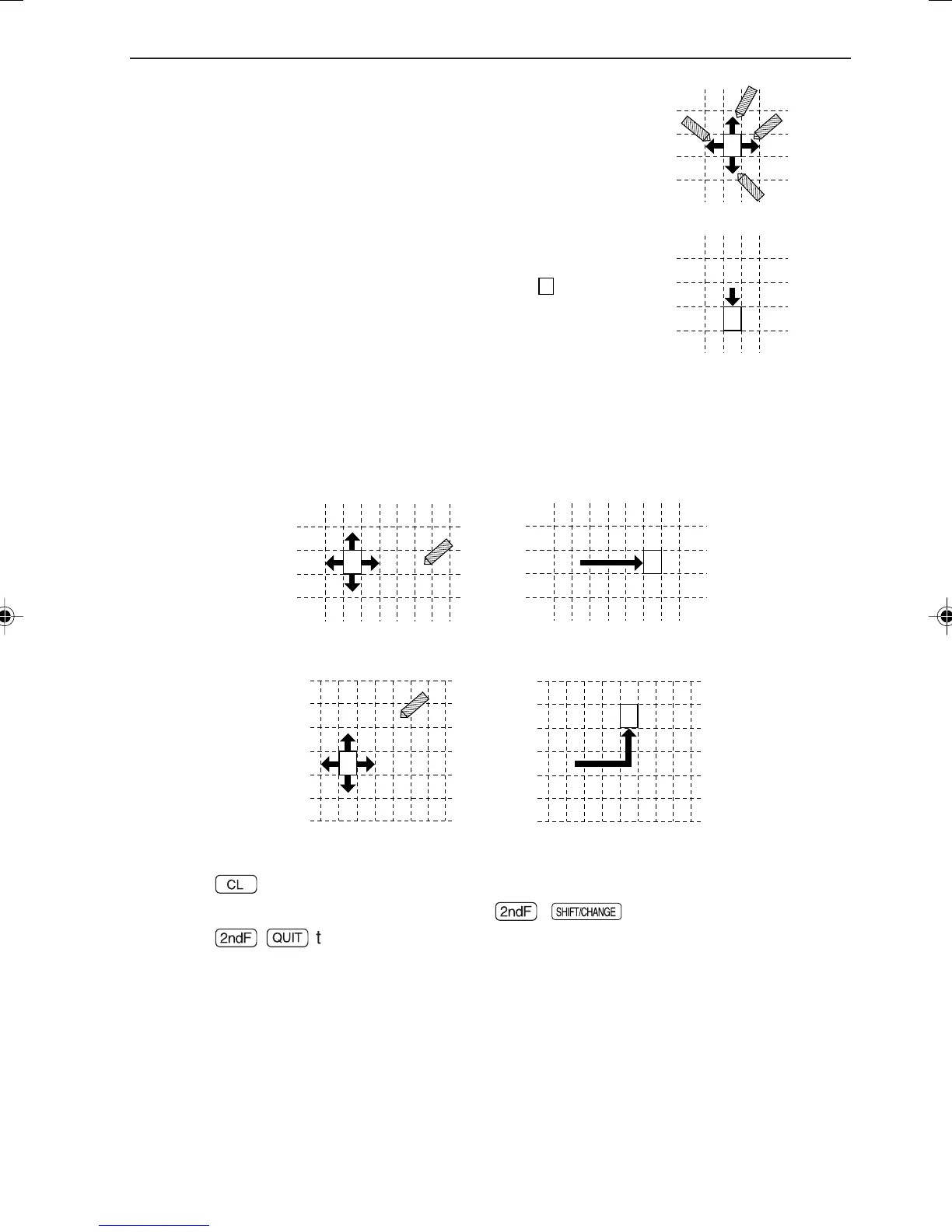
Movement range using the touch-pen:
• A cursor having four arrow marks shows that it can
be used in both the horizontal and vertical direc-
tions.
• As shown in the above figure, an area where the
pen can be touched is not in units of dots, but in
units of grids containing of 6 × 8 dots.
* The dot structure of the grid is different from that of “ ” to
be displayed.
• Therefore, to move the graph one scale unit, touch the arrow as shown in the above
example.
• To move the graph two scales or more in parallel, touch a part away from the arrow.
To return from the SHIFT function to the previous screen:
• Press
¬
to return to the screen which appears immediately after a desired
equation has been selected by pressing
Ï
,
,
[A SHIFT ]
, and equation.
• Press
Ï
œ
to return to the standard function calculation screen.
• Note that the above key operations clear the moved or saved equations/graphs.
(The built-in equations are not cleared.)
↓
→
→
(When touching the down
arrow.)
• The same procedures are applied to quick movement in the X- and Y- directions .
EL-9650-(11)En (229-238) 8/1/00, 9:29 AM235



 To Next Page