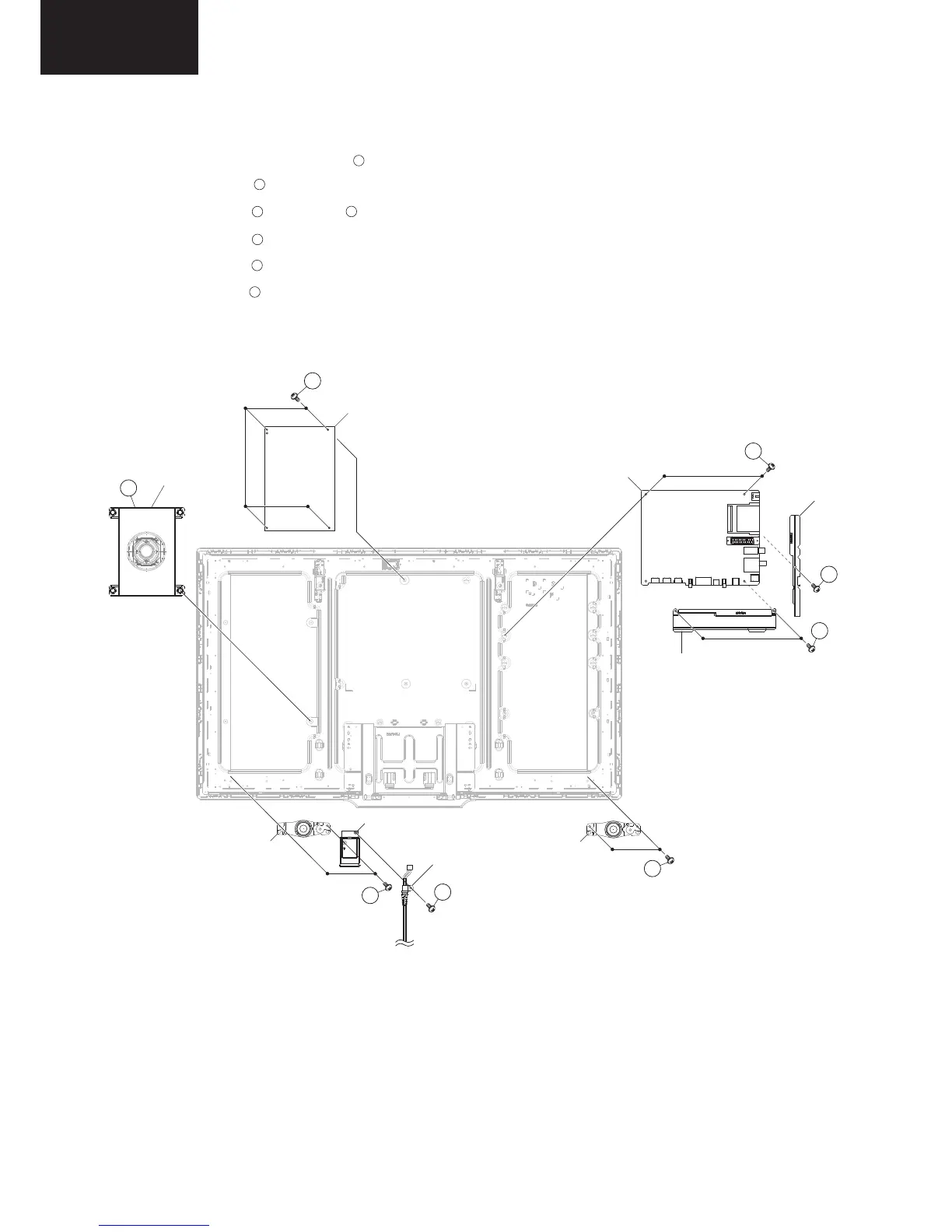
4. Remove the SPEAKER full range (subwoofer) .
5. Remove the 1 lock screws and detach the TERMINAL COVER side.
6. Remove the 2 lock screws , 2 lock screws and detach the TERMINAL COVER bottom and the MAIN unit.
7. Remove the 4 lock screws and detach the POWER unit.
8. Remove the 4 lock screws and detach the SPEAKER tweeter L and R.
9. Remove the 1 lock screws and detach the AC CORD from AC HOLDER BRACKET.
6
8
5
4
9
7
10
SPEAKER -L
(tweeter)
5
MAIN unit
TERMINAL
COVER
side
TERMINAL
COVER
bottom
SPEAKER full range
(subwoofer)
4
POWER unit
6
7
8
SPEAKER -R
(tweeter)
9
9
AC HOLDER
BRACKET
AC CORD
10













 To Next Page