28
LC-40LE730
LC-46LE730
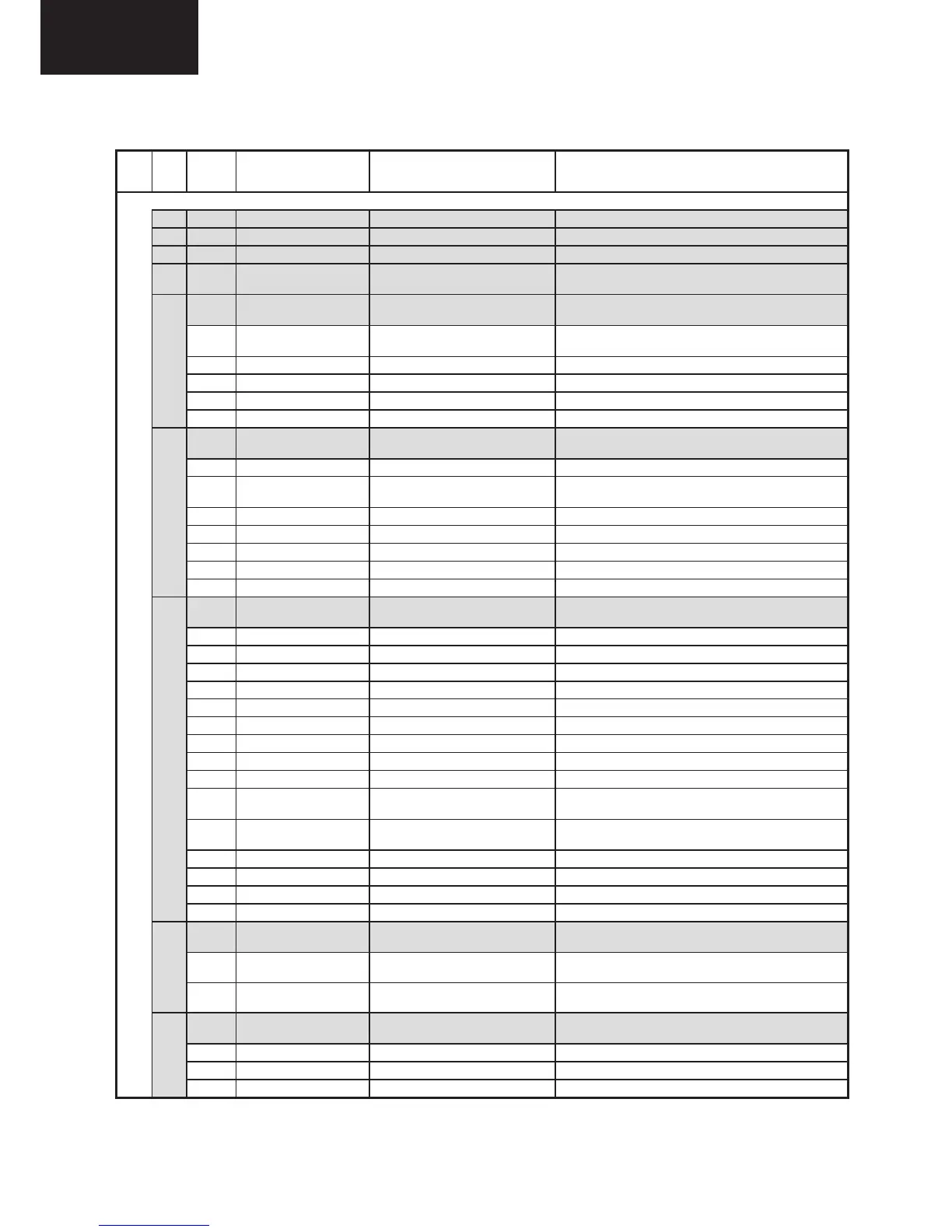
5. Adjustment process mode menu
Item Description Remarks (adjustment details, etc.)
1 Main Version LE730E v1.253 790.173.78 v14 Informative only (Main microprocessor version)
2 FRC 2.3.0.180.390-290 Informative only (FRC version)
3 HardwareVersion SHARP 691 Informative only
4 Normal Standby Cause
None / Remote Control /
Keyboard...
Factory Init Submenu
Press “►” or “OK” to enter to Factory Init Submenu
Informative (EURO/RUSSIA/NORDIC/UK/EAST
EUROPE)
Inch Setting 40" Panel type (40" / 46")
Center Acutime 0 H 0 M Backlight ON accumulated Time
RESET ► Press “►” to reset Center Acutime
TUNER NuTUNE Press “►” or "OK" to slect (Nutune / LG)
6
ETC
EEP, Autoinstallation, Option,
Country, L Error...
Press “►” or “OK” to enter to ETC Submenu
3/8 EEP Clear ► Press “►” to Clear NVM data
EEP Clear B ►
Press “►” to Clear NVM data (except adjustments
area).
Standby cause reset ► Press “►” to Reset of STANDBY CAUSE.
Autoinstallation SW Off ►
Pattern 0 Selection of internal pattern from 0 to 6
L Error Counter 0 Function is not available
L Error Reset ► Function is not available
7
PUBLIC MODE PUBLIC MODE Submenu
Press “►” or “OK” to enter to PUBLIC MODE
Submenu
4/8 Power On fixed Variable Press “►” to change Variable/Fixed.
Maximum volume 60 Press “►” to change 0/60.
Volume fixed Variable Press “►” to change Variable/Fixed.
Volume fixed Level 20 Press “►” to change 0/60.
RC button Respond Press “►” to change Respond/No respond.
Panel button Respond Press “►” to change Respond/No respond.
Menu button Respond Press “►” to change Respond/No respond.
Input mode start Normal Press “►” to change Normal/TV/SCART/…
Input mode fixed Variable Press “►” to change Variable/Fixed.
Input TV mode program
number
0 Press “►” to change 0 → 1 → 2 ...999 ).
RC path through Off
Press “►” to change On/Off (required external
module)
Hotel mode Off Press “►” to change On/Off.
Reset ► Press “►” to return to factory settings.
Commit ► Press “►” to confirm.
On screen display On Press “►” to change On/Off.
8
SMART LOADER SMART LOADER Submenu
Press “►” or “OK” to enter to SMART LOADER
Submenu
"Wait…" and "OK" when finish
the process
Press “►” to Save.
Load settings from USB
"Wait…" and "OK" when finish
the process
Press “►” to Load.
9 ADC ADJUST ADC ADJUST Submenu
Press “►” or “OK” to enter to ADC ADJUST
Submenu
6/8
MODE YPbPr(SD) Only for Engineering purpose (Please don’t use)
ADJUST Int. signal Only for Engineering purpose (Please don’t use)
R-GAIN 272 Only for Engineering purpose (Please don’t use)







 To Next Page