MX-5001N OTHERS 11 – 2
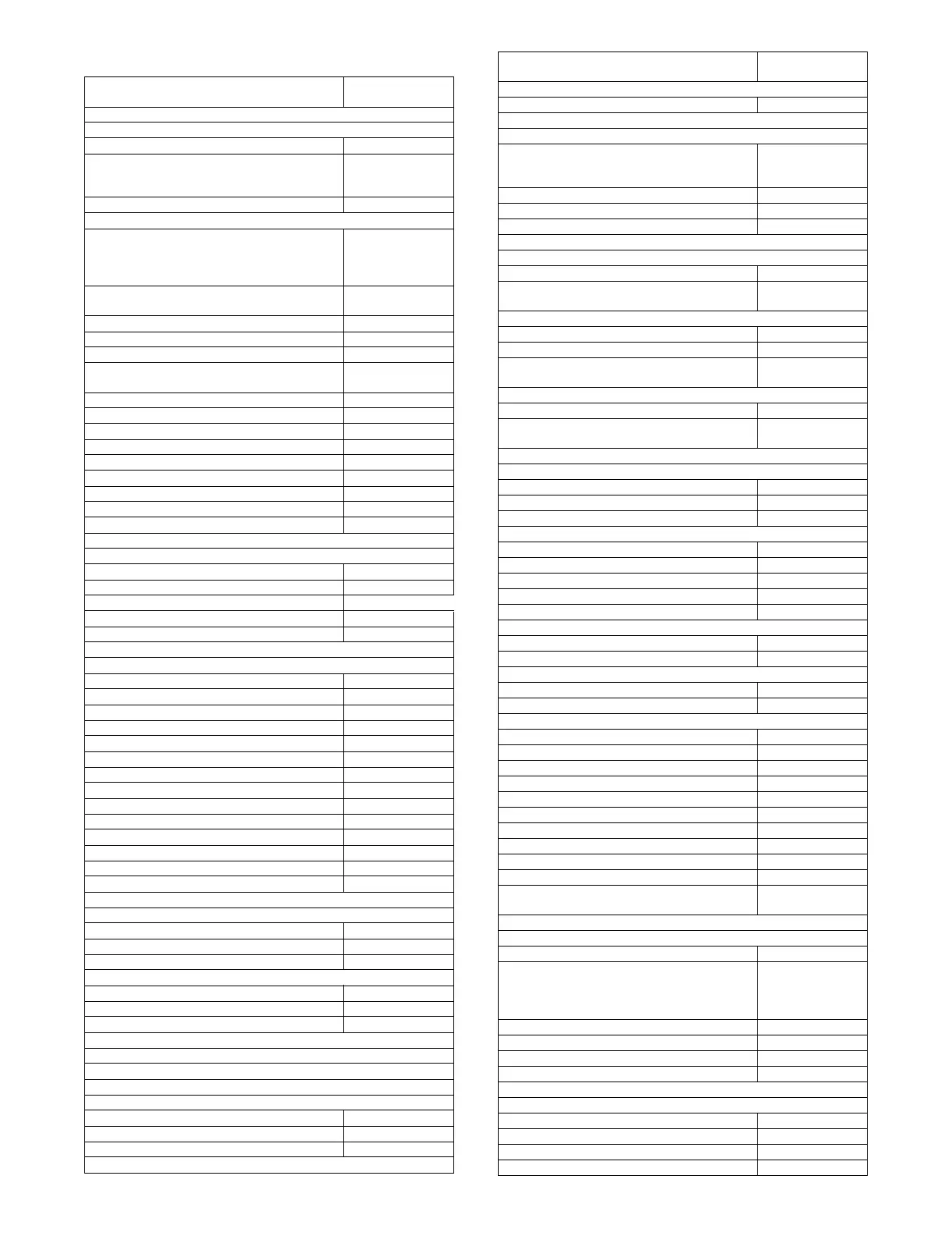
(2) System setting (administrator) list
Item
Factory default
setting
■ User Control
● User Authentication Setting
X User Authentication Disabled
X Authentication Method Setting Authenticate a User
by Login Name and
Password
X Device Account Mode Setting Disabled
● Other Settings
X Actions when the Limit of Pages for Output
Jobs
Job is Completed
even when
the Limit of Pages is
Reached
X The Number of User Name Displayed
Setting on Operation Panel
12
X A Warning when Login Fails Disabled
X Disabling of Printing by Invalid User Disabled
X Automatically print stored jobs after login Disabled
X Default Network Authentication Server
Setting
-
X Count Setting after Login -
X User Information Print -
● User List -
● Page Limit Group List -
● Authority Group List -
● Favorite Operation Group List*1 -
X Favorite Operation Group Registration*1 -
X Home Screen List*1 -
● User Count -
■ Energy Save
● Toner Save Mode
X Print Disabled
X Copy Disabled
● Auto Power Shut-Off Enabled
● Auto Power Shut-Off Timer 45 min.
● Preheat Mode Setting 15 min.
■ Operation Settings
● Other Settings
X Keys Touch Sound Middle
◆ Key Touch Sound at Initial Point Disabled
X Auto Clear Setting 60 sec.
◆ Cancel Auto Clear Timer Disabled
X Message Time Setting 6 sec.
X MFP Display Language Setting American English
X Disabling of Job Priority Operation Disabled
X Disabling of Bypass Printing Disabled
X Key Operation Setting 0.0 sec.
◆ Disable Auto Key Repeat Disabled
X Disabling of Clock Adjustment Disabled
X Disabling of Covers/Inserts Mode Disabled
X Initial Original Count Setting All disabled
● MFP Display Pattern Setting Pattern 1
● Customize Key Setting*2
X Copy
◆ Customize 1 File
◆ Customize 2 Quick File
◆ Customize 3 -
X Scan
◆ Customize 1 Address Review
◆ Customize 2 File
◆ Customize 3 Quick File
X Internet Fax*3
◆ (Same as Scan)
X Fax*4
◆ (Same as Scan)
X USB Memory Scan
◆ Customize 1 -
◆ Customize 2 -
◆ Customize 3 -
X Data Entry*5
◆ (Same as Scan)
● Home Screen Settings*2 -
● Preview Setting
X Default Preview Display
◆ Image Send Reception Date:
Twice
Memory Box: Twice
◆ Doc. Filing Twice
X Received Date Image Check Setting Disabled
X Default List/Thumbnail Display List
● Remote Operation Settings
X Remote Software Operation
◆ Operational Authority Prohibited
◆ View Password Entry Screen Display in Both PC
and MFP
X Operation from Specified PC
◆ Operational Authority Prohibited
◆ Hostname or IP Address of PC -
◆ View Password Entry Screen Display in Both PC
and MFP
X Operation by User who Has Password
◆ Operational Authority Prohibited
◆ View Password Entry Screen Display in Both PC
and MFP
■ Device Control
● Other Settings
X Original Feeding Mode All Disabled
X Saddle Stitch Position Adjust*6 0.0 mm
X Auto Paper Selection Setting Plain Paper
X Tandem Connection Setting
◆ IP Address of Slave Machine 0.0.0.0
◆ Port Number 50001
◆ Disabling of Master Machine Mode Disabled
◆ Disabling of Slave Machine Mode Disabled
X Detect Standard in Auto Color Mode 3
X Registration Adjustment
X Optimization of a Hard Disk -
X Clear All Job Log Data -
● Original Size Detector Setting
X Original Detection Size Combination Inch-1
X Cancel Detection at Document Glass Disabled
● Disabling of Devices
X Disabling of Document Feeder Disabled
X Disabling of Duplex Disabled
X Disabling of Large Capacity Cassette*7 Disabled
X Disabling of Optional Paper Drawer*8 Disabled
X Disabling of Tray Setting Disabled
X Disabling of Finisher*9 Disabled
X Disabling of Offset Disabled
X Disabling of Stapler*9 Disabled
X Disabling of Punch*10 Disabled
X Disabling of Color Mode*11 Disabled
● Fusing Control Settings 16 - 24 lbs.
(60 - 90g/m2)
■ Copy Function Settings
● Initial Status Settings
X Color Mode Full Color
X Paper Tray Varies depending
on the
machine
configuration
X Exposure Type Auto
X Copy Ratio 100%
X 2-Sided Copy 1-Side to 1-Side
X Output -
● Other Settings
X Copy Exposure Adjustment
◆ Color 5
◆ Black & White 5
X Rotation Copy Setting Enabled
X Add or Change Extra Preset Ratios -
Item
Factory default
setting



 To Next Page