MX-5001N OTHERS 11 – 3
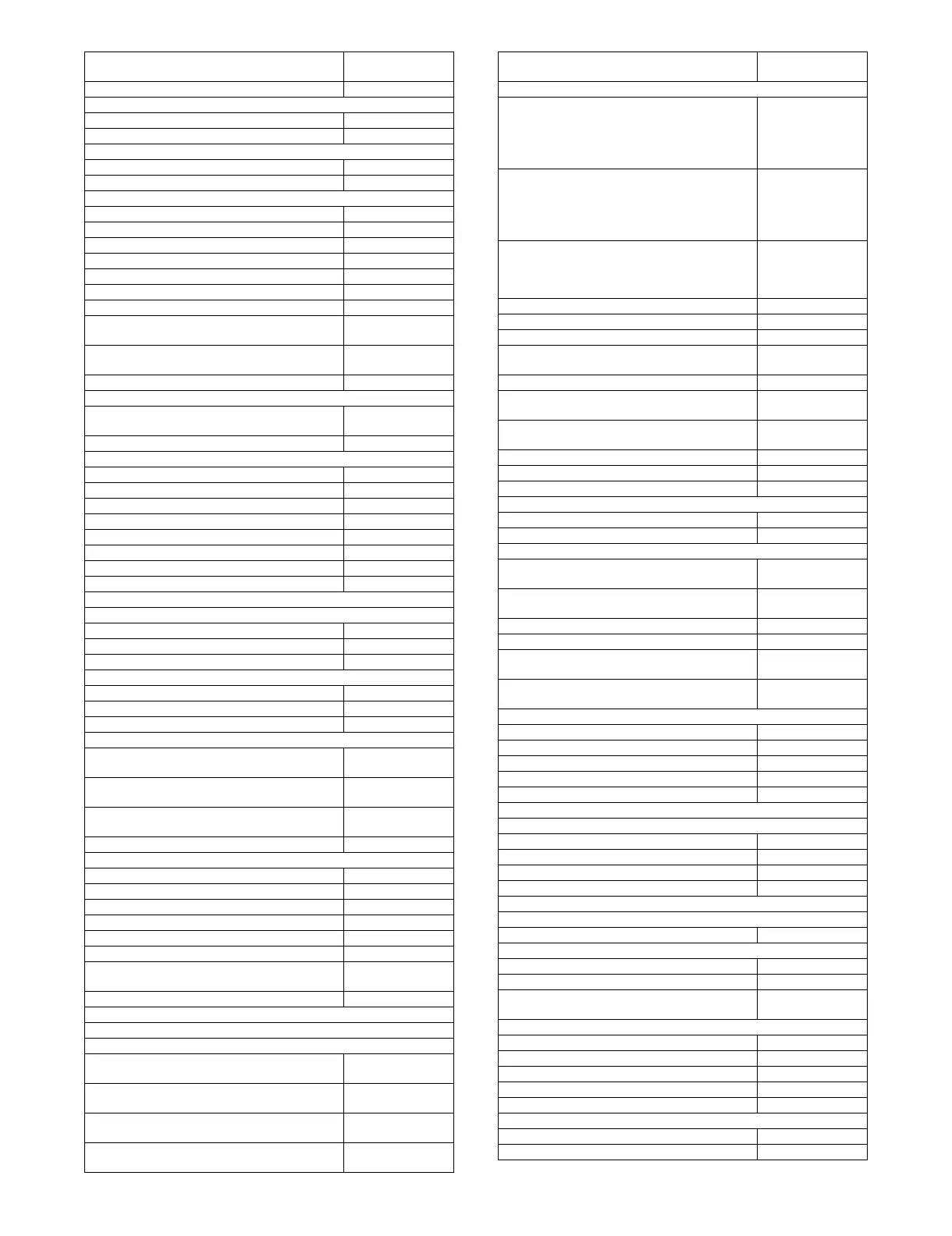
X Setting a Maximum Number of Copies 999
X Initial Margin Shift Setting
◆ Side 1 1/2"
◆ Side 2 1/2"
X Erase Width Adjustment
◆ Edge Clearance Width 1/2"
◆ Center Clearance Width 1/2"
X Card Shot Settings
◆ Original Size X: 3-3/8", Y: 2-1/8"
◆ Fit to Page Disabled
X Automatic Saddle Stitch*6 Enabled
X Initial Tab Copy Setting 1/2"
X Disabling Deletion of Job Programs Disabled
X Disabling of Bypass-Tray in Duplex Copy Disabled
X Disabling of Auto Paper Selection Disabled
X Auto Selection Setting of Tray that is
Supplied the Paper
Disabled
X B/W 600dpi x 600dpi Scanning Mode for
Document Feeder
Disabled
X B/W Quick Scan from Document Glass Enabled
● Color Adjustments
X Initial Color Balance Setting Factory default
state
X Auto Color Calibration -
■ Network Settings
● IPv4 Settings DHCP
● IPv6 Settings Disabled
● Enable TCP/IP Enabled
● Enable NetWare Enabled
● Enable EtherTalk Enabled
● Enable NetBEUI Enabled
● Reset the NIC -
● Ping Command -
■ Printer Settings
● Default Settings
X Prohibit Notice Page Printing Enabled
X Prohibit Test Page Printing Disabled
X A4/Letter Size Auto Change Disabled
X Print Density Level
◆ Color 3
◆ Black & White 3
X CMYK Exposure Adjustment 0
X Bypass Tray Settings
◆ Enable Detected Paper Size in Bypass
Tray
Disabled
◆ Enable Selected Paper Type in Bypass
Tray
Enabled
◆ Exclude Bypass-Tray from Auto Paper
Select
Disabled
X Job Spool Queuing Enabled
● Interface Settings
X Hexadecimal Dump Mode Disabled
X I/O Timeout 60 sec.
X Enable USB Port Enabled
X USB Port Emulation Switching Auto
X Enable Network Port Enabled
X Network Port Emulation Switching Auto
X Port Switching Method Switch at End of
Job
● Auto Color Calibration -
■ Image Send Settings
● Operation Settings
X Other Settings
◆ Default Display Settings Scan (fax when fax
is installed)
⋅ Hold settings for a while after scanning
has been completed
Disabled
⋅ Switch Automatically to Copy Mode
Screen
Enabled
◆ Address Book Default Selection Tab Switch: ABC,
Address Type: All
Item
Factory default
setting
◆ Initial Resolution Setting
⋅ Scan Apply the
Resolution Set
when Stored:
Disabled
200 X 200 dpi
⋅ Internet Fax*3 Apply the
Resolution Set
when Stored:
Disabled
200 X 100 dpi
⋅ Fax*4 Apply the
Resolution Set
when Stored:
Disabled Standard
◆ Default Exposure Settings Auto
⋅ Original Image Type Text
⋅ Moire Reduction Disabled
◆ Must Input Next Address Key at
Broadcast Setting
Disabled
◆ Scan Complete Sound Setting Middle
◆ The Number of File Name/Subject/Body
Keys Displayed Setting
12
◆ The Number of Direct Address Keys
Displayed Setting
10
◆ Disable Switching of Display Order Disabled
◆ Hold Setting for Received Data Print Disabled
◆ Default Verification Stamp Disabled
◆ Erase Width Adjustment
⋅ Edge Clearance Width 1/2"
⋅ Center Clearance Width 1/2
X Settings to Disable Registration
◆ Disable Registering Destination from
Operation Panel
All disabled
◆ Disable Registering Destination on Web
Page*12
All disabled
◆ Disable Registration of Program All disabled
◆ Disable Registration of Memory Box All disabled
◆ Disable Destination Registration Using
Global Address Search*12
All disabled
◆ Disable Registration Using Network
Scanner Tool*12
Disabled
X Settings to Disable Transmission
◆ Disable [Resend] on Image Send Mode Disabled
◆ Disable Selection From Address Book All disabled
◆ Disable Direct Entry All disabled
◆ Disable PC-I-Fax Transmission*3 Disabled
◆ Disable PC-Fax Transmission*4 Disabled
X Own Name and Destination Set
◆ Sender Data Registration
⋅ Sender Name -
⋅ Sender Fax Number -
⋅ I-Fax Own Address -
◆ Registration of Own Name Select -
● Scan Settings
X Other Settings
◆ Default Sender Set -
◆ Default Color Mode Settings
⋅ Black & White Mono 2
⋅ Color Mode Auto, Grayscale
⋅ Disable Change of B/W Setting in Auto
Mode
Disabled
◆ Initial File Format Setting
⋅ File Type PDF
⋅ Black & White MMR (G4)
⋅ Color/Grayscale Medium
⋅ Specified Pages per File Disabled
⋅ Number of Pages Disabled
◆ Compression Mode at Broadcasting
⋅ Black & White MH (G3)
⋅ Color/Grayscale Medium
Item
Factory default
setting



 To Next Page