7-13
SYSTEM SETTINGS
Contents
List Print (User)
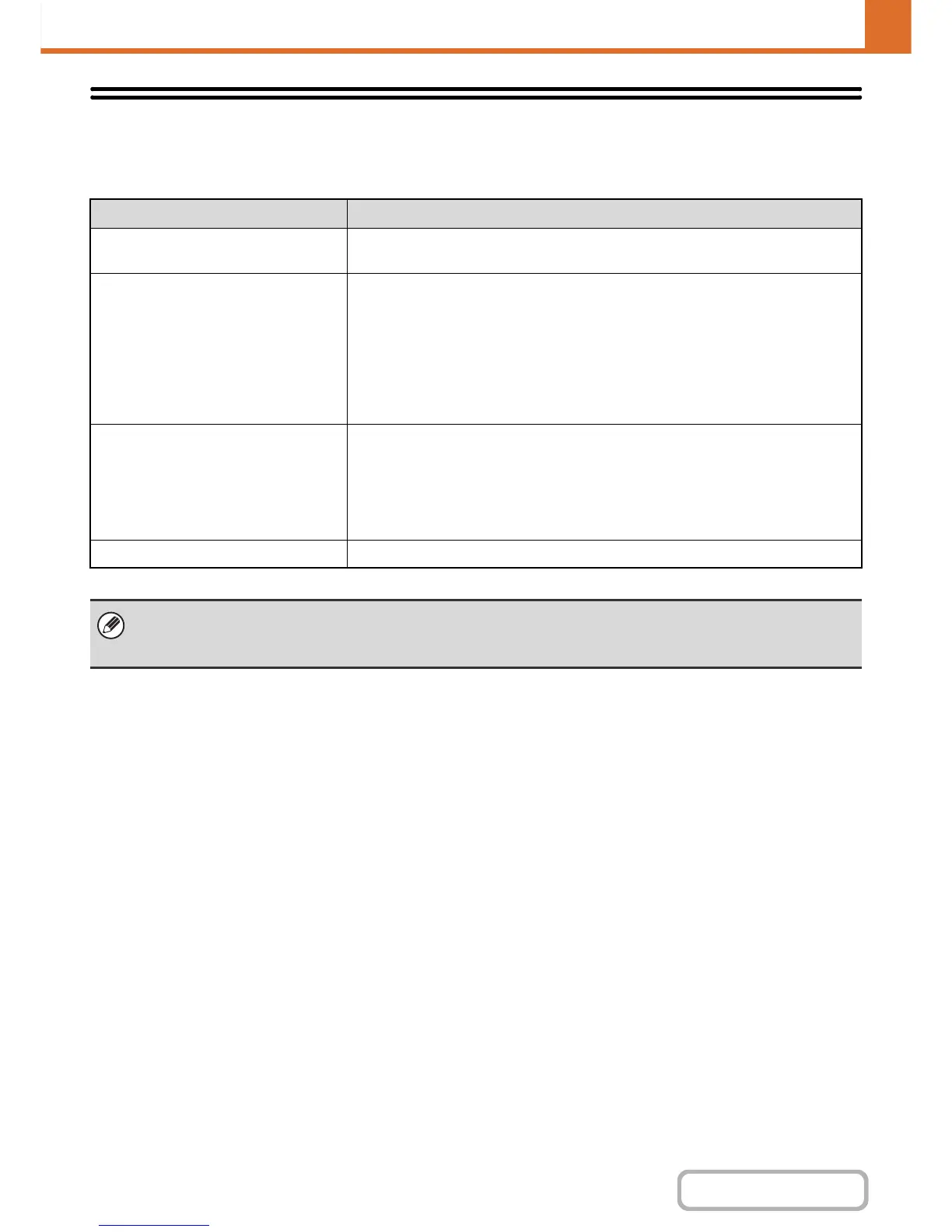
Lists showing the settings and information stored in the machine can be printed. Touch the [List Print (User)] key and
select the settings.
List name Description
All Custom Setting List
This list shows the hardware status, software status, printer condition settings, paper
tray settings, and total counts.
Printer Test Page
This is used to print the PCL Symbol Set List, various font lists, and the NIC page
(network interface settings, etc.).
• PCL Symbol Set List
• PCL Internal Font List
• PCL Extended Font List
• PS Font List
• PS Extended Font List
• NIC Page
Sending Address List
Lists can be printed of various addresses stored in the machine.
• Individual List
• Group List
• Program List
• Memory Box List
• All Sending Address List
Document Filing Folder List This shows the folder names for document filing.
• The items that appear will vary depending on the functions that have been added to the machine.
•If "Prohibit Test Page Printing" (page 7-76) has been enabled in the system settings (administrator), it will not be possible
to print a test page.


 To Next Page