139
3
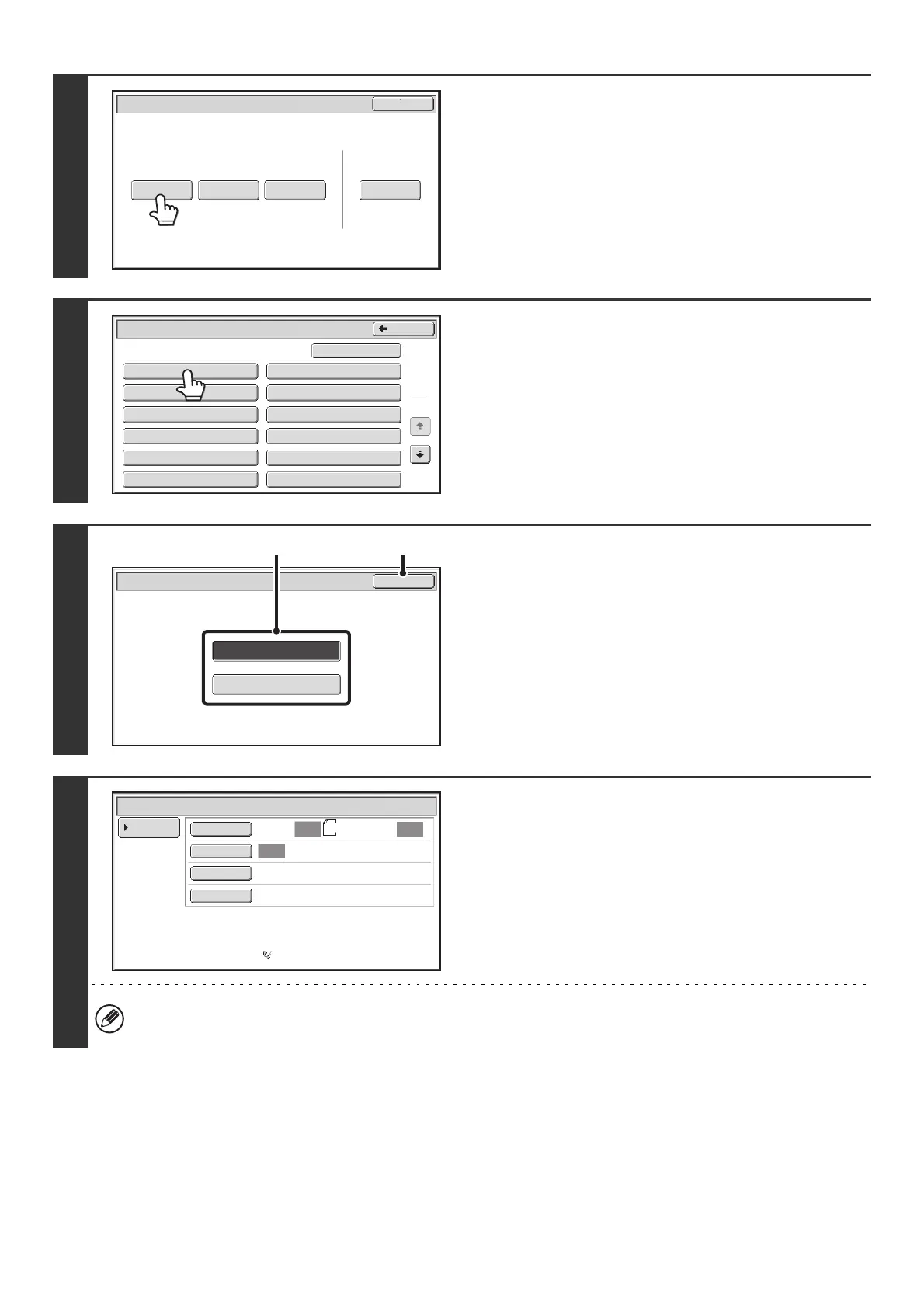
Touch the [Data Store] key.
4
Touch the key of the F-code memory
polling box.
5
Specify the number of polling times.
(1) Touch the key for the desired number of
times.
Touch the [Once] key if you want the document cleared
from memory after it is transmitted. Touch the [Unlimited]
key to allow polling an unlimited number of times.
(2) Touch the [OK] key.
6
Select image settings and special
modes.
• A program, timer setting, transaction report, polling, and document filing cannot be selected.
• To return to the screen of step 4, touch the [Memory Box List] key.
Polling Memory
Confidential
Reception
Print Data Delete Data
Data Store
Memory Box
Print Data
Exit
Memory Box - Data Store
Public Box
Back
1
2
Box 1
Box 3
Box 5
Box 7
Box 9
Box 11
Box 2
Box 4
Box 6
Box 8
Box 10
Box 12
Unlimited
Once
OK
Memory Box - Data Store
Standard
Auto Reception
Fax Memory:100%
Scan: Send:
Auto
Auto
Auto
Special Modes
Resolution
Exposure
Original
Memory Box - Data Store
Memory Box
List
8½x11



 To Next Page