142
DELETING A DOCUMENT STORED FOR F-CODE
POLLING TRANSMISSION
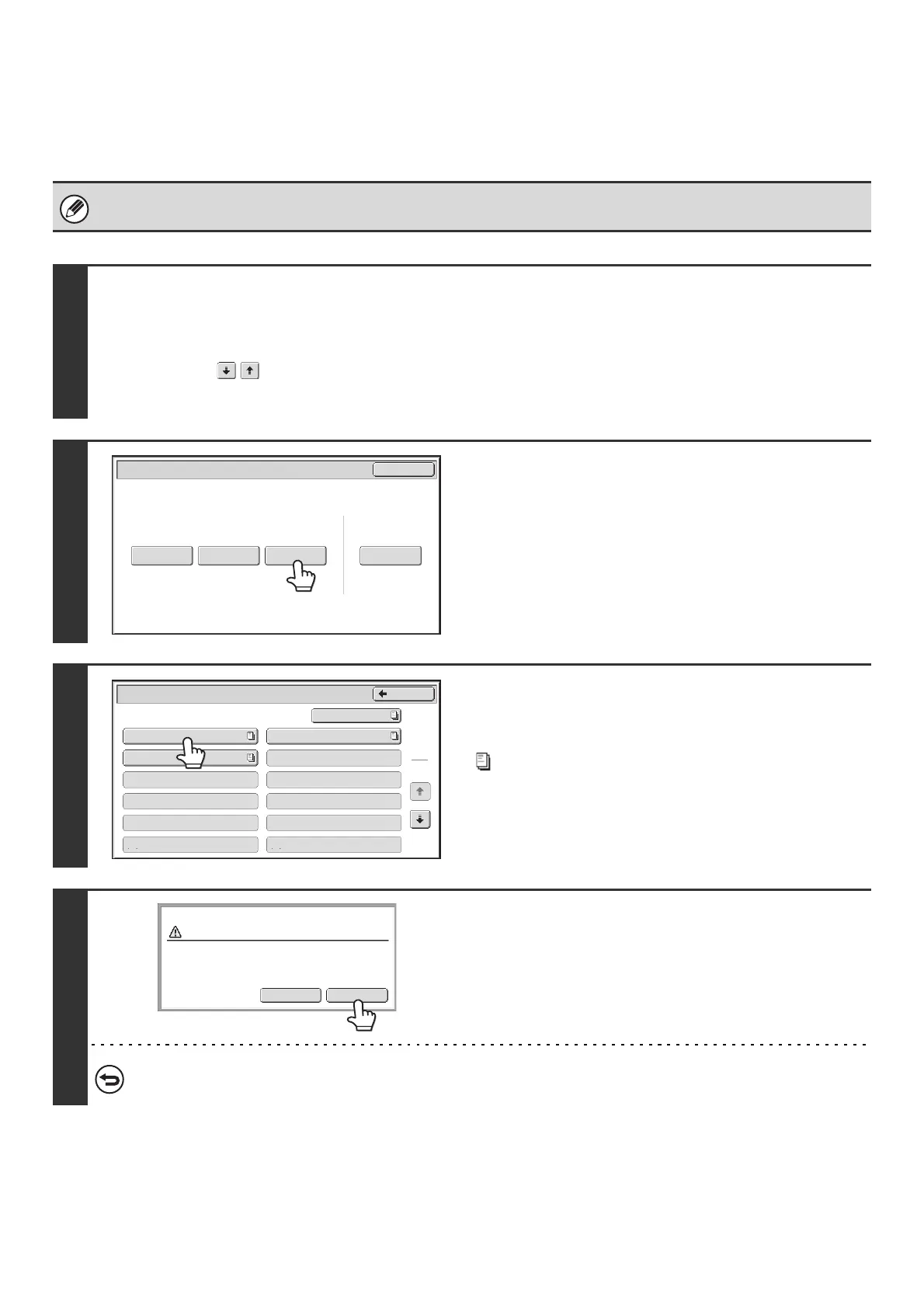
When a document in an F-code memory polling box is no longer needed, follow the steps below to delete it.
A document in a memory box cannot be deleted while the document is being transmitted.
1
Select the special modes.
(1) Touch the [Special Modes] key.
☞ SPECIAL MODES (page 87)
(2) Touch the keys to switch through the screens.
(3) Touch the [Memory Box] key.
2
Touch the [Delete Data] key.
3
Touch the key of the F-code memory
polling box that has the document you
wish to delete.
appears in keys that have documents stored.
4
Touch the [Yes] key.
The document in the selected memory box is deleted and you
return to the screen of step 3.
To cancel the deletion...
Touch the [No] key. You will return to the screen of step 3 without deleting the document.
Polling Memory
Confidential
Reception
Print Data Delete DataData Store
Memory Box
Print Data
Exit
Memory Box - Delete Data
Back
1
2
Box 1
Box 3
Box 5
Box 7
Box 9
Box 11
Box 2
Box 4
Box 6
Box 8
Box 10
Box 12
Public Box
Yes
No
Delete the data in the memory box?
Box 1



 To Next Page