20
UPCentries
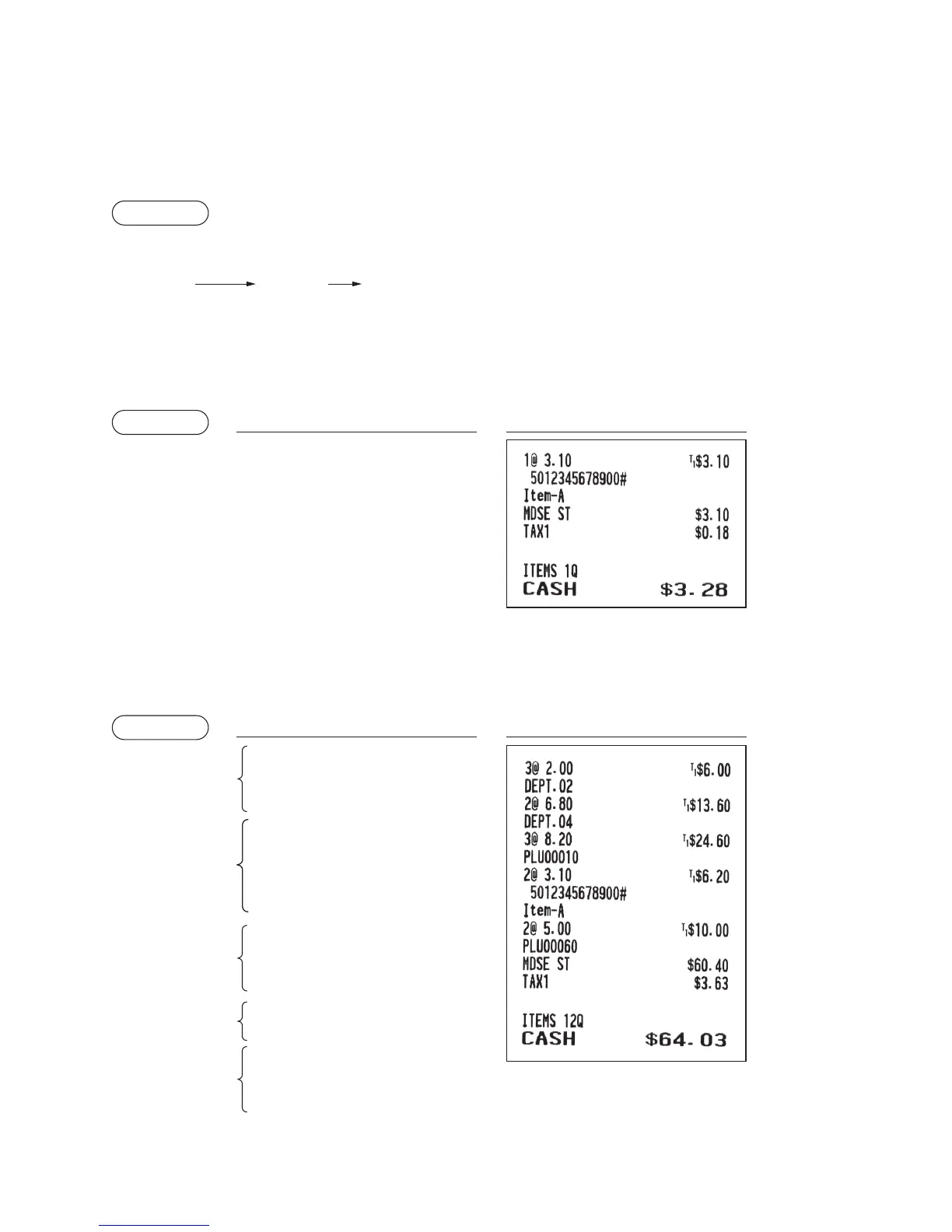
You can enter the barcodes using keyboard. The barcodes which can be entered are UPC-A, UPC-E, EAN-8,
EAN-13 and ITF-14.
For details of UPC code, please refer to “11 Universal Product Code (UPC) or European Article Number
(EAN)”.
Procedure
UPC code
(max. 19 digits)
* After an UPC entry, you may be requested to enter a
unit price with the display “UNDEFINED CODE” and
beep sound. In this case, enter the unit price and press
the
A
key, enter the department code and press
the
A
key (UPC learning function).
p
Example
Keyoperation Print
5012345678900
p
A
■
Repeatentries
You can use this function for entering a sale of two or more the same items.
You can simply press the department key,
d
, or
p
key to repeat entry.
Example
Keyoperation Print
200
2
2
2
4
d
680
A
d
10
p
p
p
5012345678900
p
p
60
p
500
A
p
A
Repeated
subdepartment
entry
Repeated
department
entry (direct)
Repeated
department entry
(indirect)
Repeated PLU
entry
Repeated UPC
entry



 To Next Page