57
FunctionalProgramming
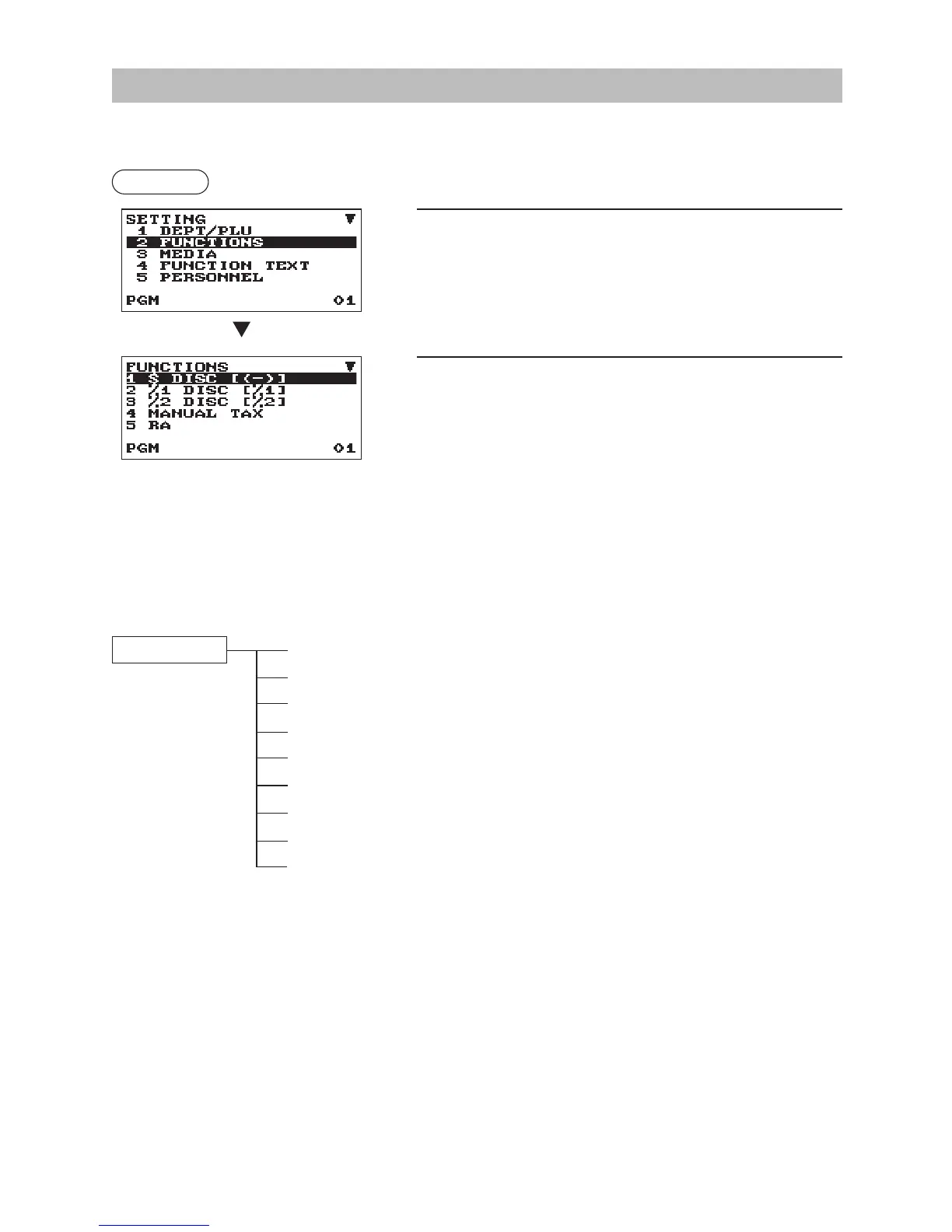
Use the following procedure to select any option included in the functional programming group:
Procedure
1.
In the SETTING window, select “2 FUNCTIONS.”
• The FUNCTIONS window will appear.
2.
Select any option from the following options list.
1 $ DISC [(-)]
Discount
2 %1 DISC [%1]
Percent 1
3 %2 DISC [%2]
Percent 2
4 MANUAL TAX
Manual tax
5 RA
Received on account
6 PO
Paid out
7 CASH IN DRAWER
Cash in drawer
8 COMMISSION1
Commission 1 rate
9 COMMISSION2
Commission 2 rate
The following illustration shows those options included in this programming group.
2 FUNCTIONS 1 $ DISC [(-)]
l
See “Discount (
J
)” on page 58.
2 %1 DISC [%1]
l
See “Percent (
0
,%2)” on page 59.
3 %2 DISC [%2]
l
See “Percent (
0
,%2)” on page 59.
4
MANUAL TAX
l
See “Manual tax” on page 59.
5 RA
l
See “RA” on page 60.
6 PO
l
See “PO” on page 60.
7 CASH IN DRAWER
l
See “Cash in drawer” on page 60.
8
COMMISSION1
l
See “Commission rate” on page 60.
9
COMMISSION2
l
See “Commission rate” on page 60.
The screen continues.



 To Next Page