60
■
Currencyconversion(CONV1,CONV2)
Procedure
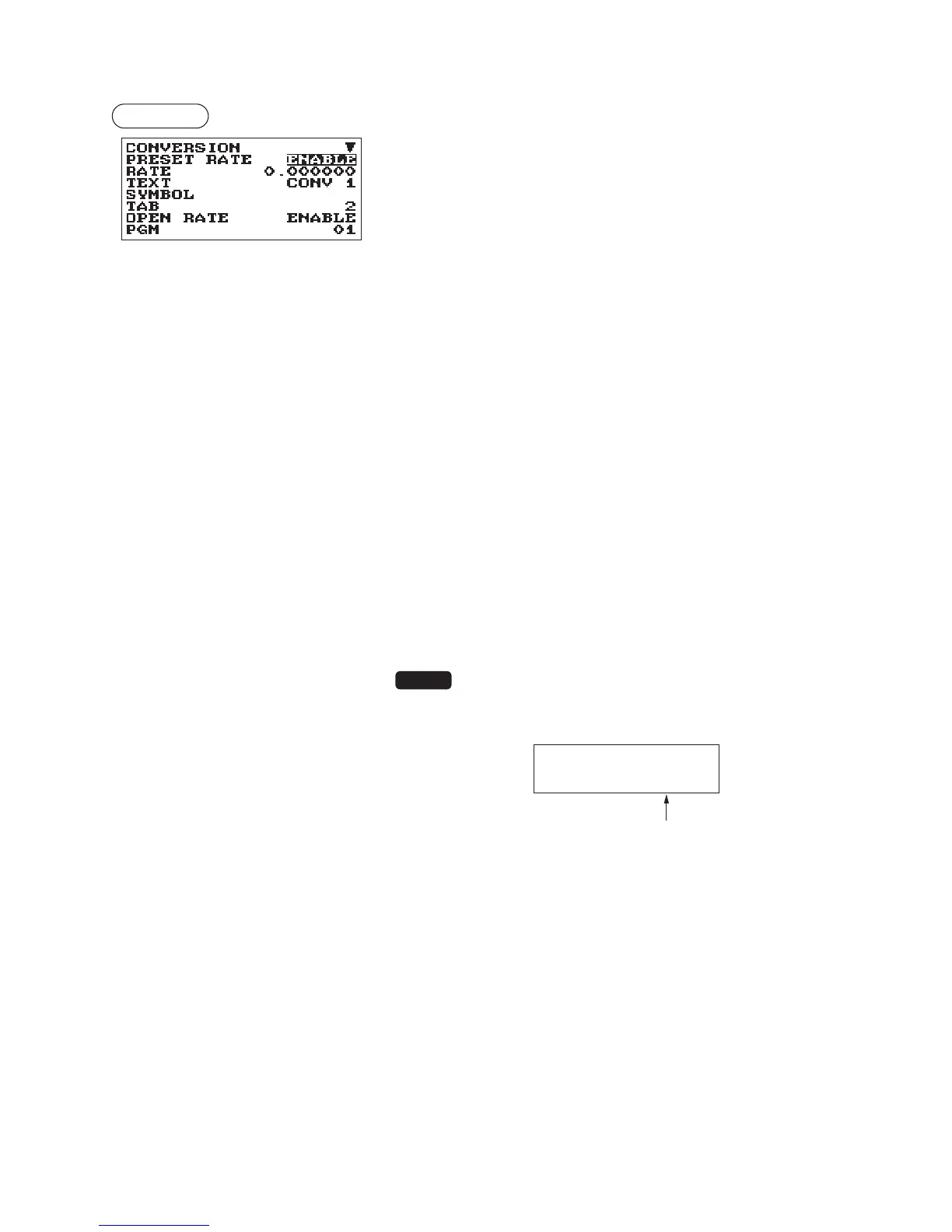
Program each item as follows:
The screen continues.
•PRESETRATE(Usetheselectiveentry)
ENABLE: Enables preset rate
DISABLE: Disable preset rate
•RATE(Usethenumericentry)
Currency exchange rate (0.000000 to 999.999999)
•TEXT(Usethecharacterentry)
Description for the currency exchange key. Up to 12
characters can be entered.
•SYMBOL(Usethecharacterentry)
Currency descriptor. Up to 4 characters can be entered.
•TAB(Usetheselectiveentry)
Tabulation (0 to 3)
•OPENRATE(Usetheselectiveentry)
ENABLE: Enables open rate
DISABLE: Disable open rate
•TEXT(Usethecharacterentry)fortheopenrate
Description for the currency exchange key for the open rate.
Up to 12 characters can be entered.
•SYMBOL(Usethecharacterentry)fortheopenrate
Currency descriptor for the open rate. Up to 4 characters can
be entered.
•TAB(Usetheselectiveentry)fortheopenrate
Tabulation (0 to 3) for the open rate



 To Next Page