34 | Page
OPERATION
SET THE TEMPERATURE SETPOINT
Perform the steps below to adjust the setpoint to your process or application temperature.
End of Procedure
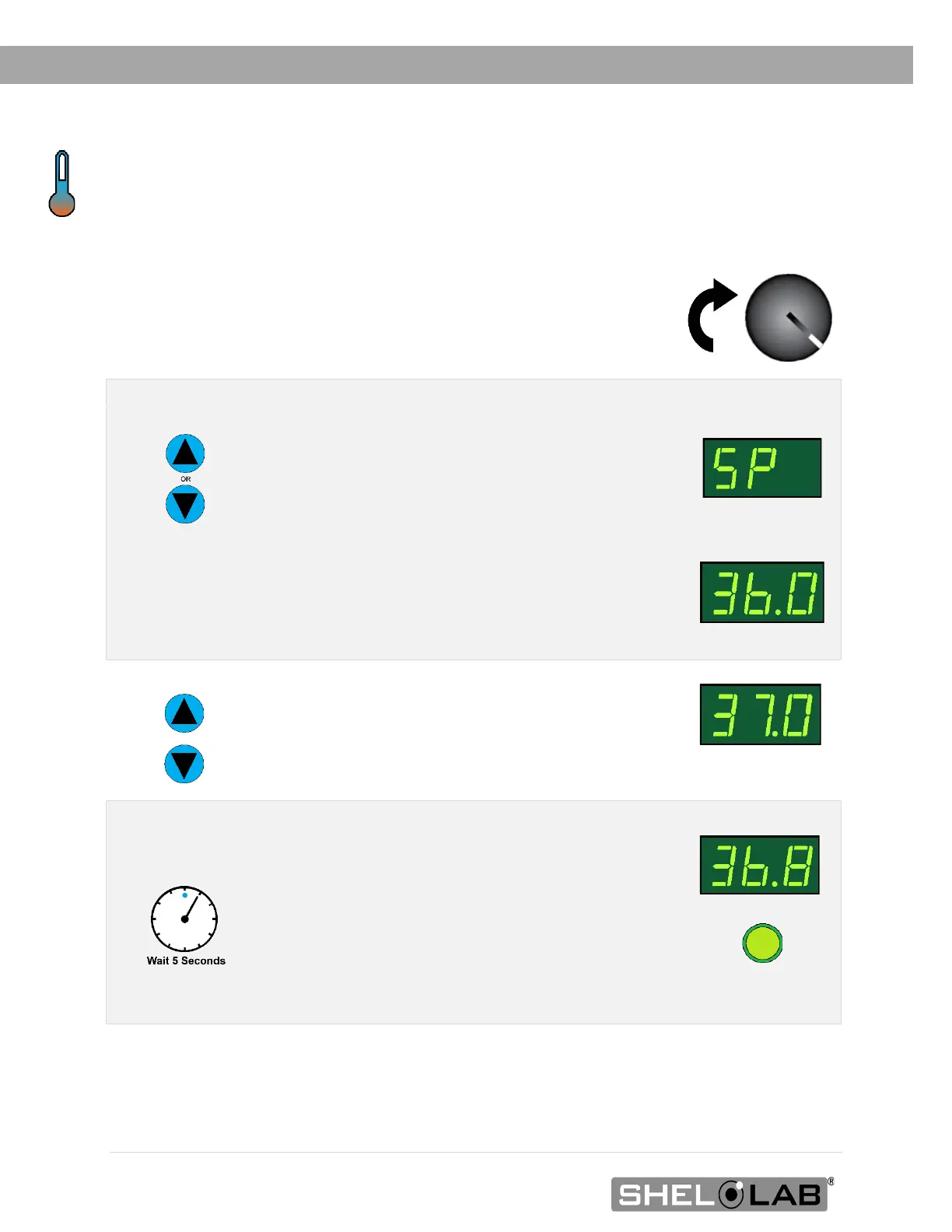
1. Set the Over Temperature Limit control to its maximum setting, if not already set to max.
• This prevents the heating cutoff system
from interfering with this procedure.
Navigate to the Temperature Setpoint Adjustment mode
Briefly push and release either the Up or Down
arrow buttons to activate the temperature
setpoint adjustment mode.
• The display will briefly flash the letters
“SP”, then show the flashing, adjustable
temperature setpoint.
Note: The display will automatically exit the adjustment mode
after 5 seconds of inactivity, with the last shown setpoint value
saved.
Setpoint Adjustment
Mode
Initial Setpoint
3. Set the Temperature Setpoint
Use the Up and Down arrow buttons to change
the temperature setpoint.
New Setpoint
4. Wait for 5 seconds after entering the Setpoint
• The display will stop flashing, and the
setpoint is now saved in the controller.
• The chamber will now automatically heat
or passively cool to match your setpoint.
• The display will revert to showing the
current chamber air temperature.
Heating to New
Setpoint


 To Next Page