27 | Page
CONTROL PANEL OVERVIEW
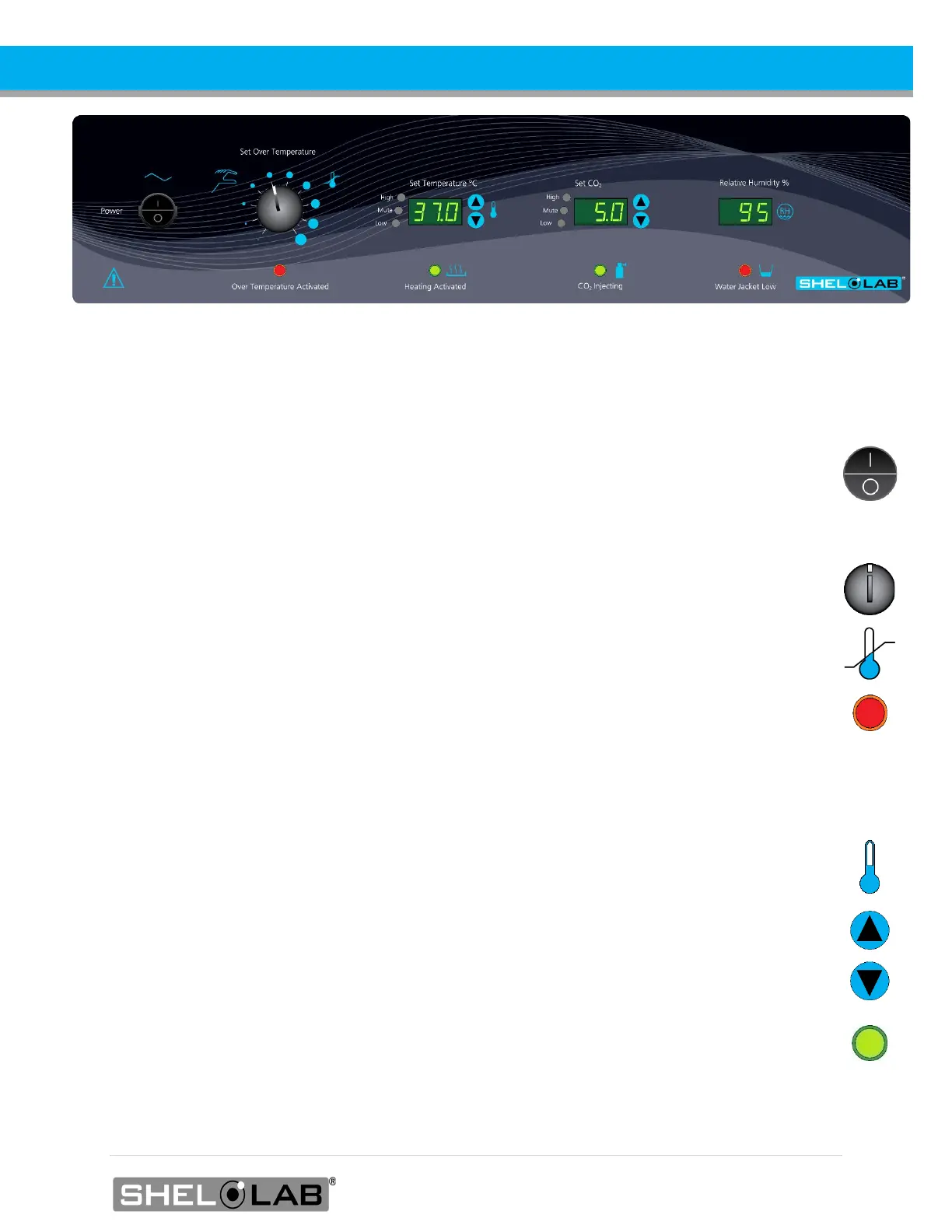
Power Switch
Power is supplied when the switch is in the ( I ) on position.
Power Switch
Power is supplied when the switch is in the ( I ) ON position.
Over Temperature Limit
This graduated dial sets the mechanical heating cut off for the Over Temperature Limit system (OTL).
The OTL helps prevents unchecked heating of the chamber in the event of an electronics failure or
external heat spike. For details, please see the Over Temperature Limit System description in the
Theory of Operations (page 30).
The red Over Temperature Activated light illuminates when the OTL system cuts off heating to the
incubation chamber by rerouting power away from the heating elements.
Set Temperature Display and Controls
Shows the current chamber temperature. The Up and Down arrow buttons are used to
access the Temperature Setpoint (SP) or Calibration Offset (C O) display modes and input
the temperature setpoint or calibration adjustment value.
Red LED alarm indicators marked High and Low illuminate whenever the temperature deviates by
±1°C or greater from the current setpoint. The yellow LED marked Mute illuminates whenever an
audible deviation alarm is being muted. See the Muting the Audible Temperature Alarm entry on
page 35 for more information.
The green Heating Activated light illuminates when the unit is calling for power to
the heating elements.
Control Panel


 To Next Page