Shure Incorporated
27/42
1.
2.
3.
◦
◦
◦
•
•
•
•
•
•
•
•
•
•
•
•
•
◦
◦
◦
◦
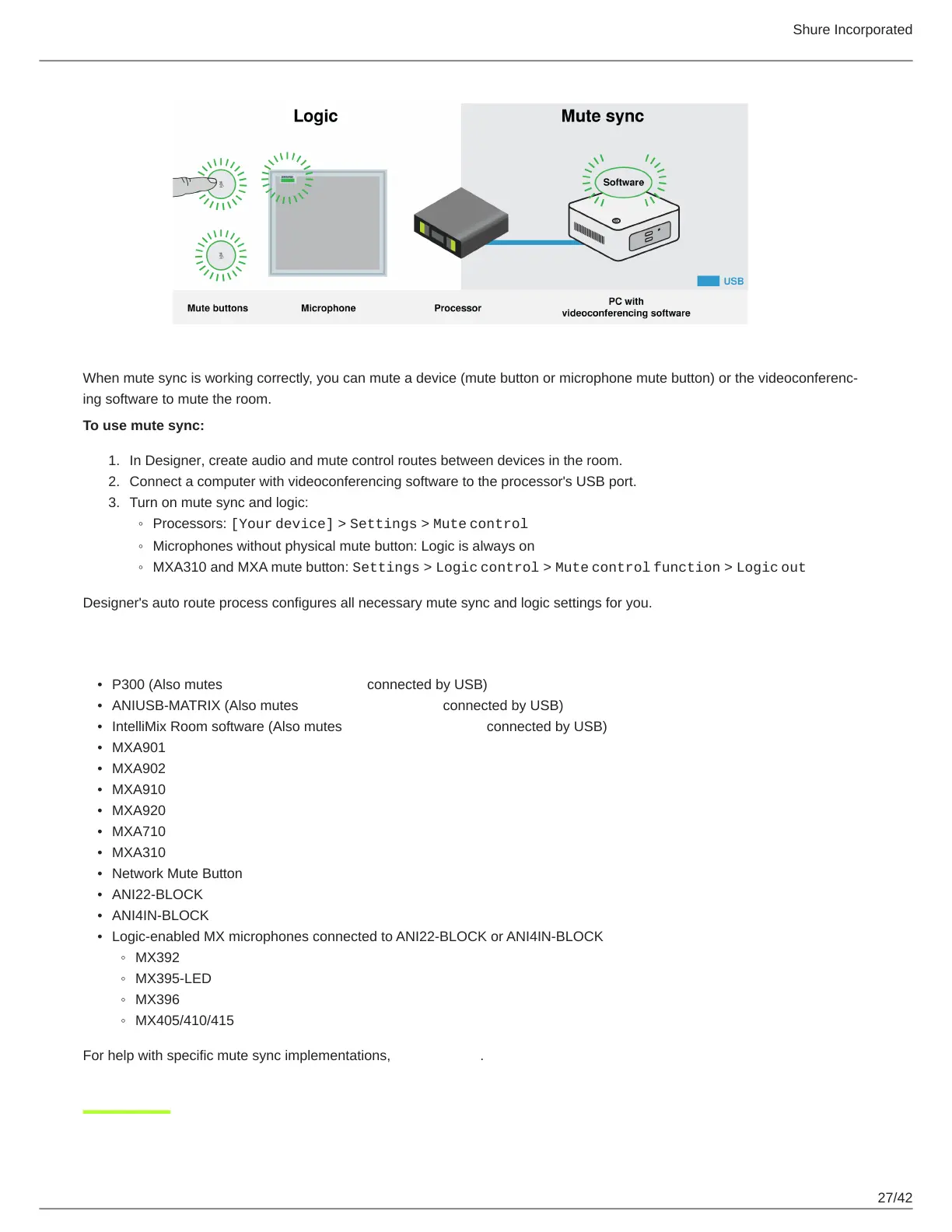
When mute sync is working correctly, you can mute a device (mute button or microphone mute button) or the videoconferenc
ing software to mute the room.
To use mute sync:
In Designer, create audio and mute control routes between devices in the room.
Connect a computer with videoconferencing software to the processor's USB port.
Turn on mute sync and logic:
Processors: [Your device] > Settings > Mute control
Microphones without physical mute button: Logic is always on
MXA310 and MXA mute button: Settings > Logic control > Mute control function > Logic out
Designer's auto route process configures all necessary mute sync and logic settings for you.
Compatible Shure Logic Devices
P300 (Also mutes supported soft codecs connected by USB)
ANIUSB-MATRIX (Also mutes supported soft codecs connected by USB)
IntelliMix Room software (Also mutes supported soft codecs connected by USB)
MXA901
MXA902
MXA910
MXA920
MXA710
MXA310
Network Mute Button
ANI22-BLOCK
ANI4IN-BLOCK
Logic-enabled MX microphones connected to ANI22-BLOCK or ANI4IN-BLOCK
MX392
MX395-LED
MX396
MX405/410/415
For help with specific mute sync implementations, see our FAQs.












 To Next Page