Shure Incorporated
9/42
What's in the Box
Cable-exit plug (black) 65A29429
Cable-exit plug (white) 65B29429
Cable-exit plug (silver) 65C29429
Mounting tube wing nut 65A27351
Mounting tube 31A2165
Rubber Isolation Ring 66A405
Nylon cable ties (4) 80A583
Reset
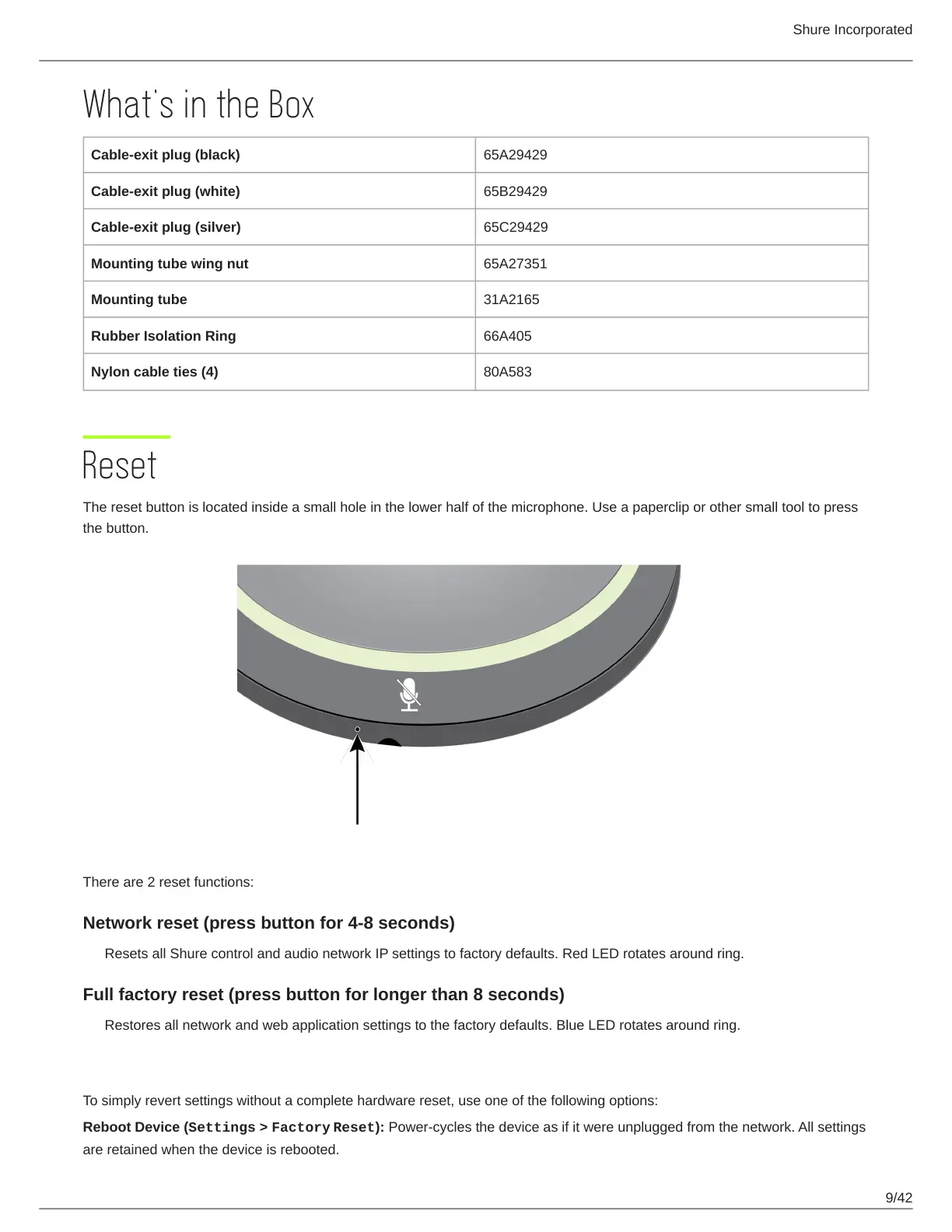
The reset button is located inside a small hole in the lower half of the microphone. Use a paperclip or other small tool to press
the button.
There are 2 reset functions:
Network reset (press button for 4-8 seconds)
Resets all Shure control and audio network IP settings to factory defaults. Red LED rotates around ring.
Full factory reset (press button for longer than 8 seconds)
Restores all network and web application settings to the factory defaults. Blue LED rotates around ring.
Software Reset Options
To simply revert settings without a complete hardware reset, use one of the following options:
Reboot Device (Settings > Factory Reset): Power-cycles the device as if it were unplugged from the network. All settings
are retained when the device is rebooted.












 To Next Page