Connecting the ground
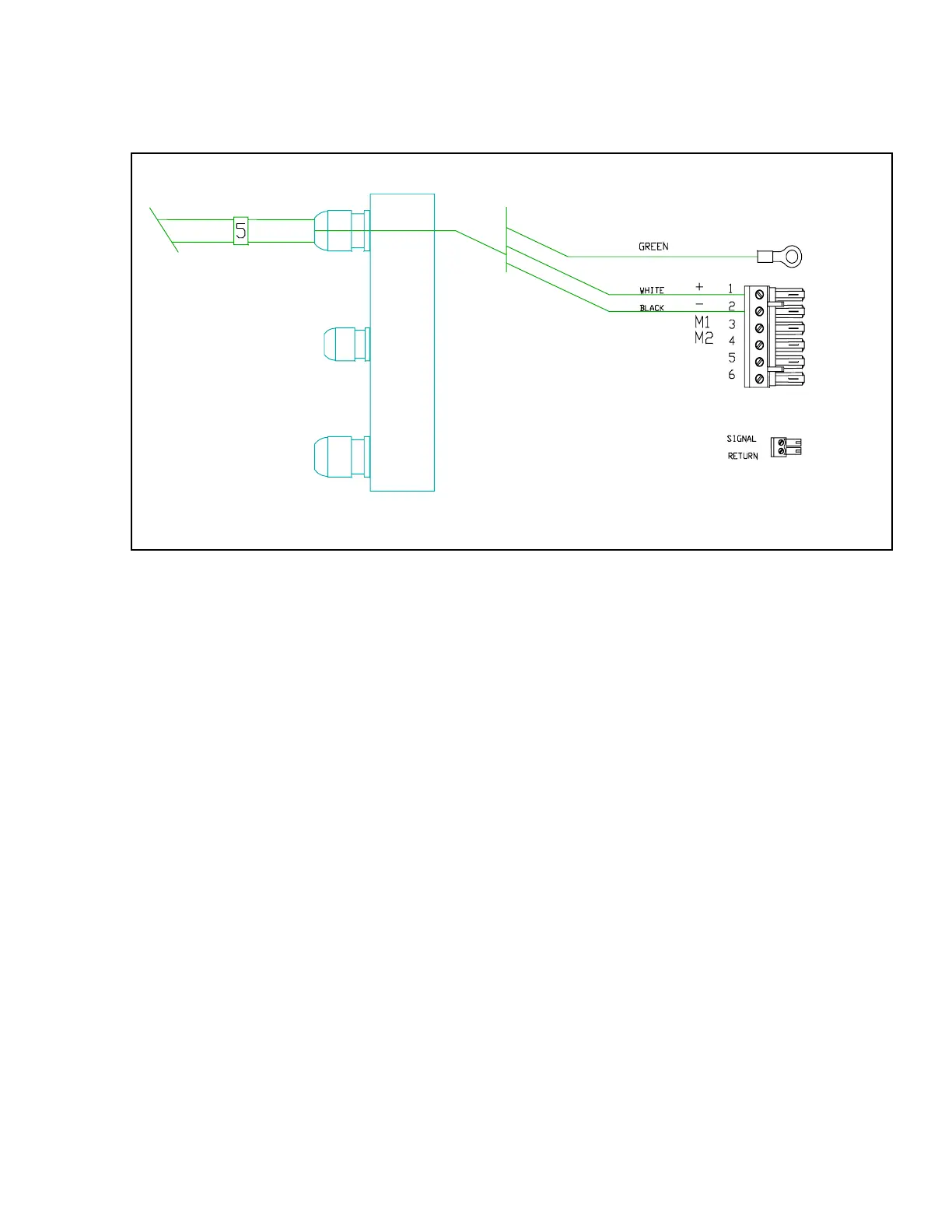
In the picture above, the ground wire is the
green wire. It is connected to the bolt beside
the terminal sockets for the power
connection.
The green wire is connected by removing
one of the nuts and the lock-washer from the
bolt. Place the connector on the end of the
green wire over the bolt. Replace the lock
washer. Replace the nut and tighten it
securely.
The other end of this wire should be
connected to the grounding point you have
chosen aboard your boat. See page 24 for
examples of possible grounding points.
If you are assembling your Autopilot for the
first time, please go to the section titled,
"Mounting the Processor" on the next page.
FUSE REPLACEMENT
The Si-Tex Processor is protected against
reversed power connection by a fuse. The
fuse will probably not blow otherwise. If you
need to replace this fuse, check your power
supply for correct polarity.
To replace the fuse:
1. Turn off the power to the Processor.
2. Loosen the right side watertight glands.
Remove the end cap. Disconnect the
plugs.
3. Remove the 4 Phillips screws holding
the inner end cap. Remove the inner
end cap.
4. Bend up the copper ground tabs so that
they are parallel to the body of the
Processor.
5. Loosen the left hand side watertight
glands. Remove the outer end cap.
J1
J2
Left-hand side. Cable 5, power


 To Next Page