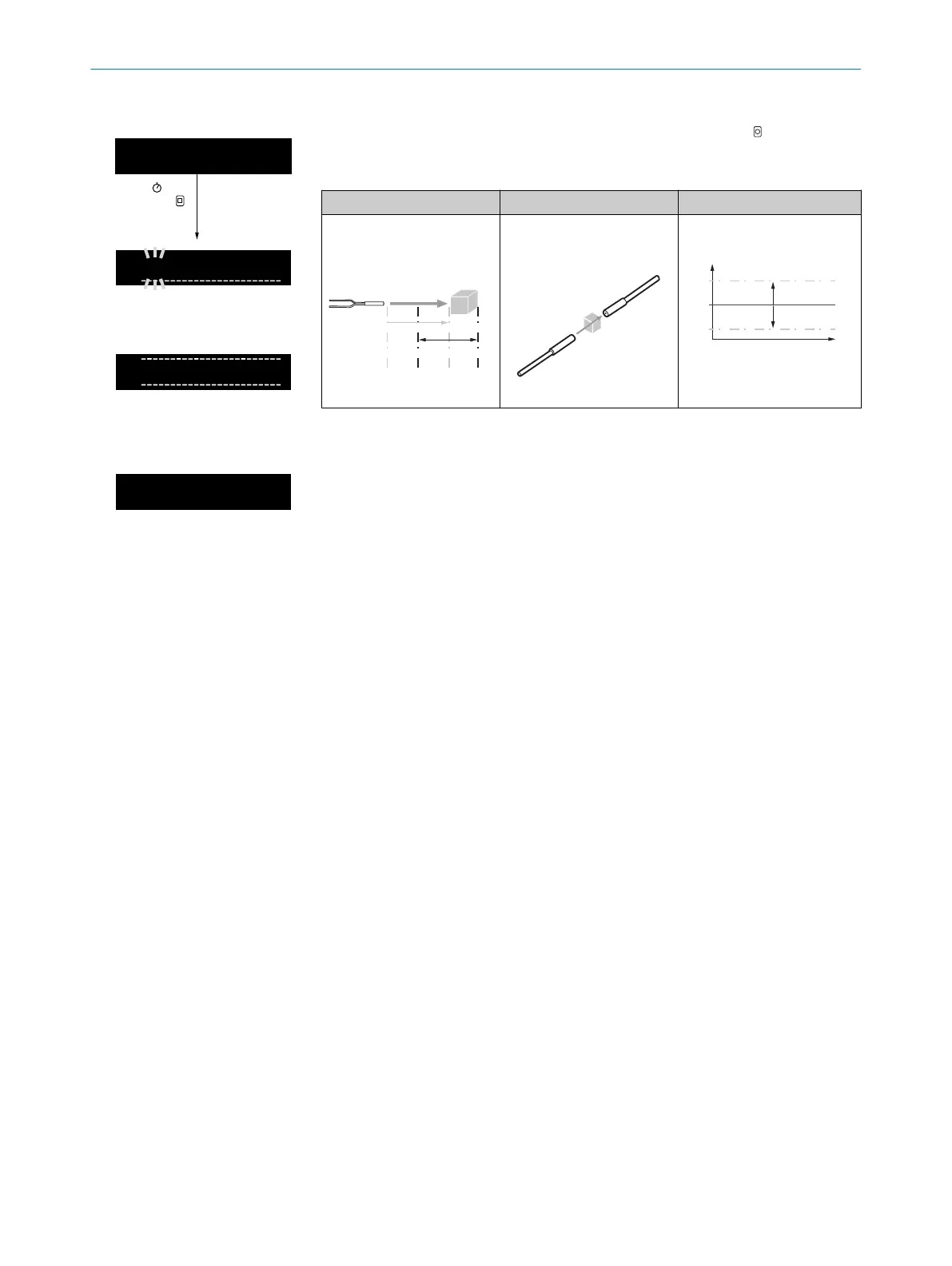
Table 69: Zone teach-in
1
A
|
1000
100
TEACH
1 sec.
Run mode
Perform a fast zone teach-in by pressing and holding (1second) TEACH.
The switching points (SP1, SP2) are updated based on the configured teach-in
offset value (± X) and the display returns to run mode.
Pushbuttons Through-beam Energy consideration
with object
with (transparent) object
SP1
TP
Energy
Time
+X%
SP1 = TP + X %
SP2 = TP - X %
SP2
–X%
8.12.1.5 Window teach-in
The window teach-in sets switching points SP1 and SP2 to teach-in points TP1 and TP2 of the received light values
that are present at the moment the teach-in is performed (teach-in points TP1 and TP2).
8 OPERATION
56
O P E R A T I N G I N S T R U C T I O N S | WLL80 Analog 8027947 /2022-12-14 | SICK
Subject to change without notice



 To Next Page