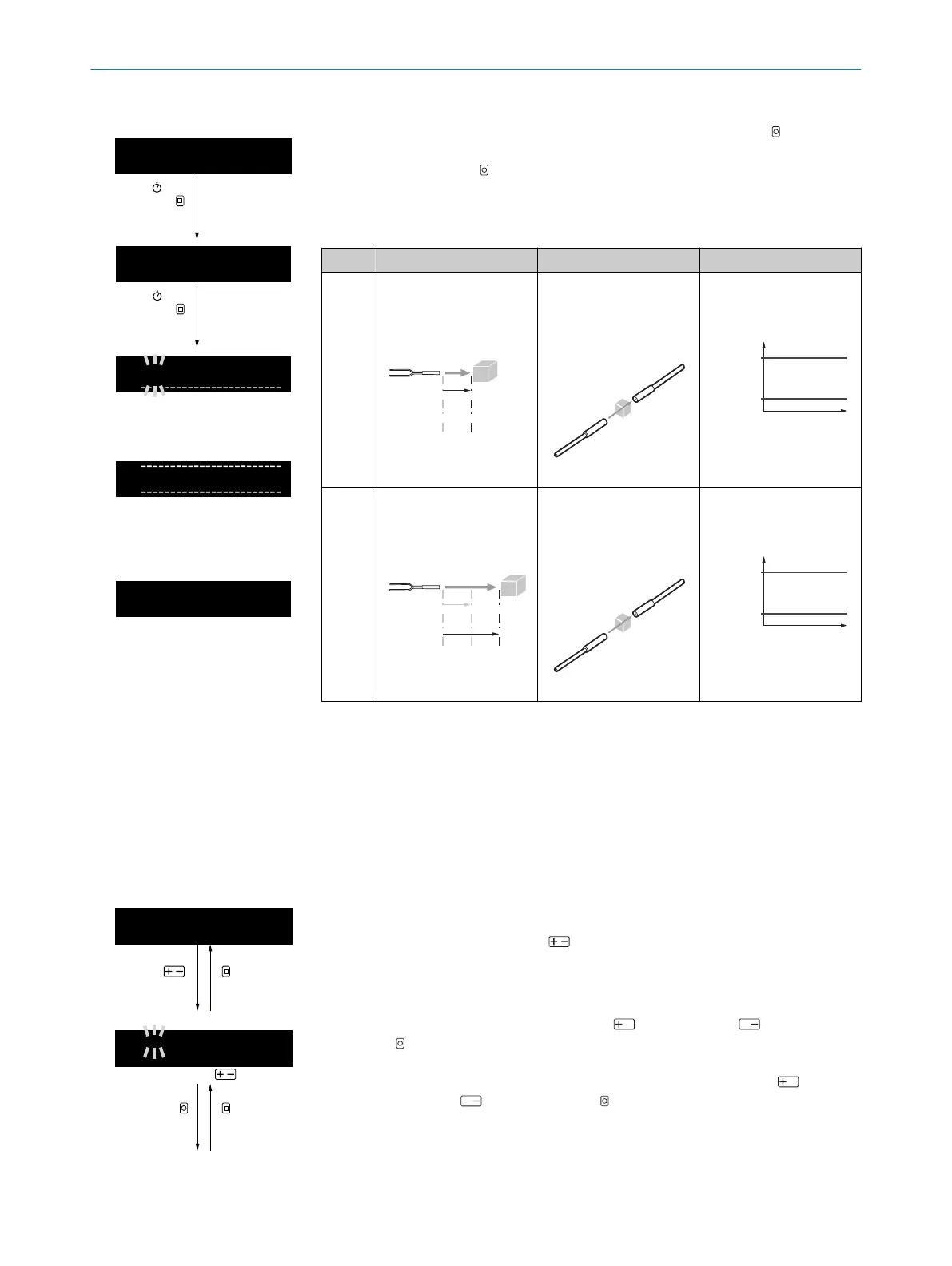
Table 70: Window teach-in
1
A
|
1000
100
TEACH
1 sec.
Run mode
Perform a fast window teach-in by pressing and holding (1second) TEACH
(confirmation of teach-in point TP1 = switching point SP1) and then pressing
and holding (1second) TEACH (confirmation of teach-in point TP2 = switching
point SP2).
The switching points (SP1, SP2) are updated based on the taught-in teach-in
points (TP1, TP2) and the display returns to run mode.
Pushbuttons Through-beam Energy consideration
Step 1 with object position 1
with (transparent) object
with transmission 1
SP1 = TP1
Energy
Time
SP2 = TP2
Step 2 with object position 2
with (transparent) object
with transmission 2
SP1 = TP1
Energy
Time
SP2 = TP2
8.12.2 Manually adjusting the switching thresholds
During teach-in, the switching point is automatically set to a value defined by the relevant teach-in mode. If
the switching events do not correspond to the expected results, the switching point can be adjusted manually
independently of the teach-in.
Manually setting the switching points
The switching point or switchings points can be set manually.
Table 71: Manually setting the current or voltage range
Manually setting the current or voltage range
Activate manual assignment of the received light values (digits) to the cur‐
rent or voltage values using (received light value for assignment to the
upper threshold (UT) of the current or voltage range 20mA/10V/5V
flashes).
1234
ESCOK
1
A
|
9999
0
-----------------------------------------
Adaption with
Adjust the upper threshold (UT) using (increase) and (decrease).
Click to confirm. After confirmation, the received light value for
assignment to the lower threshold (LT) of the current or voltage range
4mA/0V/1V flashes. Adjust the lower threshold (LT) using
(increase) and (decrease). Click to confirm.
OPERATION 8
8027947 /2022-12-14 | SICK O P E R A T I N G I N S T R U C T I O N S | WLL80 Analog
57
Subject to change without notice



 To Next Page