Rec Recording status indicator.When recording, the light is white.
Direction and Enter Direction keys: change direction to select items.
Enter key: conrm selection.
Menu Go to the Main Menu.
Rec Manual recording switch.
Multi Switch to multi-screen preview.
Single Switch to single screen preview.
Cancel Return to the previous menu or interface.
Playback Playback control.
PTZ PTZ control.
Network Status Check the network information.
Power Power on/off the HD-SDI DVR.
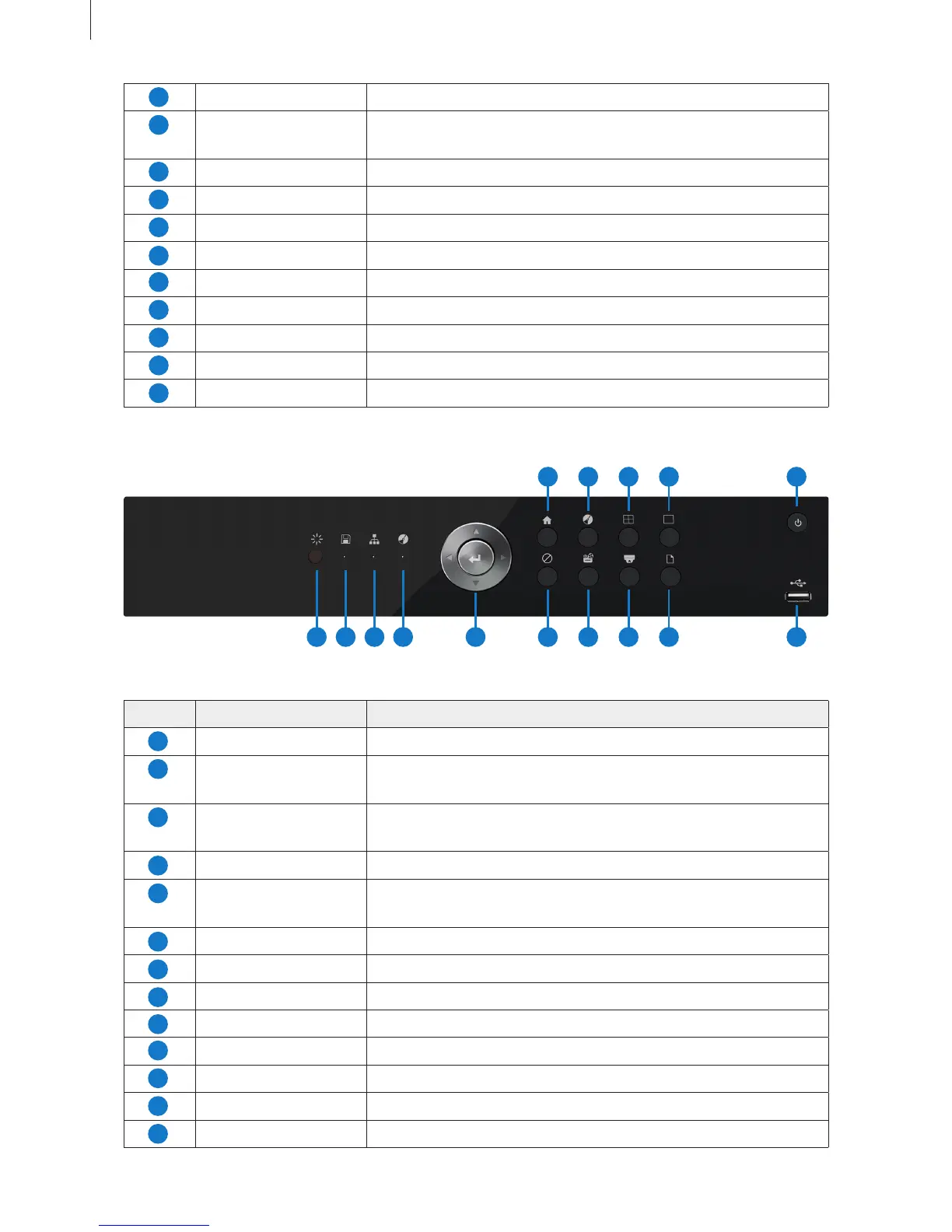
Fig 2-4
Item Name Description
IR Receive the signal of remote controller.
HDD Hard disk status indicator.
When HDD is writing or reading, the light is white.
Network Network connection indicator.
When the network connection is successful, the light is white.
Rec Recording status indicator.When recording, the light is white.
Direction and Enter Direction keys: change direction to select items.
Enter key: conrm selection.
Menu Go to the Main Menu.
Rec Manual recording switch.
Multi Switch to multi-screen preview.
Single Switch to single screen preview.
Cancel Return to the previous menu or interface.
Playback Playback control.
PTZ PTZ control.
Network Status Check the network information.
13
10
5
12
7
14
9
4
11
6
13
8
Getting Started
3) SHR-7016/8004
1 2 3 10
6
12
8
4 11
7
13
9
15
14
5
1
3
10
5
12
7
2
9
4
11
6
13
8



 To Next Page