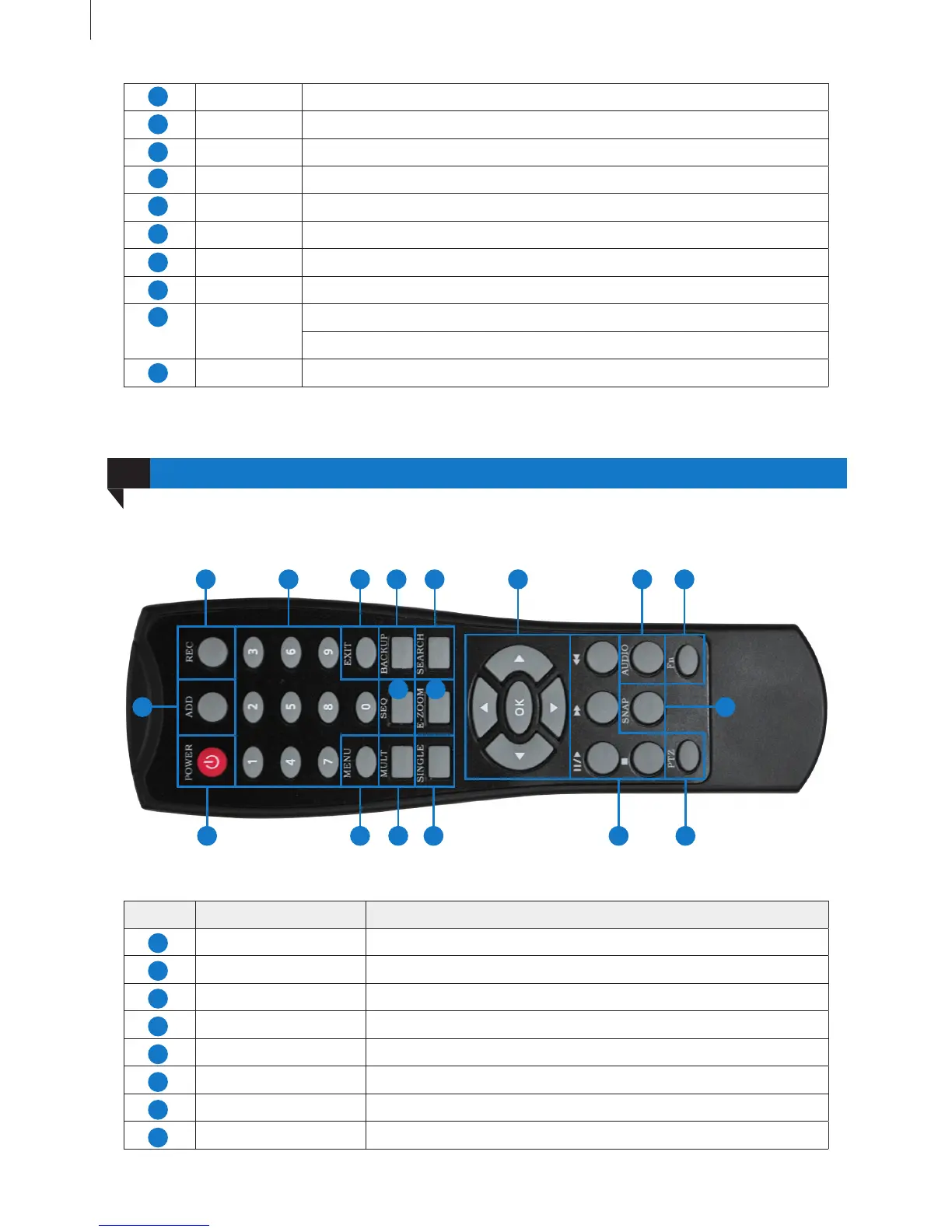
Remote Controller
05
Fig 2-9 Remote Controller
A-OUT 1ch audio output: connect to sound box and other audio output equipment.
V-OUT CVBS video signal output: connect to monitor with BNC interface.
HDMI Port HD 1080P video signal output: connect to high-denition display.
LAN Port Network connector.
USB Port Connect to USB mouse, USB disk, mobile HDD, etc.
RS-485 Connect to keyboard.
DC 12V Power input: DC 12V
VGA Port VGA output: connect to monitor.
ALARM
IN/OUT
ALM IN: 4ch alarm output: connect to external alarm sensor.
ALM OUT: 1ch alarm input: connect to external alarm output device.
Power Switch Turn on/off the power.
16
Getting Started
12
The remote controller of this product series uses two AAA size batteries and works after loading batteries:
Item Name Function
REC Button To start the manual recording.
ADD Button Input the number of DVR to control it.
POWER Button To turn on/off the device.
Digital Button Code input/number input/channel switch.
EXIT Button Return to the previous interface.
BACKUP Button To enter the backup mode.
SEARCH Button To enter the video playback interface.
SEQ Button To enter the auto dwell mode.
3
10
11
5
7
9
4
6
8
3 10 11 12 17 18
1 4 5 6 7 13 14 15
2 16
8 9
1
3
5
7
2
4
6
8



 To Next Page